
Onion Browser Button icon

Onion Browser Button

by Sevina

v0.2.6 Updated Jul 23, 2025 108KiB
CWS
10K
Users
★ 3.46
46 reviews
#2431
of 89.8K
tools
#460 of 27.7K

Description

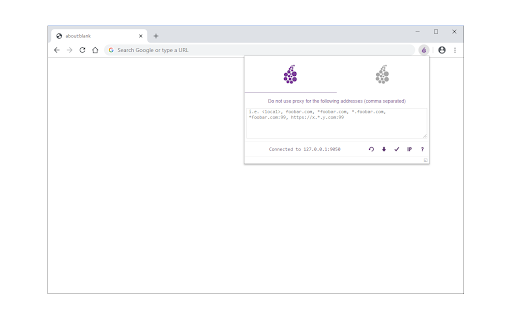
Onion Browser Button is an extension that let you easily connect to TOR network in your browser (browse under TOR proxy). Important note: this addon does NOT belong or relate to Tor® project and has NO affiliations with Tor® anonymity software or website at all. It is basically an unofficial extension that is developed and maintained independently by its author. Before using the addon please make sure your computer (PC or MAC) is connected to TOR. If you do NOT know how to connect your PC or MAC to the TOR network please read the following. A separate patch is prepared, to help users easily connect to the TOR network. In order to get the patch please visit this (https://github.com/jeremy-jr-benthum/onion-browser-button/releases) GitHub repo and download (mac.zip) or (win.zip) files. After downloading the patch to your computer, please follow the below steps to connect your machine to TOR network. 1. If you have Windows machine, please download and unzip "win.zip" file to your computer, and if you have Mac download and unzip "mac.zip". 2. For windows machine, please open downloaded "win" folder and run "run.bat" file within the folder. For Mac please open "win" folder and run "run.sh" file. 3. You will see the screen with 6 options. In order to start TOR connection on your computer, please press 1 on your keyboard, once "Tor is connected successfully!" message is displayed, you can use Tor Browser Button add-on to connect your browser to the TOR network. To stop TOR connection please press 2. In order to get a new TOR identity, please press 5 and to restart TOR connection, please press 6 on your keyboard. Note: The extension interface supports dark mode. To switch the interface theme to dark, please press the moon icon in the bottom-right toolbar. To report bugs, please visit the addon's homepage (https://mybrowseraddon.com/tor-button.html) and fill out the bug report form.
Onion Browser Button screenshot 1

Reviews (13 cached)

★☆☆☆☆2024-11-03
Goru Mako

yall compromising your anonymity using an extension for tor power, just use tor browser

★☆☆☆☆2024-07-14
Mars Brouwer

does not work

★☆☆☆☆2024-01-18
Animekid batts

i don't know how to use it. could i get some help i tried reading the instuctions first.

★☆☆☆☆2024-01-10
Lance Crick

You need to run a batch file that launches a Tor connection in cmd, then go back to Chrome... It's essentially just the Onion browser with extra steps. What's the point?

★☆☆☆☆2022-12-02
JT Poetry

When you click on the run.sh file on MacOS it does not start, but only calls a text editor. Besides there is no win folder in mac.zip archive as indicated in your FAQ 2.

★☆☆☆☆2022-05-15
Sebastian Orlowski

Doesn't work

★☆☆☆☆2021-10-21
Mr Ben

Doesn't work

★☆☆☆☆2021-10-12
Надежда Гилюк

when i open run.sh it just open notebook What should i do?

★☆☆☆☆2021-04-21
Yohann Flavier

when I'm checking on https://check.torproject.org/ its write : Sorry. You are not using Tor. Your IP address appears to be: (my real IP adress)

★☆☆☆☆2021-04-07
Chintu sharma

it did not worked for me it says first connect to tor network.I donot know it

★☆☆☆☆2021-03-07
Masked Guy

Doesn't work, because the tor.project page is blocked by my provider, what's the point?

★★☆☆☆2023-11-28
Todd McKean

Last login: Fri Oct 27 11:04:47 on console sionnachpro@SionnachPros-MacBook-Pro ~ % sh /Users/sionnachpro/Desktop/mac/run.sh /Users/sionnachpro/Desktop/mac/run.sh: line 3: ./node: No such file or directory doesn't seem to want to run on my Mac.

★★★☆☆2019-05-31
A Liber Excogitatoris

Given the obstacle known as Cloudflare (that will appear often with the use of this,) one really is better off using the current version of Tor (which has a better chance of getting by it;) With that said... If one should opt to use this, then use it in combination with AdvOR, instead of the limited and sometimes troublesome, recommended patch. Just download AdvOR; run it, and then launch Brave (with this addon already applied). The features and benefit to using AdvOR far outweigh the patch. Just try it and see for yourself. Note: I've no connection to the aforementioned, and am only sharing the knowledge in the hopes that users might choose to apply the "become a server" feature and provide more nodes than currently exist.

Permissions (3)

Permissions

notifications Can show desktop notifications proxy Can configure proxy settings storage Can store data locally in your browser

Details

Version 0.2.6
Updated Jul 23, 2025
Size 108KiB
First Seen Mar 25, 2026



