
Description
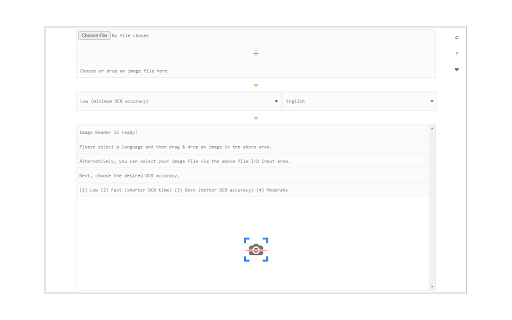
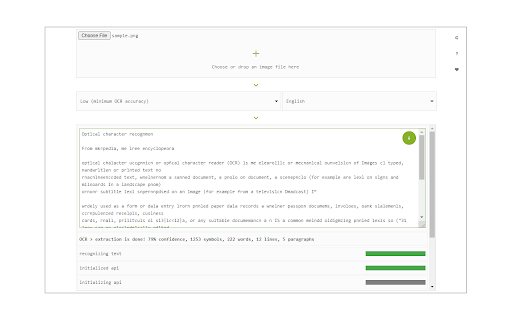
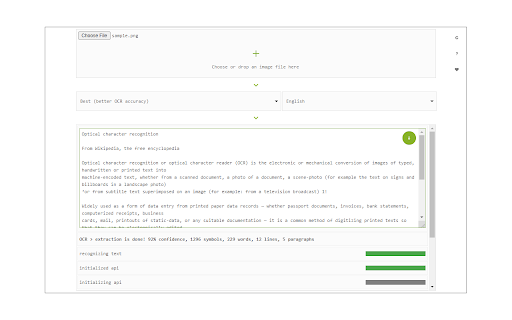
Image Reader (OCR) extension helps you easily get words out of any image. It uses two different open-source OCR engines.
The 1st engine is called Tesseract. Tesseract.js is an open-source JavaScript library and is made via an Emscripten port of the famous Tesseract OCR Engine written in C and C++. Please visit (https://github.com/naptha/tesseract.js) to get more info. The 2nd engine, called Granite Docling, is developed by IBM (https://huggingface.co/ibm-granite/granite-docling-258M). Please note that when you choose IBM Granite Docling, the app needs to download training data (~1200MB) for the AI engine. So please be patient while it is loading.
To work with this addon, simply open the addon's interface and load your image via the file selector (top section). Before using the addon, please make sure to select the appropriate OCR engine and language. For Tesseract, the default OCR language is set to English. For Granite Docling, you do not need to set a language; just select the desired backend (CPU or GPU) and wait for the app to load completely.
Note: For the Tesseract OCR engine, this addon uses the "https://github.com/naptha/tessdata/tree/gh-pages/" GitHub repo to fetch language data required for the OCR operation. For the IBM Granite Docling, it uses "https://huggingface.co/onnx-community/granite-docling-258M-ONNX" to fetch training data required for the OCR operation. Both language data packs are very large and cannot be included in the addon package.
To report bugs, please fill out the bug report form on the extension's homepage (https://mybrowseraddon.com/image-reader.html).

Reviews (5 cached)
★☆☆☆☆2022-05-07
Sobon George
Useless.
★☆☆☆☆2020-08-21
Shawn McLaughlin
Makes everything unreadable
★★☆☆☆2024-11-05
Polar Torsen
It's dumb. I thought this would allow to select a part of the screen, but instead it opens a window and asks to upload a file. This is just retarded. Two stars for making something that at least works, eventhough so unconveniently.
★★★☆☆2024-02-28
Isaac Moore
Needs a way to take information from the clipboard. It would be ideal if we could also take snips of websites.
★★★☆☆2019-10-07
smoke big
The accuracy of Chinese character recognition is not very high.
Permissions (2)
Permissions
contextMenusℹ Can add items to the right-click menu storageℹ Can store data locally in your browser
Details
| Version | 0.2.0 |
| Updated | Nov 10, 2025 |
| Size | 13.19MiB |
| First Seen | Mar 26, 2026 |
More by Sevina

Text to Speech (TTS)
by Sevina
50K
★ 3.12
tools
50K
★ 3.12
tools

Text Editor
by Sevina
40K
★ 4.04
tools
40K
★ 4.04
tools

Onion Browser Button
by Sevina
10K
★ 3.46
tools
10K
★ 3.46
tools

Full Screen Button
by Sevina
7K
★ 4.76
tools
7K
★ 4.76
tools

World Clock
by Sevina
4K
★ 4.43
tools
4K
★ 4.43
tools
Popular in tools

Browsec VPN - Free VPN for Chrome
by Browsec
7M
★ 4.44
tools
7M
★ 4.44
tools

AnyDoc Translator - Translate Web and PDF
by www.wps.com
7M
★ 4.59
tools
7M
★ 4.59
tools

Microsoft Bing Homepage & Search for Chrome
by Microsoft Corporation
4M
★ 3.72
tools
4M
★ 3.72
tools

IE Tab
by Blackfish Software
4M
★ 4.31
tools
4M
★ 4.31
tools

Monica: All-In-One AI Assist & Smartest AI Agent
by Monica Team
3M
★ 4.89
tools
3M
★ 4.89
tools
Popular Extensions

Adobe Acrobat: PDF edit, convert, sign tools
by Adobe Inc.
331M
★ 4.40
workflow
331M
★ 4.40
workflow

Chrome Remote Desktop
by Chrome Remote Desktop Release Managers
38M
★ 3.14
workflow
38M
★ 3.14
workflow

Microsoft Single Sign On
by Microsoft
36M
★ 2.27
workflow
36M
★ 2.27
workflow

Cisco Webex Extension
by cisco.chromestore
24M
★ 2.34
social
24M
★ 2.34
social

Kami for Google Chrome™
by Kami
19M
★ 4.56
education
19M
★ 4.56
education