
Description



Reviews (35 cached)
doesn't work on Opera
I would have previously rated it at 5 stars, but the v4 update has completely ruined the experience and I will be uninstalling it.
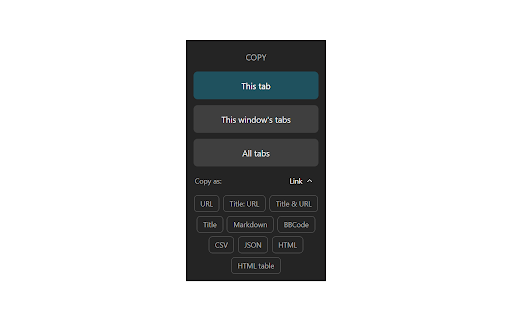
Why downgrade the add-on ? The original function is so good, only need to click once to copy the tabs. But now, users have to click twice to get the same result!!!
Why change the shortcut behaviour with C or double C etc. It can not be replicated with the current possibilities.
I had been a very happy user of this extension for years. The most recent update made it so that copying tabs is no longer a simple single click operation. It forces you to deal with multiple clicks. I am extremely disappointed such a clean clear flow was made complicated and cumbersome.
After the Plugin is updated automatically, the keyboard shortcuts still cannot be used after resetting them. (I have read reviews and the documentation and followed the instructions, but it still failed.) It's really sad & bad.
I had been a very happy user of this extension for years. The most recent update made it so that copying tabs is no longer a simple single click operation. It forces you to deal with multiple clicks. I am extremely disappointed such a clean clear flow was made complicated and cumbersome.
New update ruined usability. No more one/double/triple click option. I personally loved this one/double clicks and choose this extension only for this. Now extension overloaded with lots of unnecessary never used overcomplicated options. Also new icon is worse than previos intuitive pic and can't seen in incognito mode which I used a lot. Please revert to last version or return one-double-triple click option. Simplicity is the best. Just remember about Occam's razor. thanks
I previously loved TabCopy but removing the option for single/double/triple-click made it harder to use. I noticed a dev response that it was a strategic decision. Rather, you could have left a setting under Options for those of us committed to using it in this way. For me it was faster and, more importantly, had much lower cognitive load than this new layout. The load comes from orienting to two click targets, one of which is only revealed after the first is clicked. That's just slower than 1 click target for a high frequency action. I don't want to add new global keyboard shortcuts that I won't remember and that may interfere with some UI somewhere.
super anoying; settings change all the time and i need to come up with my custom format. classy enshittication. just keep it as it is or grandfather prev settings
I expected the "link" function to give just the URL's of the tabs, but i was instead given the title of each tab. I could not find a way to extract only the URL's without extra information being added, which did not fix the problem that i hoped for this to solve.
The one major flaw in this extension is its glaring omission. It neglects to mention how and where to retrieve the copied tabs. It also makes the false claim that it offers a choice of formats. It doesn't. This extension is yet another in the range of fake extensions that Chrome doesn't seem to vet.
Using 4.1.0 with Chrome 131.0.6778.69, only the first 45 characters of a tab's title is copied.
Bug: Copy Link only copies tab titles Feature Request: Open Pasted urls
Probably good in many use cases, however, but it does not support the simplest thing including copy just root domain of current tab like example.com when you are in fact on example.com/page1/others
The extension works well on Windows, but on my Mac, when I click the Chrome address bar to copy a URL, it always copies formatted text instead. This is frustrating and there's no option to disable it.
funtion [t] or TAB not working in this new version.
I miss the previous keyboard shortcut that triggers the copy based on how many times you press the shortcut key: - Single shortcut press: Copy the current or selected tabs - Double shortcut presses: Copy the current window's tabs - Triple shortcut presses: Copy all tabs With v4 and above, we will need to allocate different shortcuts to each of the copy operations to achieve what we could do up to v3. I am curious about what the justification is for this keyboard shortcut change.
Please add the number of tabs again; it was a very useful feature that I really miss.
I updated to version 4.0.0,but there is a small problem: my format has a [n], but when I paste the content into obsidian, there is a whitespace character... no this problem for pasting into visual studio code.
The latest update changed a lot of features for me. It no longer tells me the number of tabs copied which was useful! It also doesn't have the simple mode anymore where it's literally one click to copy all selected tabs. Please bring these features back!
I have been a user of this tool for many years. It has provided a simple but tremendously valuable improvement in my productivity. But with the single-click and double-click options removed the tool is needlessly harder to use.
welp. I only used this for the one click option to copy which is now gone
Did the latest update just remove my ability to click the button and immediately copy something?! Now I have to click it and then click another sub menu, even if all other choices are removed and I just want it to copy the immediate tab with no other questions? Please put that feature back or tell me what setting I need to change. I can't find anything to make it fast and efficient like it was.
Great extension, I just wish we could download a file directly instead of having to paste from clipboard to a file.
It does indeed put a list of all of the tabs in all of the windows into the copy buffer. However it completely loses the structure of what tabs were grouped into what windows. I need to retain that structure. There could be output options to JSON or HTML to preserve that structure.
It works nicely, but 3 stars, because there is no option to sync across browsers, since I use different browsers at one time, I would like to be able to copy a list of tabs over to the other browser and open these links. I cannot do that with this.
Good for what it offers, but evidently no Chromium-based browsers allow a right click copy URL on any tab, but only on the one that is open. However, this extension does not even provide that, thus requiring one to find the icon in the toolbar, which is not as efficient.
This is a very nice extension and copies URLs from tabs to clipboard with many different options easily configurable by the user but Im amazed nobody has pointed a fundamental flaw: this extension lacks the option to do exactly the opposite task, this extension cannot open new tabs in Chrome from a list of URLs stored in the clipboard... Im sorry but I wont use this extension because I find it is severely crippled without that function.
Was disappointing so I uninstalled it. (1) How to contact the author / community for help? tabcopy.com redirects right back to this web store page (2) I can't seem to navigate the menu with the keyboard. Seems to be mouse only, even though I have "Full Keyboard Access" turned on and I can navigate the rest of Chrome with the keyboard.
The extension works great, but is there a way it could delimit some parts of the URL? for example: https://www.abc.com/defg-hijklm-nopqrst delimiter-start: - delimiter-end: - result: hijklm or even copy a number of characters?
Can't just get the url, sad..
The extension save only the titles.. For me is unuseful..
This extension is excellent, and does a very good job of performing an extremely helpful and necessary function in Google Chrome. That said, I rate it three stars as this is the second time I've come to this chrome store page to seek remedy for my problems. This extension is simultaneously what the Titanic's designers rightly strived towards but failed to achieve as well as what any modern programmer should strive to avoid: it is unsyncable (ba doom boom). OLD:Does what its called, but I'm not a big fan of any extension that opens a new tab, unsolicited. Its usefulness has limited my rating deduction to one star only. --Recent reinstalls of chrome have not exhibited the behavior described in the preceding paragraph, seems to have been corrected.
Super stoked to use this, but with the latest Chrome it doesn't work as planned anymore. You can only copy a single tab since they moved the icons out of the address bar (which is a joke). So you lose the functionality of double and triple click. Bummer! The only way I have gotten it to work now is if you are on an actual chrome webstore page, then the click functionality works. Otherwise, the regular context menu shows instead. This needs an update to allow those functions via the main extension dropdown if possible.
Permissions (6)
Permissions
Details
| Version | 4.1.1 |
| Updated | Mar 13, 2025 |
| Size | 326KiB |
| First Seen | Mar 22, 2026 |
More by Hansifer

Popular in workflow





Popular Extensions


