Note Sidebar icon

Note Sidebar

by Stefan vd

v1.0.36 Updated Jan 21, 2026 560KiB
CWS
40K
Users
★ 4.38
106 reviews
#1693
of 115.8K
workflow
#541 of 17.8K

Description

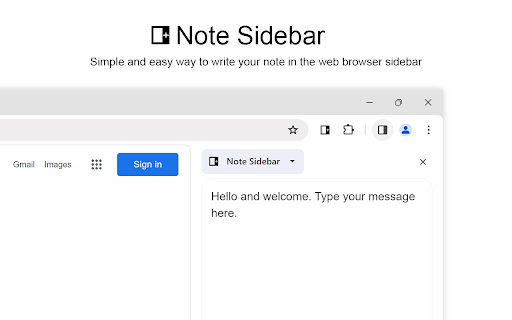
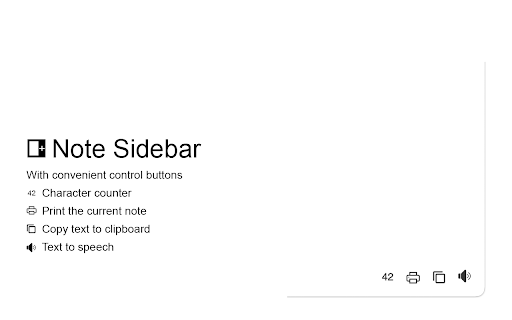
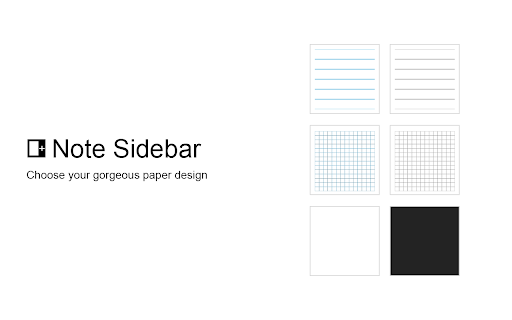
Note Sidebar is a lightweight and useful add-in designed for taking notes from the sidebar of your web browser. With this browser extension, you can customize the note paper according to your preferences, whether it is your favorite background color, squared graph paper, or lined paper. It serves as a secure notepad extension for writing notes in a minimalist design. Everything you type is automatically saved securely in your web browser. The Note Sidebar can be used for various purposes, such as creating a to-do list for tasks you plan to work on later in the day, jotting down any thoughts, taking notes on YouTube videos in the simplest way possible, or even recording meeting notes. It is ideal for students, teachers, managers, IT experts, influencers, engineers, and business owners. Additionally, it is suitable for medical professionals who need to write therapy notes, urgent care doctor notes, and physical reports. You can retrieve your personal notes on all your synced web browsers and edit them at a later time without interrupting your work. What are you waiting for? Your thoughts deserve the best. Install the extension and start taking notes. Browser extension features: ◆ Automatically Saving: Instantly type your note and automatically save it on your local and synced settings. ◆ Infinity Text: Write as much as you want without worrying about character limits, just like your personal journal. ◆ Font Style: Customize the font color, font size, line height, and background paper. ◆ Text Format: Choose between Plain Text or Rich Text format, supporting Bold, Italic, Underline, Hyperlink, and custom text background. ◆ Text To Speech: Convert your text to speech and select your preferred voice for a personalized experience. ◆ Copy to Clipboard: Easily copy text the complete text area in your clipboard with a single click button. ◆ Print: Print your current note directly from the sidebar. ◆ Character Counter: Keep track of the number of characters in your typed text. ◆ Context Menu Note Addition: Quickly add notes using the right-click menu to copy text into your note sidebar. ◆ Toolbar Customization: Hide buttons in the bottom toolbar to streamline your workspace. ◆ Note Locking: Secure your note with your personal password ◆ Export Options: Export your notebook text to a TXT file, perfect for importing into Google Docs, Microsoft Word, or Apple Pages. ◆ Shortcut: Customizable shortcut key to open the Note Sidebar. ◆ Custom Toolbar Icon: Select your preferred toolbar icon in either light or dark mode, adapting to your visual preferences. ◆ Accessibility: Accessibility Ready with labels for the interactive elements. ◆ Support Dark Mode, which makes it comfortable for your eyes. Project Information: https://www.stefanvd.net/project/note-sidebar/browser-extension Required Permissions: ◆ "contextMenus": This is to add the "Copy text to sidebar" menu item in the web browser context menu. ◆ "sidepanel": Allow the note to be visible in the side panel. ◆ "storage": Save settings locally and sync with your web browser account. <<< Option feature >>> Unlock an option feature to protect your eyes at night and focus on the video player, such as YouTube™, by installing Turn Off the Lights browser extension for YouTube and Beyond. https://chromewebstore.google.com/detail/turn-off-the-lights/bfbmjmiodbnnpllbbbfblcplfjjepjdn
Note Sidebar screenshot 1Note Sidebar screenshot 2Note Sidebar screenshot 3Note Sidebar screenshot 4Note Sidebar screenshot 5

Reviews (14 cached)

★☆☆☆☆2025-10-11
Emily Davis

The whole idea of this extension is neat, but unfortunately it feels buggy. The "Print" icon is invisible until the "Options" page is opened ( but the "Print" option is activated by default ) And the Print feature is totally useless. Nothing happens when clicks on the print icon, which forces me to move the whole note to Google Docs in order to print it.

★☆☆☆☆2025-09-21
Mohammad Reza T

It could be nicely enhance your work but when you want to copy a word, it could simply ruins what you've done:) no matter did you save them or not. Unfortunately, you cannot recover it.

★☆☆☆☆2025-04-17
Pablo Mujica

I wish I could leave negative stars as this extension resulted in a massive net loss. 7 hours of research for a project was deleted when I opened a new tab. I am in so much disbelief I can't even react with anger. This was critical information and time for an opportunity I can't get back and massive sacrifices where made towards this project.

★☆☆☆☆2024-10-07
Mohamed Anan

Does not always save notes, I lost a lot of important things, you can stop auto save if it's updating like this and add manually save button at least!

★☆☆☆☆2024-07-25
Uğur Can Kuru

with the latest update, I click to open this app and my web browser closes completely...... I had a lot of important notes, now I can't access them and there is a possibility that they may have been deleted..... It really sucks.

★☆☆☆☆2024-04-02
A dmin

Unfortunately if you write large amount of text and it goes above your resolution, there is no scroll or possibility to scroll down/ up. Uninstalled, wont go to external forum so spare me your standard reply. There is way too many alternatives for me to bother registering on your website to get support, it should be in your best interest to follow reports.

★☆☆☆☆2024-03-31
Banti Uppala

Nothing happens when I click on it.

★★☆☆☆2025-01-02
Jeff Axelrod

I was assuming/hoping this would provide a page- or site-specific context for individual notes. Even better if it would automatically open the sidebar when visiting the page in the future. One global note isn't useful for my needs.

★★★☆☆2025-08-26
Jelif Zhang

Generally speaking, it's good, but the "New! Discover all my FREE browser extensions" popup is really annoying, it exists on other extensions from same author like https://chromewebstore.google.com/detail/page-sidebar-open-any-pag/gkkebamcfeaggmcfciekfakbmlgckdnh too.

★★★☆☆2025-05-15
Ceilidh Givan

I really want to like this extension. A sidebar to take notes in my browser is exactly what I need. But I'm running into issues with text disappearing. I made a bunch of notes on stuff I needed to follow up on today while I was working yesterday. Throughout the day. Next day when I started up my PC and opened Chrome they were all gone. I had a second tab just now, closed the side bar, when I opened it the second tab was gone. Made a test note and switched back and forth a few times and closed it and it seemed to stay, but when I pasted in the table I actually needed in that note and switched to the main tab, by the time I switched back everything in the second tab was just the test note. It's frustrating to say the least.

★★★☆☆2024-09-03
Dustin Moore

I would add 5 stars but for some reason ,I dont have the down arrow option to add additional notes?

★★★☆☆2024-06-07
Ming Minh

Easy to use. But I have problems with lag, turning the app on and off very slowly and sometimes automatically backing up previous content without saving new content.

★★★☆☆2024-05-10
Zeyad Eldeeb

Great and to-the-point extension! Just what most people need. However, sometimes, unexpectedly, it just don't save the last modifications, and just reclosing and opening the sidebar back, everything is gone!

★★★☆☆2024-05-07
Wayne Donovan

Does not always save my updates when I edit my notes. After pasting into notes, you appear to have to type some text manually to trigger it to save

Permissions (6)

Permissions

activeTab Can access the current tab when you click the extension contextMenus Can add items to the right-click menu scripting Can inject scripts into web pages sidePanel storage Can store data locally in your browser unlimitedStorage

Details

Version 1.0.36
Updated Jan 21, 2026
Size 560KiB
First Seen Mar 27, 2026

