Date Today for Google Chrome icon

Date Today for Google Chrome

by Stefan vd

v1.4.10 Updated Feb 26, 2026 339KiB
CWS
10K
Users
★ 4.48
334 reviews
#843
of 36.5K
workflow
#260 of 4.5K
Recently updated

Description

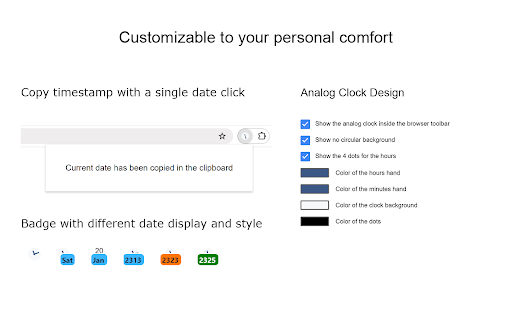
Stay organized and never lose track of time with Date Today, the perfect browser extension for displaying an analog clock in your toolbar bar. In a single blink, effortlessly access the current date and time, helping you manage your schedule seamlessly. Date Today is a lightweight and useful add-in designed to know the current time in hours and minutes. With the current day of the week, day number and current month. Are you asking yourself 'what day is it today' or 'what is the time today'? With one single click on the button you get this information, and if you click again in the popup window. You copy the current timestamp in your clipboard. So, you can paste it in your online Google Doc, Microsoft Word Document or your new Gmail email message. Browser extension features: ◆ Popup Panel: View the current date and time in a convenient popup window for quick reference. ◆ Clock format: Choose between a 12-hour or 24-hour clock system to suit your preference. ◆ Browser Button Options: Opt to showcase either the Analog or Digital Clock in the browser button for added flexibility. ◆ Customize Day Theme: Personalize the color of the hour and minute hands to match your style. ◆ Customize Night Mode theme Activate Night Mode for a visually comfortable clock display during darker hours. ◆ Color Personalization: Make it yours by customizing the number and text color to reflect your unique taste. ◆ Font Family Customization: Modify the font family with options such as Arial, Impact, Sans-serif, Times New Roman, and Verdana. ◆ Picture-in-Picture Mode: Experience enhanced visibility with the Picture-in-Picture mode, showcasing the Date Today panel in a convenient floating popup window. Stay informed about the date and time without disrupting your browsing experience. ◆ Badge Customization: - Current Date Badge: Enhance your experience with the inclusion of a Current Date badge, prominently displaying the current date in a clear and concise format. - Current Time Badge: Keep track of the current time with a dedicated badge, providing quick access to this essential information. - Day Number and Month Badge: Display a customized badge featuring the day number, seamlessly integrated with the month. Choose whether to position it at the top or bottom, depending on your web browser's layout. - Day Name of the Week Badge: Elevate your toolbar with the inclusion of a dynamic Day of the Week badge. Stay informed about the current day effortlessly, ensuring you are always in sync with your schedule. - Customizable Badge Color: Personalize your badges by selecting your favorite colors. Choose hues that resonate with your style and preferences, ensuring a visually appealing and cohesive browsing experience. ◆ Tooltip: Easily monitor the current date and time (hours:minutes:seconds) directly in the toolbar. ◆ Context Menu: Right-click menu functionality to paste the current timestamp in text boxes, text fields, and the address bar. ◆ Support for Dark Mode Project Information: https://www.stefanvd.net/project/date-today/browser-extension/ Required Permissions: ◆ "contextMenus": Add web browser context menu to paste the current timestamp. ◆ "activeTab": This to execute the context menu action on the currently open tab. ◆ "alarms": This to run the clock time in the background. ◆ "storage": Save settings locally and sync with your web browser account. <<< Option feature >>> Unlock an option feature to protect your eyes at night and focus on the video player, such as YouTube™, by installing Turn Off the Lights browser extension for YouTube and Beyond. https://chromewebstore.google.com/detail/turn-off-the-lights/bfbmjmiodbnnpllbbbfblcplfjjepjdn
Date Today for Google Chrome screenshot 1Date Today for Google Chrome screenshot 2Date Today for Google Chrome screenshot 3Date Today for Google Chrome screenshot 4Date Today for Google Chrome screenshot 5

Reviews (22 cached)

★☆☆☆☆2025-12-16
Ethan Artym

dosent work when I touch my mouse and it just turns off so useless

★☆☆☆☆2024-02-05
lori lutsch

not working and will not change colors and do what I want

★☆☆☆☆2023-12-11
Juliet Marotzke

Installed the extension and 1) it knew I had an adblocker, required suspension. But then 2) it knew, and told me, my display settings and why they were wrong. 3) Immediate request for donation before I even had a chance to know if I like it or not. 4) Ads. Worries me where this extension dives into, and donations are fine but this feels like ebegging in as many formats as can be crammed in. But mostly --- diving into my system and TELLING ME ---- not appreciating that.

★☆☆☆☆2022-03-26
John Underwood

This was not designed for Google Chrome , it was designed for Firefox. Which is where it placed it , on my Firefox browser that I replaced with Chrome a little while ago. The Chrome browser is set up as default , so why does it stick it in my Firefox Browser? Its right in the chrome web store. Sorry Google , I am not impressed , you are not in control of your own store? Does not inspire confidence in your products , or how you look out for your customers. I usually have several browsers , it is bad enough I have to have multiple browsers because nobody puts enough effort into a browser that can do it all. For us non-techs , our browser is the frontline of defense. Now we have to worry it will be the trojan horse that brings about the next data dump.?

★☆☆☆☆2020-04-10
John Blackledge

Nice but a waste of time (pun intended). It does not display as shown. You have to click to get that view. I'd want an option to have it on permanently.

★☆☆☆☆2019-10-15
sd di

works slowly , delay to open extension window.

★☆☆☆☆2019-01-31

not working

★☆☆☆☆2018-07-16
Max

There is no way to request support on the delopeers website. App opens a nag screen on a new tab advertising other apps each time chrome is loaded. Also the options menu for 'Date Today' is quite buggy. Uninstalling.

★☆☆☆☆2018-01-10
Reuben Shannon

it do not let us to delete the extension

★☆☆☆☆2017-12-13
Uri Shenderovich

This is a quite good extension, unfortunately sometimes it's just stop working

★☆☆☆☆2016-03-30
Ynnek Thennek

stamp doesn't work anymore. you can go to options and choose right click to stamp, but it is broken now. also, there is no need for this extension to read or change any data on any website i visit let alone all of the data on all of the websites. it has a very broad permission, which is ridiculous and deserves no higher than a 1 star rating for this reason alone. either way they do not fix anything

★★☆☆☆2021-06-11
Simon Miller Jr

When hovering over the extension the date read out keeps flashing.

★★☆☆☆2019-07-01
Navin Gurnani

The clock gets stuck to the same time. Does not refresh.

★★☆☆☆2016-02-11
Michael Levy

Why does it want to know my data on all websites!

★★★☆☆2019-10-24
Ken Green

Extension works well. But support is a bit of a mystery. I am instructed to visit the developer's website for support. There you can type a question and a list of support articles will show up, but if those don't answer your question, you are out of luck. There isn't a 'Contact Me' at the bottom, and no support email address I could find. Otherwise a good extension. In case the dev reads this, my question was about formatting the date to be copied into the clipboard. I'd like to format the date copied to the clipboard myself. Or have more options. I need YYYY-MM-DD for example.

★★★☆☆2019-10-09
Jean-Claude Allain

It will be fine this extension can remember text like my signature/name tu write it after the date Say; "Any text 9 October 2019 20:00 MyName" Regards

★★★☆☆2018-11-04
Sgt

I like this extension, however, I think it would be even better if you could show on the badge, the day of the month with the day name under it. It is strange because the only way to see the day name is with the analog clock in the background.

★★★☆☆2018-03-31
Richard Hackett

I would rate this extension five stars if only it gave me the option of displaying smaller time units; I am an online wargamer, and for me it's important for launching coordinated attacks. So for me, seconds are a must, tenth of a second would be nice, hundredth of a second would be perfect.

★★★☆☆2017-11-14
Benjamin Nicholas Toll

Would like to be able to change background color of pop-up time.

★★★☆☆2017-05-24
Jessica Calderon

Good solution for lack of date mouseover/ display options on the taskbar of a Chromebook. I would give this extension 5 stars if it offered those features :)

★★★☆☆2017-05-21
Stephen Wajer

I want the Date and Time to stay visible in the Browser Toolbar in a easily readable font size

★★★☆☆2016-12-10
Samsung A20

It would be better if the time & date showed always without clicking the icon.

Permissions (4)

Permissions

activeTab Can access the current tab when you click the extension alarms Can schedule periodic background tasks contextMenus Can add items to the right-click menu storage Can store data locally in your browser

Details

Version 1.4.10
Updated Feb 26, 2026
Size 339KiB
First Seen Mar 22, 2026