
Focus - On Your Work icon

Focus - On Your Work

by Freedom

v1.0.4 Updated Nov 5, 2023 1.45MiB
CWS
5K
Users
★ 4.16
32 reviews
#1581
of 35.3K
workflow
#446 of 4.4K
⚠️Not updated in over 2 years

Description

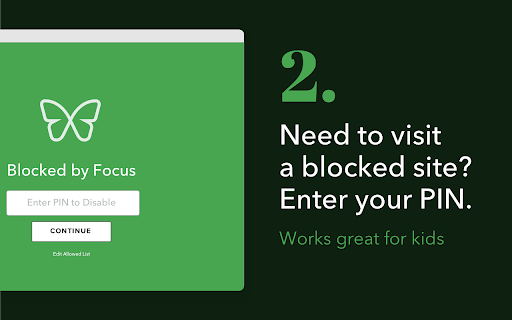
Focus by Freedom helps you stay focused on your work or schoolwork. Focus blocks distracting websites, while allowing you access to the sites you need. Focus lets you do better work in less time. THE CHALLENGE Do you work or study on your computer? Then you’ve been distracted by news, social media, shopping, email. These distractions lead you to drift off-task, waste time, and end up unproductive and unfulfilled. We’ve all been there. The temptation of opening a new browser tab to find a new distraction is strong and the action is often compulsive. We all have specific sites that are our go-to distractions, but we also know that anything we click has the potential to become a distraction. except for the tools we’re using to get our work or studying done. THE ANSWER Focus by Freedom blocks only those distracting websites so that you can focus on your work or studies. You tell Focus what sites you do need for work or schoolwork, and it will block everything else. You’ll stay focused and on-task, while doing high quality work because of your sustained attention. What’s more, you’ll find you can get more done in less time without those constant online interruptions! HOW IT WORKS Focus by Freedom blocks websites by placing them behind a PIN. EASY SETUP – create a PIN (a password) and decide which websites should be allowed CUSTOMIZABLE - Focus comes pre-populated with an Allow List of common work and learning sites. You can customize as needed. ACCOUNTABILITY - A parent can set the PIN for children, or you can have your spouse or friend set the PIN for you WHO SHOULD USE FOCUS? - Remote workers, from home or in hybrid working situations - Students doing homework - Students with online or remote learning - Writers, Teachers, Entrepreneurs, Editors, Researchers, Journalists, and Developers all use Focus to get their work done! Focus is a product of Freedom Labs, where we develop new ways to meaningfully interact with technology. Like our other extensions, Focus is highly privacy-conscious. None of your data is sent anywhere (the cloud, our servers, etc.) It remains secure on your own device. You can learn more about Freedom here: https://freedom.to Release notes: Focus 1.0.3 fixes two issues: - Sometimes, the extension disables itself automatically and bypasses the green screen when visiting a blocked website - Sometimes, when adding a new website to the allowed list, it does add it, but it's not shown in the list Please send us your feedback at support@freedom.to and we'll continue to improve Focus. Thank you!
Focus - On Your Work screenshot 1Focus - On Your Work screenshot 2Focus - On Your Work screenshot 3Focus - On Your Work screenshot 4

Reviews (9 cached)

★☆☆☆☆2024-08-26
Dawid Dutkiewicz

It doesn't work. Lags on adding or removing sites, it hung my Chrome on Mac M1

★★☆☆☆2024-04-14
Areeba Hussain

It wont work for me i tried adding and removing sites multiple times but it blocks the allowed sites anyway ive been here for like 30 mins. Why does it sometimes choose to allow the sites that i whitelist and sometimes block????? Also if i disable it and enable it its all messy some are blocked and some are not. I guess I can use my pin every single time on each day I need to use it but its so annoying.

★★★☆☆2025-10-31
Sung Woo Park

is there no way where I can make it to not block pdf files?

★★★☆☆2024-10-01
Man Hay S2D35 YIU

Some websites I chose to allow are still showing as blocked. I had a negative experience and I hope it can be resolved.

★★★☆☆2024-03-27
Ксения Аулова

If site is added in whitelist, subpages on this site are blocked. It doesn't help to work, if I can't read different scientific papers on one site without entering pin every two minutes.

★★★☆☆2023-02-08
Britt Vaughn

Good overall design, but it keeps disabling itself so I have to re-enable it every time I visit a site. Kind of defeats the point. If it worked more consistently it'd be great. I like the option to enter the PIN to allow access, because sometimes you forget to add a site to your allowed list.

★★★☆☆2022-10-12
borkomotorko

Its nice. But it block sites that are on the "whitelist" which is kind of frustrating.

★★★☆☆2021-11-06
Taylor Ulch

it doesn't really work. the wildcard thing.

★★★☆☆2021-11-01
Charlotte DeTroy

Equal parts helpful and frustrating. I love it when I want to use it, but it enables itself anytime I launch my browser and I have to manually disable it each and every time. There does not appear to be any option to keep the extension but stop it from automatically enabling itself. When I'm working it's great, but to have to manually disable it repeatedly anytime I am off the clock and just want to casually surf the web is incredibly annoying. I honestly can't understand why the very simple option to change this default setting doesn't exist (or if it does exist, it is needlessly difficult to find). If it weren't for this obnoxious issue, I would definitely give Focus a 5-star review, but as it stands now, I will likely get rid of it because it's becoming more trouble than it's worth.

Permissions (3)

Permissions

alarms Can schedule periodic background tasks storage Can store data locally in your browser tabs Can see your open tabs and their URLs

Details

Version 1.0.4
Updated Nov 5, 2023
Size 1.45MiB
First Seen Mar 21, 2026