
Description


Reviews (42 cached)
Causes insane delays loading random web pages and especially retards uploads.
"Disable auto pause feature" does not work (anymore).
doesnt work only used the "Disable Auto Pause" feature and it didnt work i tried reloading youtube many different times and ways including refreshing closing and re opening youtube closing and re opening youtube etc even after all that it would still have the Video paused. Continue watching? prompt, i have it playing with a playlist that may be affecting it i also have an adblocker specifically ad guard any help would be greatly appreciated replying to inzkdev was just testing with it mainly just clicking between videos in a playlist and withen a few clicks it appears may be an issue on my end as even for youtube its strange
No skip ads, useless features, uninstalled.
After months of use and not changing any settings, the extension has suddenly started forcing every video into theater mode.
Not working!
Can't find the scroll to increase/decrease volume.
Loved it but it freezes chrome after scrolling few short videos. Please fix the issue.
cannot be used to block autoplay of videos opened in a new tab when you open the tab. For this you can use: https://chromewebstore.google.com/detail/enhancer-for-youtube/ponfpcnoihfmfllpaingbgckeeldkhle
The Disable Auto Pause feature no longer works, at least for me.
video quality keeps changing to auto
Absolutely Rediculous that there's NO Dam FF or Rew Option's.! W T F K.............
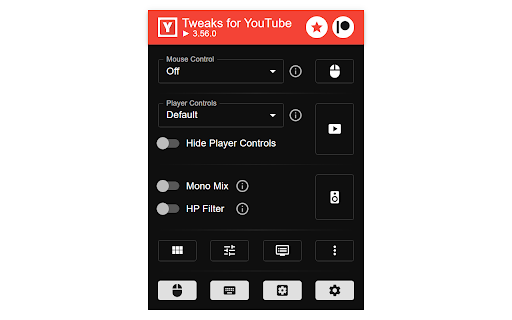
Mono Mix doesn't work
As of 7/26/2024: the ad "mute" function doesn't seem to be working for me anymore. As of 6/7/2024 YouTube flags this extension as an ad-blocker and doesn't play any videos unless the extension is disabled. Will change back to a 5-star review once this is resolved, because this was working wonderfully for me until today.
This program doesn't work whatsoever. I got it to get rid of the play button in the middle of a youtube video, but the program doesn't do that.
I've no idea how this extension has five stars. Automatic full screen works the one time ... for videos or as long as you keep clicking videos on the sidebar under the video rather than using the homepage, after that, YouTube's video full screen ... (I kid you not) only works ... on the YouTube homepage, not on videos themselves. Oh no, it will (dys)function as if it's in full screen but it won't be in it i.e. you may still have to click the middle X or press escape as if you're in full screen while watching a video but not because you are in full screen (video). Tried in incognito, so no, it's not caused by another extension. This is besides the fact that it, by default, makes the user go into settings to e.g. get the mouse wheel to stop fast forwarding videos and changing playback speed rather than having a way to disable all features and select the ones you want, I mean because who knows what else is wrong and needs to be disabled? Oh, and instant full screen can and will cause all of the video thumbnails on the homepage to disappear. Thanks for getting my hopes up about an automatic YouTube full screen that actually works ... for a moment before it immediately breaks.
hard to config
OMG it is so good like my youtube is like soooo normal! best extention ever! DONT EVER INSTALL IT IT DONT WORK!!!!!!
this extension has absolutely ZERO effect on youtube
Everything is great except the loop feature, which never works consistently. Honestly, that’s worse than not working at all. At this point, I’d rather activate it manually, because right now it works for two videos and then randomly refuses to loop the third one. There should be a way to FORCE loop the video, even if I'm at the very end of the video and play it, no matter what, it's gonna loop.
i only got this extension to stop the "video paused. continue playing?" popup, enabled the setting, waited for the popup to appear and the extension didnt do anything. the extension probably good in other ways but i only want it for this specific setting which doesnt work.
Where is the download option? I'm familiar with DLP. I use it via cmd batch with params. But I don't see it anywhere on the video tab.
I am using brave browser and half of the time it just doesn't work, I have to refresh the page for the extension to take effect which sucks.
I set a keyboard shortcut to copy the video URL but it keeps adding [yt-dlp] before the URL for some reason, I don't know why or how to remove it, if someone know plz tell me :D
Disable Auto Pause function doesn't work.
I wish it had custom global shortcuts for embedded YouTube videos
Worked great for a long time, but with latest Chrome updates it now has major issues. Video size will not render correctly, sidebar won't show, controls aren't visible. Sometimes when you reload the page it will work, but then the problems come back. I've disabled it for now. Hopefully the developer can fix it.
Worked great in the past, but starting today I cannot watch videos. Any video just says "Please click here to watch this video on YouTube", even though I am already on Youtube. Disabling this extension immediately fixes the problem. Hopefully this issue is resolved soon.
I am using chrome browser some times half features doese not work, after refreshing sometimes starts working,, may be due an glich or error pls take a look and currect it is the most useful extension we have i will update my reveiw 5 currect it
Can you implement some sort of delay before Auto Click "Skip Ads" button? Currently youtube is flagging this feature as an ad blocker.. Would this help not get flagged as an ad blocker? this the main reason why I use this extension is to auto click the Skip Ads button since other ad blockers will just stop youtube from playing
Was working great for a few months and now I get the pop up from YouTube "ad blocker violate youtube terms of service" AFTER every ad.
Enabling showing of Transcript works but it doesn't track current video location or allow you to click on the Transcript time to jump to that video section. Shame, I'll have to uninstall now.
Cinema mode is suddenly having issues and the page alignment is all messed up. I really love this extension and had been using it for so long. Please update it to fix the issues. Thanks!
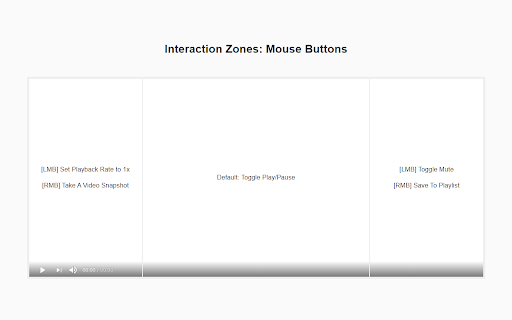
the best mouse control function compared to other tweakers. hope the mouse control works on other sites like bilibili, pornhub, or maybe all html video players The settings could be divided into more obvious sections to make it easier to browse need ways to copy settings from one interactive zone to another, it's too painful to repeatedly set the same gestures across zones.
Interesting extension. One thing I think is really missing is being able to see the dislikes on a video. Be nice to have that in a single extension than needing a seperate one just for that.
It's not choosing the Enhanced bitrate quality on youtube. I have to go everytime to do it. Can you fix it?
installed for the disable auto-pause function but it seems like that's not working at the moment?
The UX is confusing and messy despite the fact it has a lot of options also when I click its icon, it takes a while to respond. I'll keep it since it doesn't slow down Chrome.
[Feedback / Feature request] Audio Booster does it job when it comes to my laptop's speakers but when I'm on headphone the audio get too loud can you please provide an option so that audio booster get disabled when on headphones.
Its okay but if I use global seek forward and seek back then my normal play pause doesn't work anymore
seems to have lots of functions.. I tried to toggle off double click as I find it annoying left click brings up full screen sometimes I want it to ignore it on html5 but its not working on YTube also I love a way to save side chat.. the URLs get shorten with dotdotdot ,,, on end but clicks still work.. I like to save side chat from YT to other platforms andhave URL long URLs work!
Nice extension, but... the reason I'm using is to not lose player focus, so I can always use arrows hotkeys to change volume and move the video forward/backward... However, when I use the mouse to change manually the volume (in the player volume button) I lose the focus and the right and left arrow now control the volume, not the video (fwd/bwd)... Can you fix this? Thanks!
Permissions (3)
Permissions
Details
| Version | 3.87.0 |
| Updated | Mar 3, 2026 |
| Size | 679KiB |
| First Seen | Mar 21, 2026 |
Popular in workflow





Popular Extensions


