
⚠️Not updated in over 2 years ⚠️Below average rating
Description
When testing the operation of forms in website development, you can easily input values by copying (Alt + i) and pasting (Alt + o) the troublesome task of "inserting values into the form for each test".
The Copy and Paste buttons can be toggled on and off by pressing Alt + p in the lower right corner of the screen.
This speeds up testing around forms and improves development efficiency.
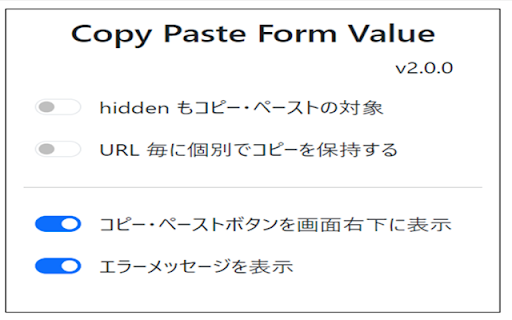
■ Option Settings
・Copy hidden elements
・Copy/paste button on the lower right corner of the screen
・Auto Paste
・Keep a separate copy for each URL
・Display error messages

Reviews
Loading reviews...
Permissions (2)
Permissions
commands storageℹ Can store data locally in your browser
Details
| Version | 2.1.0 |
| Updated | Mar 5, 2024 |
| Size | 60.42KiB |
| First Seen | Mar 26, 2026 |
Popular in workflow

Adobe Acrobat: PDF edit, convert, sign tools
by Adobe Inc.
330M
★ 4.40
workflow
330M
★ 4.40
workflow

Chrome Remote Desktop
by Chrome Remote Desktop Release Managers
38M
★ 3.14
workflow
38M
★ 3.14
workflow

MetaMask
by metamask
13M
★ 2.68
workflow
13M
★ 2.68
workflow

Microsoft Power Automate
by Microsoft Corporation
10M
★ 1.99
workflow
10M
★ 1.99
workflow

Screencastify - Screen Video Recorder
by castify-ext-dev
9M
★ 3.95
workflow
9M
★ 3.95
workflow
Popular Extensions
Adobe Acrobat: PDF edit, convert, sign tools
by Adobe Inc.
330M
★ 4.40
workflow
330M
★ 4.40
workflow
Chrome Remote Desktop
by Chrome Remote Desktop Release Managers
38M
★ 3.14
workflow
38M
★ 3.14
workflow

Cisco Webex Extension
by cisco.chromestore
24M
★ 2.34
social
24M
★ 2.34
social

Kami for Google Chrome™
by Kami
17M
★ 4.56
education
17M
★ 4.56
education

Read&Write for Google Chrome™
by Texthelp
17M
★ 3.44
accessibility
17M
★ 3.44
accessibility