
⚠️Not updated in over 2 years ⚠️Requests 1 sensitive permission
Description
This Global Privacy Control Chrome Extension enables the GPC setting and evaluates whether whether websites honor the opt-out setting by providing transparency into the personal data shared with third parties.
The right for website visitors to opt-out of the sale of personal information is a hallmark of data privacy laws such as the California Consumer Privacy Act (CCPA). Regulators are accelerating enforcement against companies that do not honor the Global Privacy Control (GPC) signal as a valid opt-out. "Under law, [GPC] must be honored by covered businesses as a valid consumer request to stop the sale of personal information." https://oag.ca.gov/privacy/ccpa"
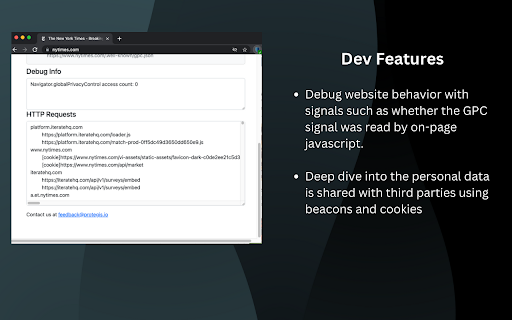
For developers and IT teams, this extension helps understand and debug how webpages respond to the GPC signal. Diagnostic capabilities include:
- Validate the GPC signal was set and the website response is consistent with the GPC specification
- Diagnose website behavior including whether the GPC signal was read by the page
- Debug whether personal data is shared by examining information provided to third parties using beacons and cookies.
Questions? Feedback? We'd love to hear from you at contact@protegis.io

Reviews (1 cached)
★★★☆☆2023-08-07
Rutuj Runwal
Hi Delson, The extension is really good and works fine There is a minor issue though, whenever the enable GPC option is checked and unchecked, the details are not visible right away even if the page is reloaded. The extension needs to be reopened again for the details to show and it seems to be checking GPC compliance on chrome:// or file:// type urls where it is supposed to do nothing. Also I am confused with the way the headers are set when you are using declarativeNetRequest to set the GPC header, the extension is applying it to all resource types like images,fonts,stylesheets as well is that intended and really necessary? Thanks. Rutuj Runwal, Creator - RR Adblocker
Permissions (6)
Permissions
declarativeNetRequestℹ Can block or redirect network requests declarativeNetRequestFeedback scriptingℹ Can inject scripts into web pages storageℹ Can store data locally in your browser tabsℹ Can see your open tabs and their URLs webRequestℹ Can observe and analyze network traffic
Details
| Version | 0.1.4 |
| Updated | Jan 13, 2024 |
| Size | 1.46MiB |
| First Seen | Mar 26, 2026 |
Popular in privacy

uBlock Origin Lite
by Raymond Hill (gorhill)
16M
★ 4.49
privacy
16M
★ 4.49
privacy

uBlock Origin
by Raymond Hill (gorhill)
15M
★ 4.70
privacy
15M
★ 4.70
privacy

Online Security
by ReasonLabs
12M
★ 3.62
privacy
12M
★ 3.62
privacy

DuckDuckGo Search & Tracker Protection
by DuckDuckGo
4M
★ 4.24
privacy
4M
★ 4.24
privacy

Free VPN For Chrome - VPN Extension - Windscribe
by Windscribe
2M
★ 4.66
privacy
2M
★ 4.66
privacy
Popular Extensions

Adobe Acrobat: PDF edit, convert, sign tools
by Adobe Inc.
330M
★ 4.40
workflow
330M
★ 4.40
workflow

Chrome Remote Desktop
by Chrome Remote Desktop Release Managers
38M
★ 3.14
workflow
38M
★ 3.14
workflow

Cisco Webex Extension
by cisco.chromestore
24M
★ 2.34
social
24M
★ 2.34
social

Kami for Google Chrome™
by Kami
17M
★ 4.56
education
17M
★ 4.56
education

Read&Write for Google Chrome™
by Texthelp
17M
★ 3.44
accessibility
17M
★ 3.44
accessibility