Fathom AI Note Taker for Google Meet icon

Fathom AI Note Taker for Google Meet

by Fathom

v0.0.37 Updated Jan 7, 2026 203KiB
CWS
400K
Users
β˜… 4.95
1.5K reviews
#204
of 74.1K
communication
#2 of 1.6K
⚠️Requests 1 sensitive permission βœ…Highly rated

Description

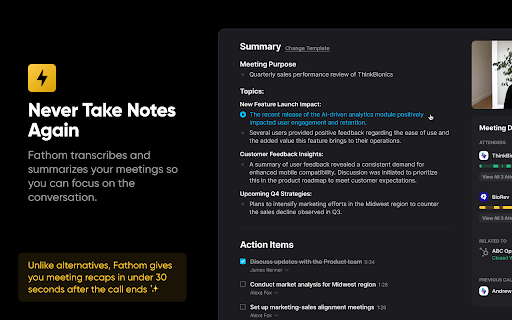
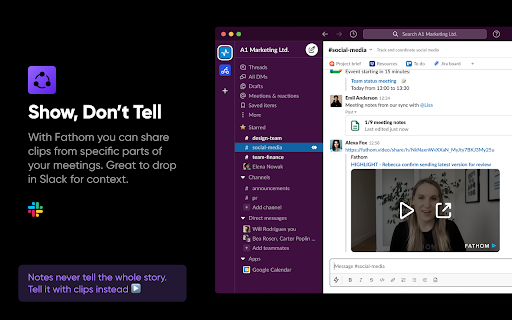
Install this Fathom for Google Meet Chrome extension to unlock: * Ability to use Fathom on any Google Meet - without it you have to make sure to join the meeting from the Fathom desktop app * No more looking for the desktop app - Fathom recording controls embedded directly in Google Meet ABOUT FATHOM Fathom records, transcribes, and summarizes your Zoom, Google Meet, or Microsoft Teams meetings so you can focus on the conversation instead of taking notes! πŸ†“ Fathom is completely FREE to use! Get setup in a matter of minutes. πŸ₯‡ #1 Rated AI Meeting Assistant on G2 with a perfect 5/5 rating. Read our reviews: https://www.g2.com/categories/ai-meeting-assistants KEY FEATURES: πŸ’₯ Instant Access to Fully Transcribed & Highlighted Recordings No more waiting after your calls for the recording! Jump directly to highlights & action items. πŸ€– Auto-Generated Call Summaries Turn a 30 min call into a 1 min read! Copy your summaries into Google Doc, Notion, or Word with a single click. πŸ”₯ Updates Salesforce & Hubspot Automatically No more post-call data entry! Fathom will log your call and its summary into your CRM. πŸ™ Easily Share Highlights Show don't tell! Fathom makes it easy to share key passages of your customer calls or meetings with colleagues. πŸ” Search Across Calls & Transcripts Getting on a follow-up call and don’t remember where you left off? Boss asking you if anyone’s brought up a certain competitor recently? Fathom’s got you covered.
Fathom AI Note Taker for Google Meet screenshot 1Fathom AI Note Taker for Google Meet screenshot 2Fathom AI Note Taker for Google Meet screenshot 3Fathom AI Note Taker for Google Meet screenshot 4Fathom AI Note Taker for Google Meet screenshot 5

Reviews (13 cached)

β˜…β˜†β˜†β˜†β˜†2025-11-25
Lucia Jonsson

Really useless! It turns off the sound in meetings - either my customer or myself are muted. I have to remove Fathom to be able to hold the meeting!! Then I have no notes or any recording whatsoever 🀬

β˜…β˜†β˜†β˜†β˜†2025-07-29
Archon London

Make it simple to use on a call or not to use.. Switch Fathom on or off It's not user friendly and it's irritating

β˜…β˜†β˜†β˜†β˜†2024-11-07
Akanksha Dhyani

It's a great notetaker... when it works, which is unfortunately almost never. In the same week, I had it working flawlessly for one meeting and then fail spectacularly ever since. It's the cycle from hell. Click the Fathom extension and it shows nothing but a 'login' button. When you try to log in, it leads you to a connect your account button. When you click that, it tells you "Your Google Meet now has a new button! Click it to start recording with Fathom on your next call.". Click on that, and of course you can't use it because you're NOT LOGGED IN?! If it weren't frustrating, it'd be hilarious.

β˜…β˜†β˜†β˜†β˜†2024-08-14
Ren Tyler

Recorder showed as being in the meetings, but no video or notes appeared in my Fathom account.

β˜…β˜†β˜†β˜†β˜†2024-07-30
Simon Wong

not able to sign in.

β˜…β˜†β˜†β˜†β˜†2024-07-10
Dennis Weppner

Not able to sign in

β˜…β˜†β˜†β˜†β˜†2024-07-04
Ashish Barui

Issues from last 10 days. Not able to sign in on chrome extension so not able to record call. Requirement: Ability to download multiple/all videos for backup. An option like that would help

β˜…β˜…β˜†β˜†β˜†2024-10-07
Zeeshan Hanif

It's incompatible with Vivalid, which is a chrome-based browser. All other extensions from google store work. But not the Fathom. If I click login, and login using my Google Account, extensions remains logged-out, whatever I do.

β˜…β˜…β˜†β˜†β˜†2024-08-19
Π“Π΅Π½Π½Π°Π΄ΠΈΠΉ theblackpost

eternal auth via google account...

β˜…β˜…β˜…β˜†β˜†2024-11-19
D N

DMG File for Mac Intel not working. Error: Cannot open disk image.

β˜…β˜…β˜…β˜†β˜†2024-07-25
Victoria Perez

It's not recording meetings that are not scheduld on my calendar and my extension is not showing up on my computer so I can not manually hit record. Is there another way to handle this?

β˜…β˜…β˜…β˜†β˜†2024-02-21
Tim Jackson

Looks fantastic, but I can't figure out how to enable real time coaching in the Chrome app. Also, Fathom joins automatically only on some videocalls and not others -- I'm not sure why.

β˜…β˜…β˜…β˜†β˜†2024-01-15
Oleksandr Chumak

Connecting for more than 2 min. It's too long

Permissions (4)

Permissions

identityβ„Ή Can use your Google account identity identity.email storageβ„Ή Can store data locally in your browser webRequestβ„Ή Can observe and analyze network traffic

Details

Version 0.0.37
Updated Jan 7, 2026
Size 203KiB
First Seen Mar 26, 2026


