
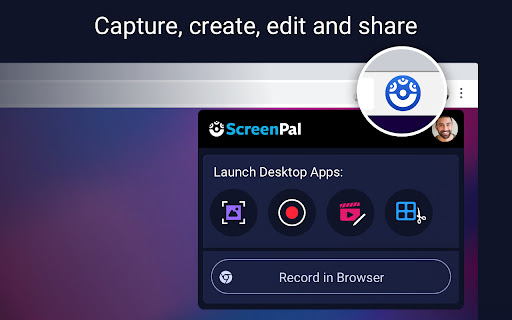
ScreenPal - Screen Recorder & Video Editor
by ScreenPal (formerly Screencast-O-Matic)
Description



Reviews (56 cached)
just use OBS its so much simpler than this hot garbage of a recording software. here is my reasoning. confusing web design took me 10 minutes to find the video section. pay to access features why are they money hungry. never showed on websites. used TENNAS dance from deltarune with a astronaut. DO NOT INSTALL THIS IS AS USELESS AS 1 BUCKET OF WATER TO AN ENTIRE VOLCANO if your looking for a recording website just use OBS its confusing but its not money hungry like this app. that goes for EVERYONE. Edit: W_A_S_D typed lying wrong: not to be mean but please note that lieing is not a real word and i'm not making fun of them for their spelling mistake but it's so EASY man how do you fumble this badly with lying. all you needed to do was remove ie from lie and replace it with a y. come on.
Does not work. I keep getting "unsupported device" error.
It's a scam, doesn't work, unless you "register"
WARNING WARNING WARNING DO NOT USE THIS AT ALL Activates on all open tabs even though they were not selected. It may only record the Tab selected but to activate itself on all open tabs??????????????????? A brech of privacy.
it always forwards me to the register screen if i want to start recording. doesnt work for me
I used the Launch the free recorder - did a test and now I cant find the actual recorded video? I created an acct and its not there. Where is the free recorded version?
That was a big waste of time. Just needed to combine 2 clips and export. After finally figuring out how to edit, I realize you can't export without upgrading. Seriously? It's a Chrome app. Export shouldn't be a paid feature. Deleted.
dont start
I created an account and was excited to test this product for use as an educator. Creating an account was easy. They seem to have good support on how to use the product. I just wish I could actually test it out. I first tried using an older MacBook Pro and couldn't install the app because of a "no mountable file systems" error. I did a hard restart, redownloaded the app and repeated. No change. I then tried using my 2021 Lenovo IdeaPad Flex 5 and now get an error saying the app is "not compatible." WTH?!? Either it works across platforms or it doesn't? I know my Lenovo is not the beefiest Chromebook on the market, but I've never had issues before like this. The developer should really make the hardware requirements clear before advertising their product as available. Also... I tried to contact the developer through their website. But it appears that may only be for show. I've not been able to submit a ticket despite using multiple machines and multiple browsers.
Impossible to launch. Tried to launch it from the webpage, from the extension, from the manual download - nothing. There are no topics covering a complete failure to launch in the FAQ. I've submitted a help ticket but to be honest at this point I'm so frustrated I think I'll use a different software anyway.
The fact you can't logout is hysterical. Access to browser history unless we uninstall? Bet.
I hate it. It was not working when I tried to post something on youtube
The stupid halo won't get removed even if i remove the exension. and recording with this doesnt even work. fix this please.
This is horrible. - 1. You need to sign in and when I sign in with my account, it tells me I already signed in (which I know). But the problem is, I can't access my account. 2. Well yeah, I would suggest goCast screen recording.
This review is given due to the fact that they acccesed for information then they should've and led me to change my password, secure my account. This app technically hacked me.
Whenever I try to sign into my account after apparently signing into my Google account, I tried to log into it whilst using my Google account but it didn't do anything. Then I tried putting in my gmail and my gmail's password but it still didn't work and instead a message below "Last logged in with Google" said to set up my password for the account. I tried pressing that button but it wouldn't take me anywhere, and then after I remove my cursor from hovering over the "Click here to set up password" it then underlines it confusing me into thinking that it was supposed to be underlined when my mouse pointer was hovering over it. Please fix this issue it is very upsetting and I really want to record something for my YouTube channel and stuff. I've seen these reviews and it seems like this is the best screen recorder I can possibly use at this moment, and I really wanna try this one out. Thanks for reading.
it sucks
Not letting me log into my account. I already had a Screencast-O-Matic account with my Google account, but wasn't letting me login. Thought it was a bug with my account so I created a new one. Still isn't letting me. Basically, extension became useless.
Ohh my god I cannot STAND this app!! It gave me lag on allll my videos!!
it wont let me sign in with my google account
login is all messed and terrible
It sucks. I cant use it because when i hit "get the recorder" after installing it, it takes me to a blank tab that i cant reload. Its unusable.
Doesn't work.
It wouldn't work while I was trying to record my roblox video
Every time I try open it I get a message saying "Get the app from chrome!" I already have the app and it's really stressing me out!
More pay to use GARBAGE...Uninstalled it immediately !
Will never know how it works -- No way to use the product without creating an account and logging in. Sorry, an app does not need my personal info just to make a screencast. I'd recommend a "Use app as guest" option for the privacy-conscious users.
I hate it! You can't even edit without paying and the whole editing thing sucks!
I have been a paying customer of the PC version of this for years and it is fine. This, however, is non-functional. Installs and extension that, when clicked, simply asks you to install the app on your Chromebook. Click on the button to do that and it opens a blank tab. Go to Google Play store and download the app, which is garbage, and the two seem completely unrelated.
So i wanted to try this out and i enjoy but I have one issue. I decided not to use it so i deleted it but i kept getting the blue circle that appeared when i got it. I'm not a fan of it and im trying to get rid of it. I don't exactly know if this was from the app or something but if anyone knows how to get rid of it let me know please.
I used to use Screencast when I was using a Windows 10 and it worked perfect! I am currently using a Chromebook as my Windows 10 broke. I am starting a YouTube channel and I wanted to use Screencast again to record, because it was the best recorder I had! I installed it and I did a welcoming video of my channel. When I was finished, I clicked on Screencast to see how my video turned out and when I clicked it, only a grey rectangle popped up on my screen. Nothing else, but that. I waited for a while and nothing changed. I am dissapointed, screencast was my favorite and now I can't do anything with it, due to the problem I said. *Edit: I have removed it and reinstalled it numerous times, but the same problem occurred.*
when i click on the extension it's just a white box.
Way more worse than Soapbox. It can't close, and it affects the screen like Soapbox so i can literally can't beat Stereo Madness on geometry dash. If you can close the app and fix the camera bug, i would rate this 5 stars.
not good, have to download the exe, can't work in chrome os.
TAKE NOTE ALL. What a total disappointment. I had used Nimbus for a long time, fantastic app. Something changed during the last update of Nimbus on 19th May 2019 and it stopped working. I was forced to purchase this app as the free version does not record PC sound. After doing so I find out that Screencast O Matic only records in MONO, not stereo. Only MONO sound, sounds like a joke but I checked with support who got back late to me. MONO sound is like a throw back to the 70's. How can a modern app like this record in MONO, it's a farce. Needless to say I cancelled my subscription immediately. What a crock.
Used to be good, didn't use it for months, and then, when I try to use it now, it just glitches!
Was working so well day one, but now I can't even record!!!! :(
All I get is a spinning circle of death. No indication of what it is waiting for. No idea what it needs from me? Gave up.
The free plan does not get audio and downloading the chrome extension is just a lazy way to force you to download the exe version.
i cant find the song feature
It didn't let me use it without logging in, and even then I logged in with Google and it still wouldn't let me record anything.
The recording itself lagged what i was doing for the first few minutes, but then it started running more smoothly. I then checked the playback of the video i recorded and it was 3 times as choppy as it was while it was recording.
It's great when it works, but half the time when I click the extension, it tells me I need to install the recorder...which is already installed. Crashes often too.
Doesn't work well when I try to record it's very laggy + the audio is blocked as well as the settings so whats the point of recording if you can only record your mic
On Chromebook. Says click Allow or OK to get started but this doesn't pop up and it doesn't work
Before i got a chrome book, screencastoutomatic worked really well. And now im trying to install it but im having a trouble.
I found it great, now complete garbage. "All I get is a spinning circle of death. No indication of what it is waiting for. No idea what it needs from me? Gave up." is from another review, and honestly, same here.
doesnt work on linux so i cant see how it works
Love everything about it EXCEPT that it never recognizes the correct microphone, and even if I set it to use the correct mic, it keeps defaulting back to my system mic.
It's not that bad for a free video recorder, but my only problem is that the video lags a lot which is a annoying mostly because I want everything to run nicely. I know that's a stupid thing to complain about, but whateves.
Permissions (10)
Permissions
Details
| Version | 3.1.8 |
| Updated | Jun 24, 2025 |
| Size | 21.44MiB |
| First Seen | Mar 21, 2026 |
Popular in communication





Popular Extensions




