
⚠️Not updated in over a year
Description
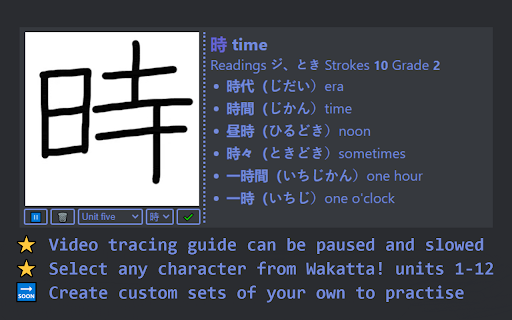
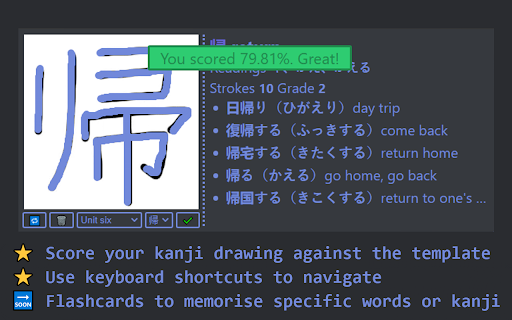
Practice drawing Kanji in the browser in a popup extension. Select a kanji from the drop down menu, and the extension will play a gif with the appropriate stroke order of that kanji. Trace it using your mouse until you've perfected your kanji skills! The gif can be paused and rewound using the buttons below the player.
Kanji from each of the Wakatta units have been loaded in and you can select a unit to learn kanji from. In the sidebar to the right, information about the selected kanji is specified including its grade, stroke count, and the various onyomi and kunyomi readings. Example words that contain the kanji are also included, accompanied with the reading and meaning of the word.
Use keybinds to navigate the extension!
- Up/down arrows to select a different unit
- Left/right arrows to select a different kanji
- Backspace/ender to clear your drawing
- Return to submit your drawing
- R To select a random kanji
To see more upcoming features: https://github.com/aiden2480/kanjithing#memo-future-features
Send an email via the "Contact the developer" button or open an issue on the GitHub to request a feature or report a bug.

Reviews
Loading reviews...
Permissions (2)
Permissions
contextMenusℹ Can add items to the right-click menu storageℹ Can store data locally in your browser
Details
| Version | 2.2.0 |
| Updated | Apr 6, 2024 |
| Size | 432KiB |
| First Seen | Mar 26, 2026 |
Popular in workflow

Adobe Acrobat: PDF edit, convert, sign tools
by Adobe Inc.
331M
★ 4.40
workflow
331M
★ 4.40
workflow

Chrome Remote Desktop
by Chrome Remote Desktop Release Managers
38M
★ 3.14
workflow
38M
★ 3.14
workflow

MetaMask
by metamask
13M
★ 2.68
workflow
13M
★ 2.68
workflow

Microsoft Power Automate
by Microsoft Corporation
10M
★ 1.99
workflow
10M
★ 1.99
workflow

Screencastify - Screen Video Recorder
by castify-ext-dev
9M
★ 3.95
workflow
9M
★ 3.95
workflow
Popular Extensions
Adobe Acrobat: PDF edit, convert, sign tools
by Adobe Inc.
331M
★ 4.40
workflow
331M
★ 4.40
workflow
Chrome Remote Desktop
by Chrome Remote Desktop Release Managers
38M
★ 3.14
workflow
38M
★ 3.14
workflow

Cisco Webex Extension
by cisco.chromestore
24M
★ 2.34
social
24M
★ 2.34
social

Kami for Google Chrome™
by Kami
19M
★ 4.56
education
19M
★ 4.56
education

Read&Write for Google Chrome™
by Texthelp
17M
★ 3.44
accessibility
17M
★ 3.44
accessibility