
Description

Reviews (20 cached)
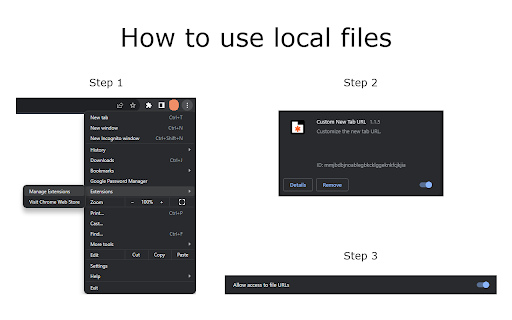
Enabled per screenshot for local files. but there is no place in the extension to enter a URL. appears this extension does nothing and cannot be configured.
Most USELESS extension ever tell me how google and YouTube don't work with it? Like seriously two of the biggest freaking websites don't want to work with it? What's the point in this if it wont even function properly?
Doesn't work for local files. Even default Chrome lets you set the Startup page to a "file://". For anyone seeking a solution to have both startup page and new tab page be a simple offline HTML file - this ain't it.
Works for one day, then gets turn off by Chrome for some reason. Happens over and over again. BOOOOOOOO
i am getting chrome new tab instead of google.com which is my preferred new tab default. this extension was supposed to help; but unfortunately did not address the issue at all.
How do I register a local file? "file:///C:/homepage.html" <- This doesn't work.
Does not work. Tried to set new tab to google.com and gave me an error
Only for these: Apps (chrome://apps/) Blank (about:blank) Bookmarks (chrome://bookmarks/) Downloads (chrome://downloads/) Extensions (chrome://extensions/) History (chrome://history) Memory (chrome://memory-redirect/) Version (chrome://version/) I cannot use it for yandex.ru or google.ru !
Doesn't work
sudden permission change made me remove this extension. Replace the page that you see when opening a new tab <- required for this to function Read the icons of the websites that you visit <- should not be required for this application. Read and change your bookmarks <-- should also not be required for this application. seems like the author is starting to subtly collect user info.
how do I fix error ERR_FILE_NOT_FOUND
did not work the way i needed
Doesn't work.
how do i actually use it??????
I set this up, but every time i open a new tab Chrome now shows a pop-up if i want to change it back..no way to get rid of it so frustratingly annoying
This tool does exactly what it's supposed to, but there's a frustrating 2-second delay every time I open a new page. This slowdown significantly hampers my workflow and disrupts my momentum because I frequently open multiple tabs.
The extension stopped working with Chrome. I used this extension to display my HTML file as my Chrome theme. But now it has stopped working. Some permission requests when I open with Edge.
Great BUT the address bar is not automatically selected, so you cannot create a new tab and start typing in an address or search request. A Great Pity!
When I open a new tab and start typing a URL, the new tab loads and the URL overwrites what I just wrote. It's really annoying! When the new tab loads, the URL should be highlighted, or the address bar should be empty and the cursor should be in it ready for me to type.
I love everything about this app except the fact that it works as a redirect rather than an actual URL load. When I installed it and ran it (started a new tab), Chromes' classic new tab loaded first and then was redirected to Custom New Tab URL settings. Fix this bug and you get 5 stars. Specs: Windows 10 64-bit Chrome: 65.0.3325.181
Permissions (1)
Permissions
Details
| Version | 1.1.5 |
| Updated | Oct 18, 2023 |
| Size | 80.19KiB |
| First Seen | Mar 22, 2026 |
More by publisher


Popular in workflow





Popular Extensions


