Screen capture and recorder - Screenshot Tool icon

Screen capture and recorder - Screenshot Tool

by CaptureCast

v1.0.8 Updated Jan 11, 2024 23.78MiB
CWS
40K
Users
★ 4.73
1.9K reviews
#419
of 31.8K
workflow
#139 of 4K
⚠️Not updated in over 2 years ⚠️Requests 2 sensitive permissions Highly rated

Description

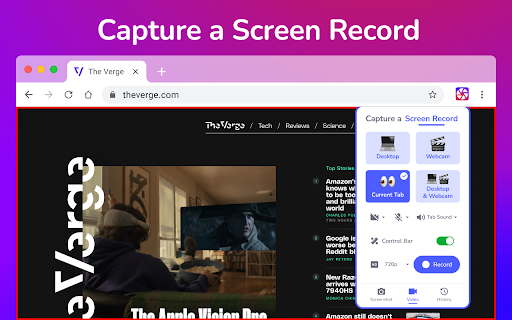
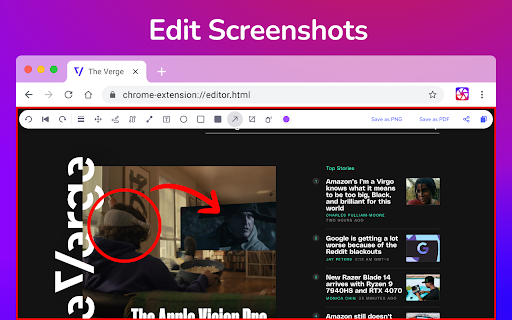
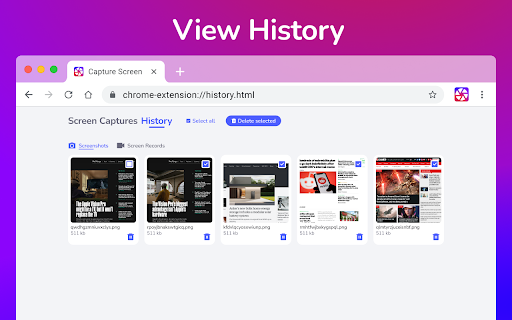
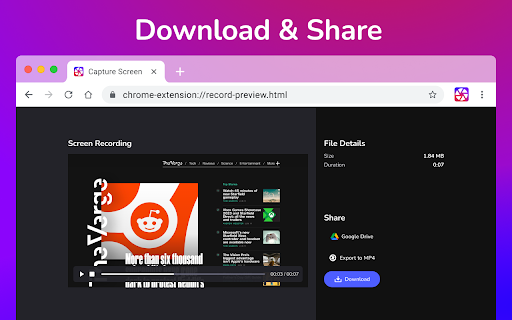
Unveiling a Comprehensive Screen Capture and Screen Recorder Tool Navigating the world of screenshots and screen recordings just became simpler. This versatile tool is your one-stop solution for all your screen capture and screen recording needs, designed with a vast array of features tailored for today's digital age. **SCREEN CAPTURE FEATURES** ⭐ The screenshot function lets you effortlessly capture a full webpage, a designated section, or just the currently visible area. ⭐ After making a screen capture, you can immediately dive into editing, then save in formats like PDF, JPEG, and PNG. ⭐ Quick storage ensures no lag, and the offline mode offers screen capture without any data worries. ❗ Elevate your screenshots with powerful editing tools: 👉 Easy sharing to Google Drive or through a link. 👉 Copy your screen captures to your clipboard instantly. 👉 Resize, crop, and tailor your captures. 👉 Annotations with various shapes, perfect for highlighting. 👉 Insert and modify text to convey more with your screenshot. 👉 Emphasize vital points with the highlight feature. **SCREEN RECORDER FEATURES** ⭐ Dive into the seamless world of screen recording with this tool, allowing you to grab videos and get an immediate sharing link, making collaborations a breeze. ⭐ From product walkthroughs to feedback rounds, the screen recorder ensures you stay synced with your team, thanks to the async video feature. ❗ Screen recorder capabilities include: 👉 Recording your desktop, a particular browser tab, or your camera feed. 👉 Integrate your reactions into the screen recording by embedding your webcam. 👉 Add a personal touch with voiceovers via the microphone option. 👉 Store your recordings either locally or on Google Drive. 👉 Choice of WebM or MP4 download formats. 👉 Instant sharing links after each recording session. In sum, for those seeking a robust screenshot , and screen recorder tool, this Chrome extension is the answer, housing a myriad of options for all your capturing and recording desires. In the ever-evolving digital era, there's been a surge in the tools and techniques to document and share what we see on our screens. Among the most utilized are screenshot, screen capture, and screen recorder tools. Whether you're trying to capture a fleeting moment on your desktop or aiming to produce an instructional video, understanding the distinctions and applications of these tools is crucial. Taking a Screenshot A screenshot is a static image capture of what is displayed on your screen at any given moment. It’s like taking a photo of your screen. Whether you're using a Mac or a Windows computer, taking a screenshot is a breeze. If you ever wonder how to take a screenshot, especially on a screenshot Mac, you simply press Shift + Command + 4. This allows you to drag and select a portion of your screen for capture. On the other hand, other platforms might have slightly different methods, but the essence of a screenshot remains consistent - a snapshot of your current screen. Screen Capture: Beyond Static Images When people refer to screen capture, they often mean the same thing as taking a screenshot. However, in a broader sense, screen capture can also refer to the recording of screen activities. This is where the screen recorder and screen video recorder functionalities come into play. The Screen Recorder and Screen Video Recorder While a screenshot captures a still image of your screen, a screen recorder or screen video recorder captures video footage of the activities on your screen. This is particularly useful for creating tutorials, webinars, or even recording gameplay. A screen video recorder often comes with added functionalities such as the option to incorporate voiceovers or annotate in real-time. This allows for a more interactive and educational experience for the viewer. The output is a video file, as opposed to the static image format of a screenshot. How to Take a Screenshot and More on a Mac For Mac users who often wonder not just about how to take a screenshot but also about recording their screen, the MacOS offers built-in tools. As previously mentioned, for a screenshot Mac users can use the Shift + Command + 4 combination. But for those looking to utilize a screen video recorder, QuickTime Player is a great native application that offers both screen recording and screen video recording functionalities. In conclusion, whether you're looking to capture a moment in time with a screenshot or wanting to produce a comprehensive tutorial with a screen video recorder, the options available today are vast and varied. The digital age offers tools for every need, and with a bit of practice, mastering the art of capturing your screen, be it through a simple screenshot or a screen video recording, becomes second nature.
Screen capture and recorder - Screenshot Tool screenshot 1Screen capture and recorder - Screenshot Tool screenshot 2Screen capture and recorder - Screenshot Tool screenshot 3Screen capture and recorder - Screenshot Tool screenshot 4Screen capture and recorder - Screenshot Tool screenshot 5

Reviews (53 cached)

★☆☆☆☆2026-03-02
B. Canavan

It doesn't capture and save the screenshot. If it's saving the screenshot I don't know where it's going. It's not in photos or Google drive photos

★☆☆☆☆2026-02-27
Imtiaz Tuhin

Wanted to take screenshot of a selcted area. After clicking the extension , it didn't trigger to select any area. They must add step by step image how to take screenshot of a slected area as it didn't work.

★☆☆☆☆2026-01-02
T Sch

I installed it only to learn that it does absolutely nothing for me. A page of edit controls opens but it never captures any screen that I've tried from the latest Chrome browser. I uninstalled it.

★☆☆☆☆2025-12-11
Jin Pyun

not intuitive at all. why is this so complicated? removing.

★☆☆☆☆2025-09-17
Zumeria 17

the developer of this extension had other extensiones removed from the store, do not download anything from this scammer.

★☆☆☆☆2025-09-03
John Sutherland

useless - doesn't do what it says.

★☆☆☆☆2025-03-08
Mitch Hess

FAKE!!! DOESNT WORK!!!!

★☆☆☆☆2025-02-19
Trionia Analytics

Did not work at all. How is this so highly rated?

★☆☆☆☆2025-01-27
Nick

doesn't work?

★☆☆☆☆2025-01-13
Kevin Seery

works rarely and only on Gmail crazy

★☆☆☆☆2025-01-01
P C

No, fake reviews this doesn't work at all.

★☆☆☆☆2024-11-20
Mark Tait

Yep installed and pinned and tried using it and the response started to work but went on another tab to clip and it wouldn't screen capture for my Mac

★☆☆☆☆2024-11-08
Camille t

Not working for me. I tried this extension SCREEN RECORDER - MY SPACE. Capture Screen & Camera. Share via GOOGLE DRIVE. Worth a try and saves lot of time as it uses our google drive and sharing it across instantly makes it so cool to use!

★☆☆☆☆2024-09-18
Arvid Linde

ok, so bear with me... ctrl+shift+v - the format-less command you've been using for MANY years to paste unformatted text, has suddenly been taken over by this idiotic ridiculous brain-crunching stinking extension. Why????? Whyyyyyy??? Please please **** yourself, ok????

★☆☆☆☆2024-08-30
Sten Sarapuu

Video is not seekable after you save it. Useless tool

★☆☆☆☆2024-08-28
Benjamin Canning-Pereira

Not working for me.

★☆☆☆☆2024-08-07
itay katav

Not working

★☆☆☆☆2024-08-05
Blood of Heroes (Billy Ho)

Pass... bad interface and glitchy.

★☆☆☆☆2024-03-19
A. S.

Does not work at all. I want to make a full page screenshot of a Content Square Analysis.

★☆☆☆☆2024-03-06
John Pucay

Recorded 45-minutes worth of screen recording with mic. NOTHING came up after I clicked stop recording. This happened twice. So I just wasted almost 2 hours for this non-working thing.

★☆☆☆☆2024-03-02
Martha Annika

What's is this supposed to do that native stuff doesn't doesn't have a timer or way to mouse over things before shot

★☆☆☆☆2024-02-29
Thad Cardine

Doesn't work and there is no troubleshooting or help that goes with it.

★☆☆☆☆2024-02-22
Alan Mak

Does not work on SFDC

★☆☆☆☆2024-01-18
Mohammad amin Mozaffar

It doesn't work at all

★☆☆☆☆2024-01-09
Michael Roth

Doesn't work at all for me. Ctrl-Shift-C opens the inspect page window. I never got past that.

★☆☆☆☆2023-12-13
Megan Paulini

Can't say how annoying it is that the shortcut to use this is ctrl + shift + V which is the same as trying to paste as plain text which I need to use a lot for work.

★☆☆☆☆2023-11-27
Fluffy Baby Wear

BAD .. not working !!!!

★☆☆☆☆2023-11-21
GoDDy NeMo

Very poor can not real use.

★☆☆☆☆2023-11-17
Alan Parillon

Useless Garbage.

★☆☆☆☆2023-11-15
Mike Urban

Won't let me do anything other than save the visible page and then just displays a blank page. Total waste of time.

★☆☆☆☆2023-11-15
Tung Le

The extension is unstable, after a 3 hours meeting, I clicked stop and didn't see any video recorded. It worked about 3 over 5 times, but that's so unreliable to use.

★☆☆☆☆2023-11-13
Lateef Maleek

Had to re-download so that I can write this review. The extension is useless. Custom area screenshot doesn't work. Full screen doesn't work either. Don't waste your time.

★☆☆☆☆2023-11-03
Malaika Arshad

Most worse extension

★☆☆☆☆2023-11-01
Artemi Lebedev

Does not work

★☆☆☆☆2023-11-01
Abdelmonaem Talbi

custom area and full page disabled visible area not working. useless aapp

★☆☆☆☆2023-10-30
Jose Leal

no shorcuts... painfull

★☆☆☆☆2023-10-25
Lennard Kowalik (Len)

I wanted to use a custom area, preferably with scrolling. When I clicked on that, nothing happened. When I clicked on the extension icon a second time, a black drop-down appeared with an instruction to select the area I wanted to save. At one attempt the only option available was visible area. I chose it and the screen image was available to edit.

★☆☆☆☆2023-10-20
Philipp Ritz

dont work

★☆☆☆☆2023-10-07
Ian Ian

dude. this screen recorder is abysmal. i recorded 4 HOURS of school stuff, and NONE of it saved. it says it has unlimited recording time, but every time i finished recording, it would not PROCESS. it SUCKS. i have wasted over 12 hours with this extension. never get this.

★☆☆☆☆2023-09-28
Miko Huang

The "Howto use" webpage content is not correct on Microsoft Edge broswer. It is VERY difficult to use on Microsoft Edge broswer.

★★☆☆☆2025-10-20
Sean Inkkz

Can be kinda hard to use

★★☆☆☆2025-04-22
Tegan Meldrum

I mean I would like it but it doesn't work

★★☆☆☆2025-02-08
Kalil Rahime

This actually is a great tool when you first download it, but after it's first use it becomes trash... Like right now I am NOT able to screenshot custom area or the whole page. Same thing happened last time where I then deleted the extension, cleared cache and history, redownload and it worked... I am not doing that again because of the few one-offs that I need a whole page screenshotted. My opinion, find something else.

★★☆☆☆2024-02-28
Guapify

Videos don't save that are 20 minutes and up for me.

★★☆☆☆2024-01-22
Sofia

it's ok. I try to record Minecraft videos but it is a bit laggy and wont record in game sound. it will only record in game sound if it is a tab but Minecraft is on another window not a tab so i have to add in the sound later which is really anoyying because i have to edit in the sound of walking, jumping, eating, music, rain, etc. Please make it so you can record in game sound, i would love that, thank you.

★★☆☆☆2023-11-27
InfoCom Galaxy.

after few time other options like selected area are locked. not good. not recommended

★★★☆☆2025-12-21
muhammad raza

JUST STARING TO USE THIS

★★★☆☆2025-08-15
Suria Karuna

It is okay. Can be done better.

★★★☆☆2024-03-24
Sreya

It is good but it is crashing after regular use for few hours. please update it accordingly.

★★★☆☆2024-03-13
Francis N. Remadji

Super !

Permissions (8)

Permissions

activeTab Can access the current tab when you click the extension alarms Can schedule periodic background tasks desktopCapture Can capture screen, window, or tab content identity Can use your Google account identity storage Can store data locally in your browser tabs Can see your open tabs and their URLs unlimitedStorage

Host Permissions

<all_urls> Can access and modify all websites you visit

Details

Version 1.0.8
Updated Jan 11, 2024
Size 23.78MiB
First Seen Mar 22, 2026



