Grid View for Google Meet™ icon

Grid View for Google Meet™

by Free Software Apps

v3.0.0 Updated Mar 16, 2022 53.51KiB
CWS
100K
Users
★ 3.28
218 reviews
#195
of 35.5K
workflow
#71 of 4.4K
⚠️Not updated in over 2 years

Description

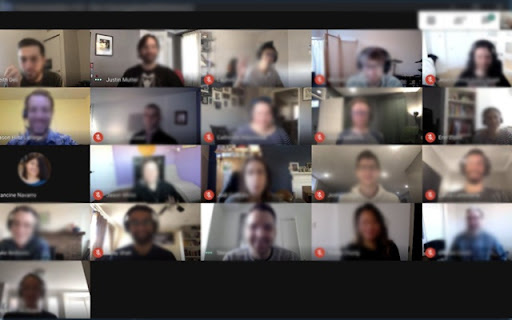
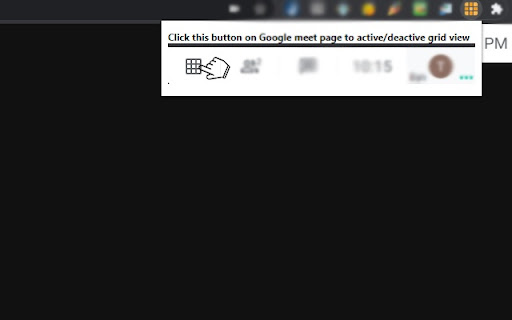
Grid View for Google Meet™ This extension helps to adds a button to use a grid layout in Google Meet. This extension adds a button to the top right bar (next to chat & participant list) to enable grid-view in Google Meet. Grid view gives every participant an equal sized video for use in meetings without a primary speaker (such as working from home silent meetings ). Try Grid View for hangouts meet. This extension forcibly loads every participant's video camera, when grid view is enabled and may cause performance issues in extremely large meetings . This software is helpful for Google Meet Grid View, it helps teachers who need to ensure students are paying attention during online classes. It also works for google hangouts meet Change Log 1.0.2 - Fixed a bug when grid view did not work well if there were more then 12 participants inside a Google Meet meeting. Change Log 1.0.5 - Fixed the bug for grid view not working correctly. Change Log 1.0.7 - Added in "Push to Talk" functionality as well. By default, this functionality is switched off. Useful to prevent meeting blunders as you need to press the "space bar" to begin talking. Removes the risk of having "live microphone". Includes a variety of options to enhance your meeting: include your own video, highlight who is speaking, and hide participants without video! Change Log 1.0.8 Updated so it works with new design of Google Meet. To begin using this extension for Google Meet or google meet app, here is what you need to do Install the Software Extension Go inside a Google Meet meeting. Click on the extension icon when you are IN the meeting to activate our extension. Please NOTE you HAVE to be inside the Google Meeting before you click on the extension icon for this grid view to be enabled. Grid View will be enabled once you click on the extension icon when you are in a Google Meet online video call. Please note if you have a large number of participants inside your Google Meet call, it may cause the meeting connection to be unstable if your internet connection is slow/you are using a older computer. Leave us some feedback if you have any questions/issues for Grid View for google video conference Disclaimer: Please note this extension is NOT made by Google and is made by an independent development team. All copyrights belong to their respective owners. Google doesn’t endorse or sponsor this Chrome extension. This is not owned by, it is not licensed by and is not a subsidiary of Google Inc.
Grid View for Google Meet™ screenshot 1Grid View for Google Meet™ screenshot 2Grid View for Google Meet™ screenshot 3

Reviews (44 cached)

★☆☆☆☆2024-05-22
Pomodya Weerasinghe

didn't work

★☆☆☆☆2023-11-10
RFU- 5

notworking

★☆☆☆☆2021-07-16
v k b

Added to chrome, but does not work for google meet, same problem as others. Not worth spending time on.

★☆☆☆☆2021-02-28
Vergiana Lestari

Not working.

★☆☆☆☆2021-02-22
James LeHart

Malwarebytes and ESET instantly flags this as malware upon installation and it doesn't even work. Be wary of this extension

★☆☆☆☆2021-02-21
Mehpreet Singh

not useful at all

★☆☆☆☆2021-02-20
Angelyna Reggiani

The extension I just downloaded does not work. What is going on!

★☆☆☆☆2021-02-19
Fire Airborne

Doesnt even go into a grid. It only opened the 3 dots and the change layout option at the same time.

★☆☆☆☆2021-02-18
Samuel Neisess

It sucks.

★☆☆☆☆2021-02-18
casp bear

I installed this on my work account this morning. Upon entering my microphone was off and I was unable to turn it on until I uninstalled the grid extension. I miss the grid extension benefits. Please fix!!!

★☆☆☆☆2021-02-18
Melinda Thomas

Every time I click the button, it gives me a pop-up image and says "Click this button on Google meet page to activate/deactivate grid view". But that button never actually appears on my Google Meet page, so I'm never able to activate it.

★☆☆☆☆2021-02-18
Willeah Zuniga-Leona

horrible!

★☆☆☆☆2021-02-17
Vick So

It sticks everyone in a vertical line, and it's like this for every single grid view I've ever tried. Also the button is weird and crooked and on top of the people that say "Name is also here" Maybe it's just google meet that is broken.

★☆☆☆☆2021-02-11
A F

Worst extension ever! Didn't see anything there! So terrible! Doesn't help anything!

★☆☆☆☆2021-02-01
Hong_ Jinn

Can't Use

★☆☆☆☆2021-01-08
Tine Co

It does not work

★☆☆☆☆2020-12-17
Prarthanaaa :D

At first it worked, but then it did not and all i could c is 5 people

★☆☆☆☆2020-11-25
Isabella Mazzacchera

Doesn't work, I've tried to install it and remove it several times, just a waste of time!

★☆☆☆☆2020-11-24
Kaitlyn H.

Do not get this! I tried it, and it didn't work! Nothing there!

★☆☆☆☆2020-10-08
Kai Resendiz

It didn't even work. Don't waste time.

★☆☆☆☆2020-09-26
Bratin Das

Its a scam. It didn't work at all. Those who are giving 5-4 stars rating are temporary accounts. I just wasted my precious time on it. JUST DON'T DOWNLOAD IT!!!!

★☆☆☆☆2020-09-14
Hongguang Wu

it doesn't work all I saw was five people when I clicked on it ❌

★☆☆☆☆2020-07-24
Siddharth Nandanwar

It is same if i turn off the grid and turn it on in both i can see only 10 people

★☆☆☆☆2020-07-20
Shresth Bajaj

does not work

★☆☆☆☆2020-07-20
Wesly Mov

It's not working. Please fix it. 😭

★★☆☆☆2021-02-19
Felipe Arruda

It's not a grid view extension, bud rather a macro for Meet's own grid view. Cans see more than 49 participants or hide participants.

★★☆☆☆2021-02-18
Nika

Hi there, just a few days ago it was working just fine, but now every grid view extensions been acting up. It shows rows instead of tiles. And it can only show about 10 people simultaneously. I hope it gets fixed.

★★☆☆☆2021-01-25
Kristina Cassandra S. Moises

very nice

★★☆☆☆2020-10-02
Daniellah Calabria

it didn't work :<

★★☆☆☆2020-09-24
marcell s.

I couldn't get it to work good idea though

★★☆☆☆2020-07-30
Yash Chaddha

yes it does give the option for grid view but it still gives me the same amount of people as tiled view

★★★☆☆2021-07-18
Mr.E Channel

OK

★★★☆☆2021-07-13
محمد شابي

fesable

★★★☆☆2021-05-25
Shaira Guillermo

good job

★★★☆☆2021-02-27
Jean Ryan Estadilla

i think the extension is broken.

★★★☆☆2021-02-17
brandon Walters

it is not working for me today it puts everyone in a strait line and i only see like 5 people and it works when it wants to so can you guys please fix it thank you

★★★☆☆2021-02-17
Austin Sweet

It worked for a little bit But now its putting Everyone in a Straight line no matter what is anyone else having this problem

★★★☆☆2021-01-08
Esthr Mrqz

Well the downloading process was easy but i'm still unable to make it work for the google meet and use it because it did not appear at my gmeet as it says. It was just sitting at my extentions. I don't know if i miss something in the instructions or what

★★★☆☆2020-11-10
Ivin Lyju

pls add pinning feature , that is allow to pin a participant comparatively larger than others while showing others on the sam screen

★★★☆☆2020-11-03
Kiera Laviolette

Its ok

★★★☆☆2020-09-14
Ada

It works, but now I can't pin people to full screen without removing the extension first.

★★★☆☆2020-09-03
190381 MUKTA JITENDRA KARAPE

ok app

★★★☆☆2020-08-21
kanishka Sharma

it was okay

★★★☆☆2020-08-13
sreehari UV

it was okay

Details

Version 3.0.0
Updated Mar 16, 2022
Size 53.51KiB
First Seen Mar 22, 2026