
⚠️Not updated in over 2 years ⚠️Below average rating
Description
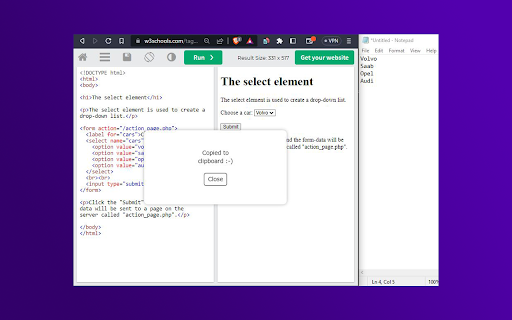
"Copy Text from HTML" allows users to copy the text content of an HTML element with ease. When activated with the hotkey Shift + Alt + C, it removes all HTML tags and attributes, JavaScript code, CSS styles, empty and blank lines, special characters, and commented code, leaving only the plain text content.
It also handles special cases, such as select elements, lists, and anchor tags within lists, to provide the user with the most accurate and useful text content possible.
With this extension, copying text from HTML has never been easier or more reliable.
If you find any trouble, try to right click the desired element and then press Shift + Alt + C.

Reviews
Loading reviews...
Details
| Version | 1.0 |
| Updated | May 2, 2023 |
| Size | 1.54MiB |
| First Seen | Mar 22, 2026 |
Popular in workflow

Adobe Acrobat: PDF edit, convert, sign tools
by Adobe Inc.
330M
★ 4.40
workflow
330M
★ 4.40
workflow

Chrome Remote Desktop
by Chrome Remote Desktop Release Managers
38M
★ 3.14
workflow
38M
★ 3.14
workflow

Screencastify - Screen Video Recorder
by castify-ext-dev
9M
★ 3.95
workflow
9M
★ 3.95
workflow

Microsoft Defender Browser Protection
by Microsoft Corporation
2M
★ 4.15
workflow
2M
★ 4.15
workflow

Pop up blocker for Chrome™ - Poper Blocker
by dingosolutions
2M
★ 4.76
workflow
2M
★ 4.76
workflow
Popular Extensions
Adobe Acrobat: PDF edit, convert, sign tools
by Adobe Inc.
330M
★ 4.40
workflow
330M
★ 4.40
workflow
Chrome Remote Desktop
by Chrome Remote Desktop Release Managers
38M
★ 3.14
workflow
38M
★ 3.14
workflow

Cisco Webex Extension
by cisco.chromestore
24M
★ 2.34
social
24M
★ 2.34
social

Kami for Google Chrome™
by Kami
17M
★ 4.56
education
17M
★ 4.56
education

Read&Write for Google Chrome™
by Texthelp
17M
★ 3.44
accessibility
17M
★ 3.44
accessibility