
NLM Organizer by Tim Mousel — Evolve AI
v3.0.0 Updated Feb 18, 2026 70.52KiB
Description
NLM Organizer — The Most Powerful NotebookLM Management Tool
Take full control of your NotebookLM library with NLM Organizer, the all-in-one sidebar that brings professional-grade organization to Google's NotebookLM.
⭐ CORE FEATURES
• Nested Folders — Create unlimited folders and subfolders with custom colors and icons to organize your notebooks exactly how you want.
• Tags & Labels — Add multiple tags to any notebook for flexible, cross-cutting organization.
• Favorites — Star your most important notebooks for quick one-click access.
• Smart Search — Instantly search across all notebooks, folders, and tags with real-time filtering.
• Drag & Drop — Drag notebooks directly into folders from the sidebar. Reorder folders with intuitive drag-and-drop.
• Resizable Sidebar — Adjust the panel width to fit your workflow. Your preference is saved automatically.
📂 SMART FOLDERS & AUTOMATION
• Auto-Assign Rules — Set up rules that automatically sort new notebooks into folders based on title patterns (contains, starts with, or regex matching).
• Run rules on demand or let them work automatically as new notebooks appear.
📋 PROMPT LIBRARY
• Save, organize, and reuse your favorite prompts right from the sidebar.
• Group prompts by category for easy browsing.
• One-click copy to clipboard with visual confirmation.
📊 STATISTICS DASHBOARD
• See your library at a glance: total notebooks, favorites, archived, folders, and tags.
• Visual bar charts showing notebooks per folder and tag usage distribution.
• 30-day activity timeline tracking your NotebookLM usage.
🔍 DUPLICATE DETECTION
• Automatically detects notebooks with similar or duplicate titles.
• "DUPE" badge overlay makes duplicates easy to spot.
• Dedicated Duplicates filter to review and clean up your library.
📝 NOTEBOOK NOTES
• Add private notes and annotations to any notebook via right-click context menu.
• Notes are indicated by a small icon overlay on the card.
🔄 IMPORT & EXPORT
• Import sources from URLs, YouTube videos, and more directly into NotebookLM.
• Export your organizational data (folders, tags, assignments) as JSON for backup or transfer.
• Bulk operations for managing large libraries efficiently.
📦 ADDITIONAL FEATURES
• Recent Notebooks — Quick access to your most recently visited notebooks.
• Notebook List — Scrollable sidebar list with checkboxes for bulk selection.
• Sorting — Sort notebooks alphabetically, by recent activity, or by oldest first.
• Archive — Archive notebooks you're not actively using without deleting them.
• Context Menus — Right-click any notebook card for quick actions.
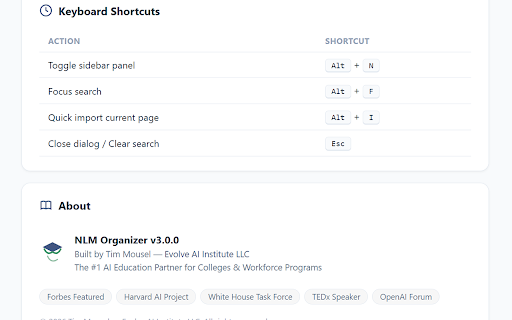
• Keyboard Shortcuts — Alt+N to toggle panel, Alt+F to focus search, Alt+I for quick import.
• Dark Mode — Automatically matches your system/browser theme.
• Multi-language — Available in English, Spanish, Portuguese, French, German, Japanese, Korean, and Chinese.
🔒 PRIVACY & SECURITY
• All data is stored locally in your browser using Chrome's storage API.
• No data is sent to external servers. No tracking. No analytics.
• No account required.
Built by Tim Mousel — Evolve AI Institute
https://evolveaiinstitute.com



Reviews
Loading reviews...
Permissions (6)
Permissions
activeTabℹ Can access the current tab when you click the extension contextMenusℹ Can add items to the right-click menu downloadsℹ Can manage and monitor downloads scriptingℹ Can inject scripts into web pages storageℹ Can store data locally in your browser tabsℹ Can see your open tabs and their URLs
Details
| Version | 3.0.0 |
| Updated | Feb 18, 2026 |
| Size | 70.52KiB |
| First Seen | Mar 22, 2026 |
Popular in workflow

Adobe Acrobat: PDF edit, convert, sign tools
by Adobe Inc.
330M
★ 4.40
workflow
330M
★ 4.40
workflow

Chrome Remote Desktop
by Chrome Remote Desktop Release Managers
38M
★ 3.14
workflow
38M
★ 3.14
workflow

Screencastify - Screen Video Recorder
by castify-ext-dev
9M
★ 3.95
workflow
9M
★ 3.95
workflow

Microsoft Defender Browser Protection
by Microsoft Corporation
2M
★ 4.15
workflow
2M
★ 4.15
workflow

Pop up blocker for Chrome™ - Poper Blocker
by dingosolutions
2M
★ 4.76
workflow
2M
★ 4.76
workflow
Popular Extensions
Adobe Acrobat: PDF edit, convert, sign tools
by Adobe Inc.
330M
★ 4.40
workflow
330M
★ 4.40
workflow
Chrome Remote Desktop
by Chrome Remote Desktop Release Managers
38M
★ 3.14
workflow
38M
★ 3.14
workflow

Cisco Webex Extension
by cisco.chromestore
24M
★ 2.34
social
24M
★ 2.34
social

Kami for Google Chrome™
by Kami
17M
★ 4.56
education
17M
★ 4.56
education

Read&Write for Google Chrome™
by Texthelp
17M
★ 3.44
accessibility
17M
★ 3.44
accessibility