
⚠️Not updated in over 2 years ⚠️Below average rating
Description
ChatLock GPT: Secure Your ChatGPT Conversations
What Does ChatLock GPT Do?
Have you ever worried about someone sneaking a peek at your ChatGPT conversations? ChatLock GPT offers an extra layer of security by allowing you to lock individual chat sessions with a unique password. Keep your AI-generated conversations private and secure, directly within your browser!
Key Features:
1) Password Protection: Lock any chat session on ChatGPT with a password of your choice.
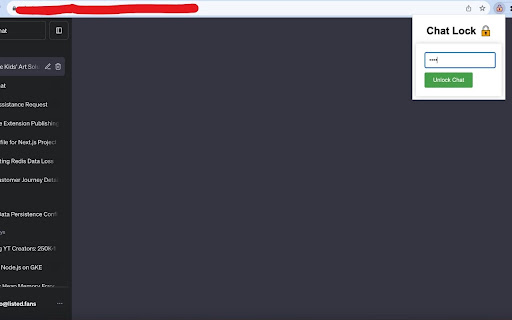
2) Quick Toggle: Easily lock or unlock chats directly from the extension popup.
3) High Compatibility: Works seamlessly with the ChatGPT platform.
Why Should You Install ChatLock GPT?
4) Enhanced Privacy: Ensure that your chats remain confidential, safeguarding them from prying eyes.
5) Ease of Use: Simple UI that integrates directly into ChatGPT, making it incredibly easy to lock or unlock chats.
6) Peace of Mind: No more worrying about someone else reading your private conversations.
Permissions:
Storage: To save your password securely.
ActiveTab: To interact with the ChatGPT web page.
Tabs: To monitor for URL changes and chat sessions.
WebNavigation: To detect when a ChatGPT page has fully loaded.
How to Use:
1) Open a chat session on ChatGPT.
2) Click on the ChatLock GPT extension icon.
3) Set a password to lock the chat.
4) To unlock, simply enter the password in the popup.

Reviews
Loading reviews...
Permissions (4)
Permissions
activeTabℹ Can access the current tab when you click the extension storageℹ Can store data locally in your browser tabsℹ Can see your open tabs and their URLs webNavigationℹ Can monitor navigation events
Details
| Version | 1.0 |
| Updated | Oct 3, 2023 |
| Size | 27.51KiB |
| First Seen | Mar 24, 2026 |
Popular in privacy

uBlock Origin Lite
by Raymond Hill (gorhill)
16M
★ 4.49
privacy
16M
★ 4.49
privacy

uBlock Origin
by Raymond Hill (gorhill)
15M
★ 4.70
privacy
15M
★ 4.70
privacy

Online Security
by ReasonLabs
12M
★ 3.62
privacy
12M
★ 3.62
privacy

DuckDuckGo Search & Tracker Protection
by DuckDuckGo
4M
★ 4.24
privacy
4M
★ 4.24
privacy

Free VPN For Chrome - VPN Extension - Windscribe
by Windscribe
2M
★ 4.66
privacy
2M
★ 4.66
privacy
Popular Extensions

Adobe Acrobat: PDF edit, convert, sign tools
by Adobe Inc.
330M
★ 4.40
workflow
330M
★ 4.40
workflow

Chrome Remote Desktop
by Chrome Remote Desktop Release Managers
38M
★ 3.14
workflow
38M
★ 3.14
workflow

Cisco Webex Extension
by cisco.chromestore
24M
★ 2.34
social
24M
★ 2.34
social

Kami for Google Chrome™
by Kami
17M
★ 4.56
education
17M
★ 4.56
education

Read&Write for Google Chrome™
by Texthelp
17M
★ 3.44
accessibility
17M
★ 3.44
accessibility