
Description
Welcome to the ChatGPT Sidebar by cloudHQ, an AI assistant that emerges from the side of any webpage you browse.
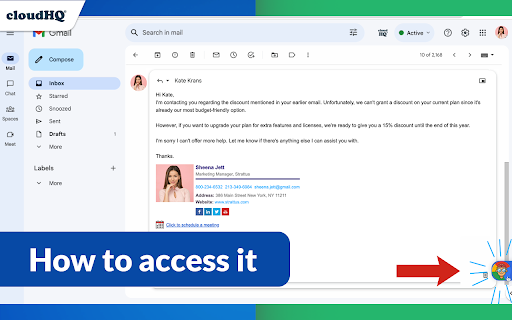
As you navigate different webpages, your email inbox, or any online document, ChatGPT Sidebar can be accessed with just a click of a button. The information you get with this handy sidebar provides you with straightforward knowledge about whatever it is that you're browsing.
Whether you're deciphering a dense article, exploring new topics, or just casually browsing, our ChatGPT Sidebar is designed to enrich your understanding, streamline information, and answer any queries you might have—immediately.
How to use ChatGPT Sidebar?
1. Go to any website
2. Select the text
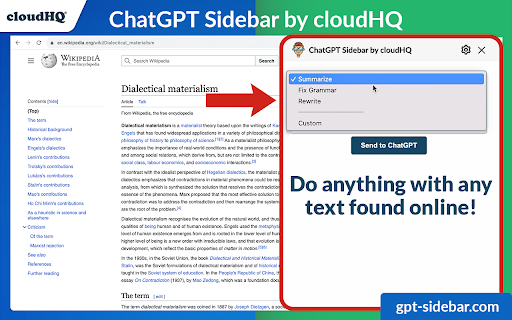
3. Click on ChatGPT Sidebar icon on the right side of your screen, select the prompt and click on "Send to ChatGPT".
~~~~ 3 Benefits of ChatGPT Sidebar by cloudHQ ~~~~
1. Use ChatGPT prompts across websites for tasks like:
✔️ Summarize
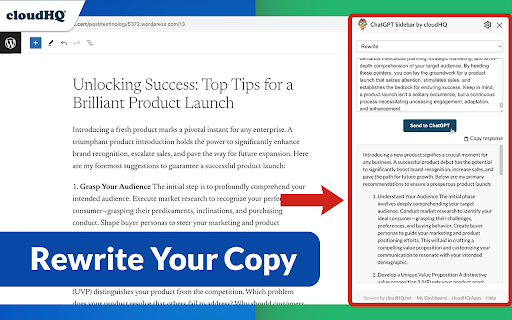
✔️ Rewrite
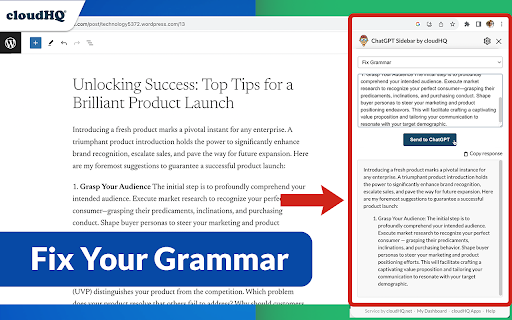
✔️ Check Grammar
✔️ Translate
✔️ Clarify code
✔️ Summarize the web page
✔️ Your own prompts
2. Access our ready-to-use prompt library, where you can further customize any prompts for your own needs.
3. Full support for both ChatGPT-4 and ChatGPT-3.5
4. Full support for Open AI API
5. Full prompt management
Refine your web experience with ChatGPT, and become smarter in 1 click! 🌟
cloudHQ website: https://www.cloudhq.net/
App website: https://www.gpt-sidebar.com
Pricing: https://www.gpt-sidebar.com/pricing
Support page: https://support.cloudhq.net/category/browser-extensions/chatgpt-sidebar/
FAQ page: https://support.cloudhq.net/chatgpt-sidebar-faq-frequently-asked-questions/
Blog: https://blog.cloudhq.net
cloudHQ is trademark of cloudHQ LLC. https://www.cloudhq.net/trademark

Reviews (3 cached)
★☆☆☆☆2025-05-12
A A
15 day trial not useful as a long term extension. At least a free version would be useful.
★★☆☆☆2025-10-22
Joey Fisher
Not a sidebar. just brings me to cloudHQ page with a prompt box. This is poop.
★★★☆☆2024-01-02
Jeremy Simpson
I gave this GPT Chrome extension with limits a shot, and it's like putting training wheels on your bike. ReplyPal sets you free, man!
Permissions (6)
Permissions
background clipboardWriteℹ Can write to your clipboard contextMenusℹ Can add items to the right-click menu scriptingℹ Can inject scripts into web pages storageℹ Can store data locally in your browser tabsℹ Can see your open tabs and their URLs
Details
| Version | 2.0.2.39 |
| Updated | Nov 29, 2025 |
| Size | 1.96MiB |
| First Seen | Mar 27, 2026 |
More by cloudHQ

Gmail™ Email Templates by cloudHQ
by cloudHQ
200K
★ 4.17
communication
200K
★ 4.17
communication

Save Emails as PDF by cloudHQ
by cloudHQ
100K
★ 4.26
workflow
100K
★ 4.26
workflow

Multi Email Forward by cloudHQ
by cloudHQ
80K
★ 4.08
communication
80K
★ 4.08
communication

Backup and Sync Google Drive to other clouds
by cloudHQ
50K
★ 4.24
workflow
50K
★ 4.24
workflow

HTML Editor for Gmail by cloudHQ
by cloudHQ
40K
★ 4.06
communication
40K
★ 4.06
communication
Popular in tools

Zotero Connector
by Zotero
8M
★ 3.96
tools
8M
★ 3.96
tools

Browsec VPN - Free VPN for Chrome
by Browsec
7M
★ 4.44
tools
7M
★ 4.44
tools

AnyDoc Translator - Translate Web and PDF
by www.wps.com
7M
★ 4.59
tools
7M
★ 4.59
tools

Microsoft Bing Homepage & Search for Chrome
by Microsoft Corporation
4M
★ 3.72
tools
4M
★ 3.72
tools

IE Tab
by Blackfish Software
4M
★ 4.31
tools
4M
★ 4.31
tools
Popular Extensions

Adobe Acrobat: PDF edit, convert, sign tools
by Adobe Inc.
331M
★ 4.40
workflow
331M
★ 4.40
workflow

Grammarly: AI Writing Assistant and Grammar Checker App
by Grammarly
42M
★ 4.50
communication
42M
★ 4.50
communication

Chrome Remote Desktop
by Chrome Remote Desktop Release Managers
38M
★ 3.14
workflow
38M
★ 3.14
workflow

Microsoft Single Sign On
by Microsoft
36M
★ 2.27
workflow
36M
★ 2.27
workflow

Cisco Webex Extension
by cisco.chromestore
23M
★ 2.34
social
23M
★ 2.34
social