Add To Calendar icon

Add To Calendar

by jeffsbaker

v1.0.9 Updated Jul 29, 2025 78.61KiB
CWS
2K
Users
β˜… 3.19
26 reviews
#2002
of 31.9K
workflow
#524 of 4K

Description

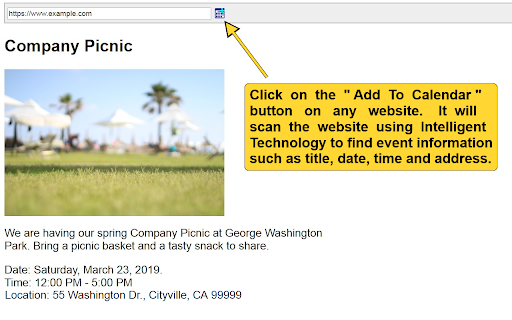
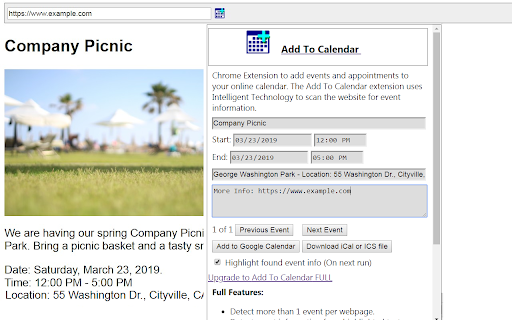
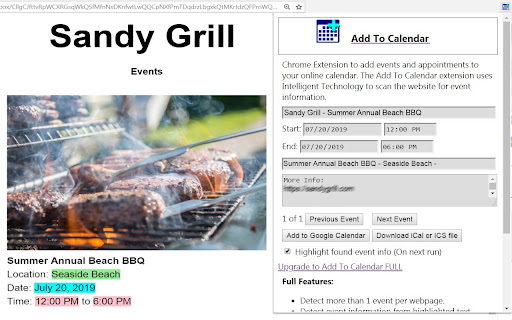
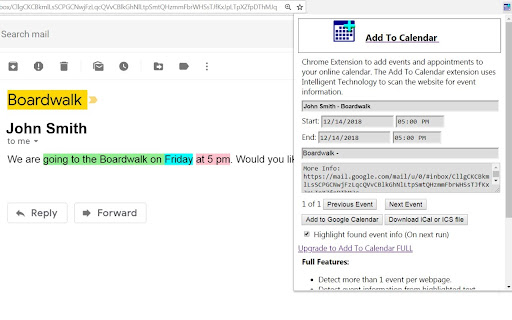
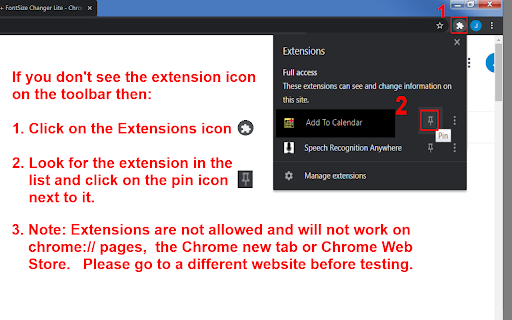
Add To Calendar Instantly add events or appointments to your Google Calendar or other calendar (iCal, .ics) with the click of a button without retyping the title, date, time or location of an event. Click on the "Add To Calendar" button πŸ“…βΊ in the Chrome Toolbar on a website. It will scan the website using Intelligent Technology to find event information such as title, date, time and address. NOTE: If you do not see the extension icon on the Chrome toolbar then click on the "Extensions" icon that looks like a jigsaw puzzle piece 🧩 on the Chrome toolbar. Look for "Add To Calendar" and then click on the pin icon πŸ“Œ next to it. 7/28/2025 - Version 1.0.9 + New payment processor 3/27/2025 - Version 1.0.8 + Bug Fix - Stopped it from detecting email sent date and time in Gmail and Outlook. 11/14/2024 - Version 1.0.7 +Bug Fix: Some times were not getting parsed if they were in the same paragraph with other times. 10/21/2024 - Version 1.0.6 + Bug Fix: If the date format was set to dd/mm/yyyy but the found event date was dd/mm/yy such as 06/12/24 then it was getting an incorrect date because it was expecting a four digit year. 2/15/2024 - Version 1.0.5 + Bug fix: "Error in event handler: SyntaxError: Bad control character in string literal in JSON at position" if the ld+json event data on a website didn't properly escape line feeds, etc. 1/25/2024 - Version 1.0.4 + Fixed license bug 1/24/2024 - Version 1.0.3 + Bug Fix - Download iCal file was attempting to download more than once. + Better matching of AM/PM for events pages like Google events. 6/26/2023 - Version 1.0.2 + Now allows paste in date and time input fields. 9/13/2022 - Version 1.0.1 + Now removes zero width no-break space (\uFEFF) from times and dates if web authors are using it for some reason. 9/9/2022 - Version 1.0.0 + Updated to Manifest V3 + Can now find events in cross domain iFrames + Highlighted text is added to event description if no other description is found. + More date values with the wrong format in ld+json events are corrected now. + Keyboard shortcut link added to "Settings". + Added busy wait spinner to popup. 8/8/2022 - Version 0.9.11 + Removes ​ from text match so that time and dates can be matched where web authors are adding ​ 7/18/2022 - Verison 0.9.10 + Fixed new bug where dates formatted as 'yyyy/mm/dd' were accidentally swapping the month and the day. + Fixed a bug where dates formatted like 7-15 were sometimes being detected as time. + Now works better with Military or British time such as "17:00 to 22:00". + Now gets description if any ld+JSON, Microdata, or RDFa includes "description" markup. + Now removes timezone offset if included with ld+JSON, Microdata, or RDFa time and adds it to a timezone offset field. 7/16/2022 - Version 0.9.9 + Now better at auto detecting the date format such as 'mm/dd/yyyy' or 'dd/mm/yyyy' and if that still does not work there is now a "Date Format" option to choose between, 'Auto Detect' or 'mm/dd/yyyy' or 'dd/mm/yyyy' or 'yyyy/mm/dd'. 9/8/2021 - Version 0.9.8 +Fixed some license issues. Version 0.9.7 - 4/7/2021 - Added identity.email permission because Google is deprecating Chrome Web Store payments. So setup for new payments processor. Also the Add To Calendar extension can now find event data in "application/ld+json" if available on the website. Also the extension can now read event data in iframes if they are from the same domain. Also the extension no longer adds H2 elements to the document for IMG tags with title or alt attributes. Also added matching for a new thin dash – that is used on Google's events page for the time (ex: 7:30 – 11:59 PM) when selecting event text on the right side. Also added Dark Mode support. Version 0.9.6 - 12/5/2019 - Links on popup were going to the wrong page to purchase "Add To Calendar" extension. Also one link was not opening because it did not have target="_blank". Fixed. Version 0.9.5 - 1/19/2019 - Now finds event information in IMG ALT tags if there. Also improved finding of event information in highlighted text by removing   from elements. Also improved matching of start time and end time located in same element. Version 0.9.4 - 1/15/2019 - Fixed so that "1-3 p.m." would not match a date by looking for it not to match "p.m." instead of just "pm". Also fixed so that "Jan 10-12" does not match a time of "10-12". Version 0.9.3 - 1/10/2019 - Fixed where Europe style dates of "23-25 February" were being skipped because were being matched with "23-25-" style matching. Also fixed where the extension would detect "01/25/2019" as a Europe style date of dd/mm/yyyy because of the leading 0. Now calculates that the 25 is too large to be a month. Version 0.9.2 - 12/21/2018 - Fixed some bugs where times like 5-7:00 were sometimes matching a date of 5-7. Also fixed a few other bugs where dates like 12/25-12/29 were sometimes matching 12/25/12. Version 0.9.1 - Added Google Developer Tools API Client ID and Chrome Web Store API. Version 0.9.0 - Add To Calendar Chrome extension created.
Add To Calendar screenshot 1Add To Calendar screenshot 2Add To Calendar screenshot 3Add To Calendar screenshot 4Add To Calendar screenshot 5

Reviews (12 cached)

β˜…β˜†β˜†β˜†β˜†2025-04-21
sahar rz

design is awful and it doesn't even work.

β˜…β˜†β˜†β˜†β˜†2024-12-14
Salma Sheriff

tried it out & did not work well. email clearly said: "Writing Session Saturday, December 14, 2024 12 pm - 1 pm" pretty straightforward. on try 1, it got the date right but put some random time (i think it was 12am-12am the next day or something weird). on try 2, after refreshing, it put some random date and random time (i think it was 4pm on april??). so inaccurate but also not consistent.

β˜…β˜†β˜†β˜†β˜†2024-12-02
Ben Wheeler

Simply did not work for me. Seems like maybe it just doesn't work with links that prompt an .ics file download?

β˜…β˜†β˜†β˜†β˜†2024-10-12
Ashish Alexander

I selected this text "06/12/24 - Happy Fridays Christmas Edition" with d/m/y format. and it gave me a date for 18th October. wrong

β˜…β˜†β˜†β˜†β˜†2024-02-10
Aasemoon

This is looking terribly shady. As soon as installed I see a "trial expired" sign, and the extension is completely unusable.

β˜…β˜†β˜†β˜†β˜†2022-12-08
ddylan β€œval” devlan

Only downloaded the extension to leave this review. Please read the privacy policy for this extension before downloading :)

β˜…β˜…β˜†β˜†β˜†2024-11-09
Dr David Brake

I thought for a while it worked just well enough to be useful but recently it just hasn't worked at all - even with what I would have thought should be pretty clear text.

β˜…β˜…β˜†β˜†β˜†2023-01-17
Binza Qureshi

Does not accurately identify titles for dates, nor does it work if theres multiple events

β˜…β˜…β˜…β˜†β˜†2025-05-01
Isaiah Poole

I just tried this extension with this page (https://politics-prose.com/miranda-spivack). It correctly parsed the title of the event, the date and the start time, but instead of pulling the location from "PLACE" it went deep into the body of the text and used the book author's universities as the location. I appreciate that you take this kind of feedback seriously and will want to make sure that the software knows to prioritize "place" and "location" signifiers when populating an address field.

β˜…β˜…β˜…β˜†β˜†2024-01-24
Brandon Chew

Not as useful as I'd hoped. Works decently but doesnt recognize dates I've set in ServiceNow. Not a big deal because you can just highlight the date and it will select that. NOTE: The highlight date thing is for premium only and I will no longer be able to use that feature after 30 days (trial period). So, without the highlighting I would give it maybe 2 stars. Also noticed an odd behavior. When I click the download iCal option it downloads the event.ics file 3 times. I've diff'd the files and they're all identical. Not sure why its downloading 3 identical .ics files.

β˜…β˜…β˜…β˜†β˜†2023-12-21
Artemi Lebedev

- Trial Plz adds an extra "undefined" to the event name and does not define dates and other service information

β˜…β˜…β˜…β˜†β˜†2021-10-23
RAMAMURTHY PATHURI

Why trial is not working? Forcing us to buy? Why?

Permissions (6)

Permissions

activeTabβ„Ή Can access the current tab when you click the extension identityβ„Ή Can use your Google account identity identity.email scriptingβ„Ή Can inject scripts into web pages storageβ„Ή Can store data locally in your browser tabsβ„Ή Can see your open tabs and their URLs

Details

Version 1.0.9
Updated Jul 29, 2025
Size 78.61KiB
First Seen Mar 21, 2026



