
⚠️Not updated in over a year
Description
OpenComments enables you to write public comments on any Web page. Why would anyone want to do that? Here are some possible use cases:
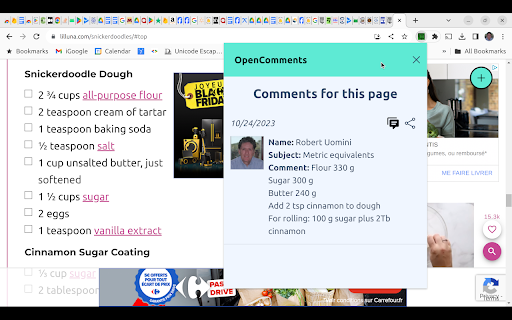
1. Online recipe notes. How many times have you found a recipe on the Internet that looked promising but didn't quite turn out the way you expected? You experimented with it and made some improvements, but how can you write your notes on the Web page as a reference for the next time you prepare the dish? Or maybe you're baking cookies or a cake. The flour, sugar and butter in the recipe are listed in cups and you prefer, as I do, to weigh the ingredients? You can post your changes on the recipe page, so they will be there whenever you navigate to the page.
2. Overcome product review censorship. Have you ever posted a negative review of a product or service on the site where you made a purchase, only to find your review removed shortly thereafter? The next time you post a review on one of these sites, crosspost your review on the same page using OpenComments.
3. Get notified about possible scam Web sites. Whenever you visit a site for the first time with OpenComments, the app will automatically scour the Internet for information that could indicate that the site is a scam and warn you immediately. Additionally, other OpenComments users may post their own experiences with the site.
4. Calling out fake news. You may have information about a site that you believe needs to be noted as a rebuttal to what the site is claiming. What better way to get the word out to visitors to the site than to post your comment directly on the front page?
And remember: the more people who use OpenComments, the more powerful everyone's voice becomes, so be sure to tell everyone you know about it.
OpenComments empowers you in a way that's totally unprecedented. Get it today. Learn more at https://www.opencomments.com. If you have any questions or suggestions for improving OpenComments, please write to us at chiaramail.support@gmail.com.
Post public comments on any site. Own the Web. Let your voice be heard.



Reviews
Loading reviews...
Permissions (8)
Permissions
activeTabℹ Can access the current tab when you click the extension contextMenusℹ Can add items to the right-click menu identityℹ Can use your Google account identity identity.email notificationsℹ Can show desktop notifications scriptingℹ Can inject scripts into web pages storageℹ Can store data locally in your browser tabsℹ Can see your open tabs and their URLs
Details
| Version | 3.0.36 |
| Updated | Mar 20, 2025 |
| Size | 658KiB |
| First Seen | Mar 23, 2026 |
Popular in communication

Loom – Screen Recorder & Screen Capture
by Loom
8M
★ 4.58
communication
8M
★ 4.58
communication

Compose AI: AI-powered Writing Tool
by Compose.ai
300K
★ 4.07
communication
300K
★ 4.07
communication

Notifier for Gmail™
by InBasic
200K
★ 4.38
communication
200K
★ 4.38
communication

Gmail™ Email Templates by cloudHQ
by cloudHQ
200K
★ 4.17
communication
200K
★ 4.17
communication

ScreenPal - Screen Recorder & Video Editor
by ScreenPal (formerly Screencast-O-Matic)
100K
★ 4.31
communication
100K
★ 4.31
communication
Popular Extensions

Adobe Acrobat: PDF edit, convert, sign tools
by Adobe Inc.
330M
★ 4.40
workflow
330M
★ 4.40
workflow

Chrome Remote Desktop
by Chrome Remote Desktop Release Managers
38M
★ 3.14
workflow
38M
★ 3.14
workflow

Cisco Webex Extension
by cisco.chromestore
24M
★ 2.34
social
24M
★ 2.34
social

Kami for Google Chrome™
by Kami
17M
★ 4.56
education
17M
★ 4.56
education

Read&Write for Google Chrome™
by Texthelp
17M
★ 3.44
accessibility
17M
★ 3.44
accessibility