
⚠️Not updated in over 2 years ⚠️Requests 1 sensitive permission
Description
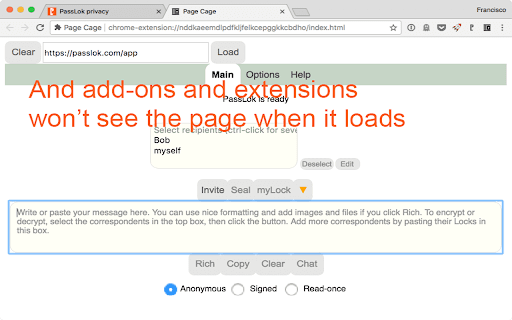
Hasn't it ever bothered you to see a password manager box popping unexpectedly and offer to save your login? Password managers can do this because they can see everything on that page, including all your precious private information. In fact, most extensions and add-ons installed on your browser can do it. Feeling better now?
Now, you can open the page in incognito mode, which by default blocks all extensions from loading, but if you have allowed some extensions to load in this mode, it's rather tedious to go one by one making sure they are safe.
Page Cage protects your private pages from intrusion by loading them inside a frame to which the other extensions do not have access. It's as simple as clicking the Page Cage icon and typing the URL.
Since this is quite a neat to prevent from intrusion my encryption and security web apps, starting with version 1.0 there is a nifty list that allow you to load them without having to remember their URL.
Not all pages will load, however, because many websites refuse to be placed inside a frame in order to prevent Clickjacking. This comes from the server so there's nothing that we can do about it. Please bear this in mind as you use Page Cage.


Reviews
Loading reviews...
Permissions (2)
Permissions
contextMenusℹ Can add items to the right-click menu historyℹ Can read and modify your browsing history
Details
| Version | 0.1.4 |
| Updated | Mar 24, 2023 |
| Size | 13.83KiB |
| First Seen | Mar 29, 2026 |
More by Francisco Ruiz

VideoSkip
by Francisco Ruiz
3K
★ 4.43
entertainment
3K
★ 4.43
entertainment

PassLok Image Steganography
by Francisco Ruiz
663
★ 0.00
social
663
★ 0.00
social

PassLok Privacy
by Francisco Ruiz
663
★ 4.15
privacy
663
★ 4.15
privacy

PassLok Universal
by Francisco Ruiz
89
★ 0.00
privacy
89
★ 0.00
privacy

SynthPass
by Francisco Ruiz
47
★ 5.00
workflow
47
★ 5.00
workflow
Popular in developer

TouchEn PC보안 확장
by 라온시큐어
8M
★ 1.33
developer
8M
★ 1.33
developer

React Developer Tools
by Meta
5M
★ 3.95
developer
5M
★ 3.95
developer

WhatFont
by Chengyin Liu
3M
★ 4.01
developer
3M
★ 4.01
developer

Take Webpage Screenshots Entirely - FireShot
by Evgeny Vokilsus
3M
★ 4.79
developer
3M
★ 4.79
developer

Wappalyzer - Technology profiler
by Wappalyzer
3M
★ 4.56
developer
3M
★ 4.56
developer
Popular Extensions

Adobe Acrobat: PDF edit, convert, sign tools
by Adobe Inc.
331M
★ 4.40
workflow
331M
★ 4.40
workflow

Grammarly: AI Writing Assistant and Grammar Checker App
by Grammarly
42M
★ 4.50
communication
42M
★ 4.50
communication

Chrome Remote Desktop
by Chrome Remote Desktop Release Managers
38M
★ 3.14
workflow
38M
★ 3.14
workflow

Microsoft Single Sign On
by Microsoft
36M
★ 2.27
workflow
36M
★ 2.27
workflow

Cisco Webex Extension
by cisco.chromestore
23M
★ 2.34
social
23M
★ 2.34
social