
Description
VideoSkip allows you to filter out several types of objectionable content from video streams. It uses the same categories as the "Parents Guide" section of IMDB.com. It can skip sections entirely, or simply mute the sound or blank the video, at your discretion. Because it does not modify the videos in any way, but rather plays them selectively, it does not infringe media copyrights.
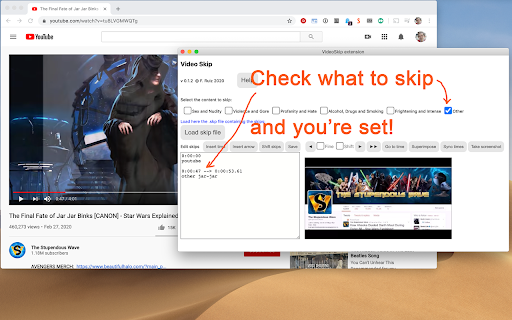
Step by step:
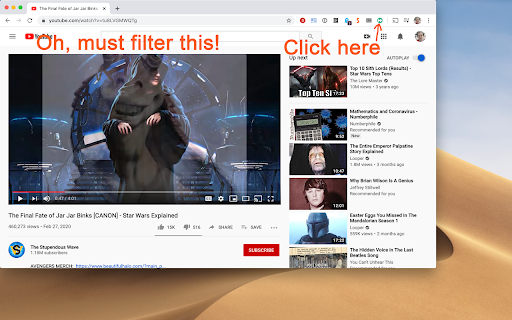
1. Load the video from a streaming service normally and begin play so it loads some data (not full-screen), then stop it and click the VideoSkip icon on the upper-right of the browser. A new window will appear next to the video. You can move it, or resize it like a regular page with Ctrl + or Ctrl -.
2. If you have a .skp file containing the skips, you can load it now with the "Load skip file" button. Once loaded, its contents will appear in a box on the "Edit" tab. There is a growing number of skip files for popular films at the VideoSkip Exchange, loaded by a button on the interface.
3. If the skip file has been previously synced with your video service, you will be taken to the "Filter" tab so you can set the filter strengths as described in the next step. Otherwise, you'll be taken to the "Sync" tab. There, you will be asked to scrub the video with the arrow buttons until it looks okay again. When the screenshot finally matches the video, click "Sync times" to sync everything for your service. A new version of the skip file will be made so the people you share it with can skip this step from now on.
4. Set the category filters using the sliders, according to the audience. The higher, the more stringent the filter. High = for children, Medium = for teens, Low = for adults. If a filter is Off, the flagged content will be shown.
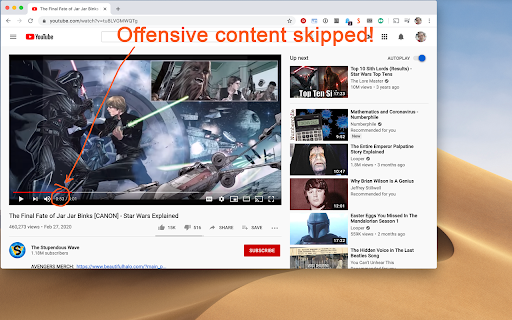
5. Start the video from its own page, sit back, and enjoy. Skips will take place when their time arrives. A message will appear on the fullscreen video when you move the mouse, telling you which filters are engaged.
You can make your own skip files and share them with your friends freely. They will work even if the videos being played are from a different source. The skip file exchange is located at https://videoskip.org/exchange
There's also a standalone web app, which works with videos that you have saved to your computer. Get it at https://videoskip.org/app for computers, or https://videoskip.org/mobile for mobile devices.
Legal Notice: Content copyright owners and distributors are hereby informed that users and developers of this software are exercising their right of free speech, guaranteed by law in many nations, by voluntarily refraining from seeing or hearing content without modifying said content in any way. Legal action that ignores this notice will be considered harassment and infringement of basic rights, and prosecuted according to the law.

Reviews (2 cached)
★☆☆☆☆2022-07-19
Loky Stellaris
Doesn't work on all embedded video !! Only major platform such a youtube, prime, netflix...etc !!
★★★☆☆2020-12-22
Big Bad Max
How do you use it? its a little confusing please tell me.
Permissions (2)
Permissions
activeTabℹ Can access the current tab when you click the extension scriptingℹ Can inject scripts into web pages
Details
| Version | 0.5.16 |
| Updated | Oct 2, 2025 |
| Size | 82.93KiB |
| First Seen | Mar 22, 2026 |
More by Francisco Ruiz

Popular in entertainment

SpotiAds - Ads remover for Spotify™
by Tomer
80K
★ 4.10
entertainment
80K
★ 4.10
entertainment

Better Lyrics (Lyrics for Youtube Music)
by Boidushya
50K
★ 4.87
entertainment
50K
★ 4.87
entertainment

VLC online - multimedia player
by Winfy
40K
★ 3.41
entertainment
40K
★ 3.41
entertainment

Mouse Cursor - Custom Cursor
by Cute Cursors
20K
★ 3.52
entertainment
20K
★ 3.52
entertainment

Mul.Live Plus
by argo
20K
★ 4.89
entertainment
20K
★ 4.89
entertainment
Popular Extensions

Adobe Acrobat: PDF edit, convert, sign tools
by Adobe Inc.
330M
★ 4.40
workflow
330M
★ 4.40
workflow

Chrome Remote Desktop
by Chrome Remote Desktop Release Managers
38M
★ 3.14
workflow
38M
★ 3.14
workflow

Cisco Webex Extension
by cisco.chromestore
24M
★ 2.34
social
24M
★ 2.34
social

Kami for Google Chrome™
by Kami
17M
★ 4.56
education
17M
★ 4.56
education

Read&Write for Google Chrome™
by Texthelp
17M
★ 3.44
accessibility
17M
★ 3.44
accessibility