
PassLok Image Steganography
v1.0.4 Updated Mar 26, 2023 110KiB
⚠️Not updated in over 2 years
Description
Steganography is the art of hiding secrets in plain sight. This app implements an improved version of A. Westfeld's F5 algorithm in order to embed text and other data into images without leaving any traces that might be detected, as presented before experts at the ForenSecure 2017 conference. It is the same stego algorithm implemented in PassLok Privacy, PassLok for Email, and URSA, also available in this store, but its output is not compatible with those because this app does not include the same encryption engine.
Processing is done completely within your browser, without contacting any outside machine or website. You can use the app with your network turned off, if you feel paranoid. Because it is an extension, the other extensions and addons installed on your browser are prevented from seeing what this app is doing. This includes any password managers you may have installed.
The images can be saved in the popular JPG format, or in PNG format, which can contain more hidden data. Then you can send them by email or upload it to a sharing site so your friends can get it. This can be very useful if you are under surveillance of live under a repressive regime. Please refrain from using the app if your intent is to engage in illegal activity.
For greatly enhanced security, please use a Password that you share with your friends. If no Password is used, anyone who has this app will be able to extract the data. Without knowing the Password, it will be very difficult even to know that there is anything hidden.
There is a Help screen that tells you how to use the app step by step, always just one click away.
For the super-paranoid, the app can hide a short second message, which requires a separate Password. It can only be retrieved if both Passwords are correct. Details are in the Help screen.
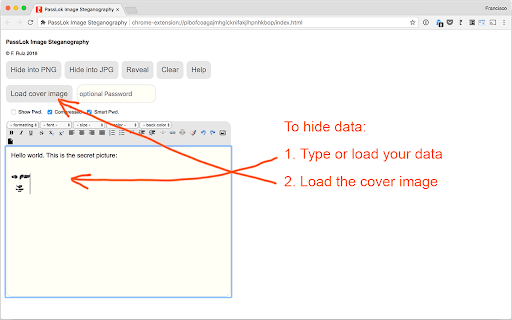
This is the process to hide data in an image:
1. Type, paste, or use the toolbar buttons to load text or data into the main box.
2. Load a cover image by clicking the "Load cover image" button.
3. Type a Password in the small box (you can omit it, but we strongly recommend that you don't).
4. Make sure the "Compress" and "Smart Pwd." options are selected the way you want them.
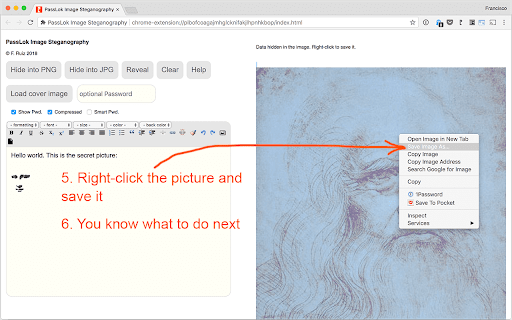
5. Click either the "Hide into PNG" or the "Hide into JPG" button.
6. When the process is complete, right-click the image and select "save image as..." in order to save it locally.
To reveal the hidden data:
1. Load the image by clicking the "Load cover image" button.
2. Type the Password, if any, in the small box. Must the the same one used for hiding the data.
3. Set the "Compress" and "Smart Pwd." options the same way they were set when the data was hidden.
4. Click the "Reveal" button. If successful the hidden data will appear in the main box.



Reviews
Loading reviews...
Details
| Version | 1.0.4 |
| Updated | Mar 26, 2023 |
| Size | 110KiB |
| First Seen | Mar 26, 2026 |
More by Francisco Ruiz

VideoSkip
by Francisco Ruiz
3K
★ 4.43
entertainment
3K
★ 4.43
entertainment

PassLok Privacy
by Francisco Ruiz
663
★ 4.15
privacy
663
★ 4.15
privacy

PassLok Universal
by Francisco Ruiz
89
★ 0.00
privacy
89
★ 0.00
privacy

SynthPass
by Francisco Ruiz
47
★ 5.00
workflow
47
★ 5.00
workflow

SeeOnce Privacy
by Francisco Ruiz
31
★ 3.00
social
31
★ 3.00
social
Popular in social

Cisco Webex Extension
by cisco.chromestore
23M
★ 2.34
social
23M
★ 2.34
social

LINE
by LY Corporation
4M
★ 3.51
social
4M
★ 3.51
social

vidIQ Vision for YouTube
by vidIQ
3M
★ 4.48
social
3M
★ 4.48
social

Google Mail Checker
by Chrome Developer Relations
2M
★ 4.12
social
2M
★ 4.12
social

WA Web Plus by Elbruz Technologies
by Elbruz Technologies
2M
★ 4.57
social
2M
★ 4.57
social
Popular Extensions

Adobe Acrobat: PDF edit, convert, sign tools
by Adobe Inc.
331M
★ 4.40
workflow
331M
★ 4.40
workflow

Grammarly: AI Writing Assistant and Grammar Checker App
by Grammarly
42M
★ 4.50
communication
42M
★ 4.50
communication

Chrome Remote Desktop
by Chrome Remote Desktop Release Managers
38M
★ 3.14
workflow
38M
★ 3.14
workflow

Microsoft Single Sign On
by Microsoft
36M
★ 2.27
workflow
36M
★ 2.27
workflow
Cisco Webex Extension
by cisco.chromestore
23M
★ 2.34
social
23M
★ 2.34
social