
Nice NewTab | Minimalist new tabs and focused workbench
by AwesomeYang
v0.0.4 Updated Jan 26, 2026 2.38MiB
Description
🎉 Nice NewTab v0.0.4 Release Notes
✨ New Features
📊 Pomodoro Statistics & History Tracking
• Real-time statistics of completed Pomodoros and focused minutes
• View recent activity history to track daily progress
• Support for resetting statistics and exporting history
• Visual display of your focus achievements
🎵 White Noise for Focus
• Multiple white noise types: Rain, Ocean Waves, Forest...
• Precise volume control to create the perfect focus environment
• One-click on/off without interrupting your Pomodoro timer
• Help you quickly enter the flow state
⏰ Time & Date Format Customization
• Switch between 12-hour and 24-hour time formats
• Choose from 6 date format options (Auto, Short, MM/DD, DD/MM, YYYY/MM/DD, Long)
• Toggle seconds display
• Toggle weekday display
• Show timezone information (PST, CST, etc.)
🍅 Pomodoro enhanced
• Pause/Resume function: You can pause and resume the Pomodoro in progress
• Break Time Management:
• Support short rest (default 5 minutes)
• Supports long rests (default 15 minutes)
• You can skip the break and start a new Pomodoro directly
• Focus Mode Optimization: Improved the state management of the focus mask to ensure correct display when the Pomodoro is running
Appearance Customization
• Text color customization for the main page
• Search box styling: background color, opacity, border radius
• "Reset Appearance" button to restore default settings
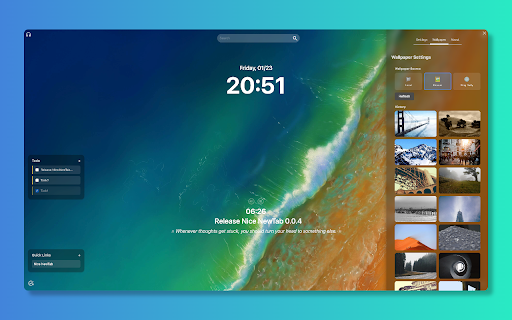
Wallpaper Enhancements
• Multiple wallpaper sources: Local, Picsum random, Bing daily
• Download current wallpaper
• Online wallpaper history for quick switching
Productivity Tools
• Quick Links panel for frequently visited sites
• Todo List with priority support
• Today's Goal display on main page
• Custom quotes/motivational messages
Search Improvements
• Search engine quick-switch bar
🎨 UI Improvements
• Enhanced bookmark search results styling
• Unified corner button interactions
• Improved scrollbar design
🔧 Fixes
• Fixed missing i18n translations
• Synced settings between panel and options page
0.0.3 Released.
1. Fixed the problem of Tomato clock stopping failure
2. Fixed the problem of setting failure
3. Add search engine selection settings, add clock and search box display switch settings
4. Add multiple search engines and AI quick links
0.0.2 Released.
1. added a new custom wallpaper option, users can replace their own wallpaper
2. Added several search options, and will continue to add AI functions.
3. Optimize the UI of Tomato Clock's reminder mask pop-up box.
4. New plug-in settings interface
5. Update the icon of About page
6. Fix a number of display exceptions
🎉🎉🎉
First Release.
1. Quick Search
Quickly search your bookmarks and web pages.
2. Today's Goal
Set daily goals to improve efficiency.
3. Pomodoro Clock
Use pomodoro technique to improve concentration and efficiency.
4. Focus Workbench
Provide a focused work environment, allowing you to focus on tasks.
Some of these features will be added in subsequent releases, so stay tuned!
🎉🎉🎉



Reviews
Loading reviews...
Permissions (7)
Permissions
activeTabℹ Can access the current tab when you click the extension bookmarksℹ Can read and modify your bookmarks favicon notificationsℹ Can show desktop notifications offscreensearch storageℹ Can store data locally in your browser
Details
| Version | 0.0.4 |
| Updated | Jan 26, 2026 |
| Size | 2.38MiB |
| First Seen | Mar 26, 2026 |
More by AwesomeYang

Popular in workflow

Adobe Acrobat: PDF edit, convert, sign tools
by Adobe Inc.
330M
★ 4.40
workflow
330M
★ 4.40
workflow

Chrome Remote Desktop
by Chrome Remote Desktop Release Managers
38M
★ 3.14
workflow
38M
★ 3.14
workflow

MetaMask
by metamask
13M
★ 2.68
workflow
13M
★ 2.68
workflow

Microsoft Power Automate
by Microsoft Corporation
10M
★ 1.99
workflow
10M
★ 1.99
workflow

Screencastify - Screen Video Recorder
by castify-ext-dev
9M
★ 3.95
workflow
9M
★ 3.95
workflow
Popular Extensions
Adobe Acrobat: PDF edit, convert, sign tools
by Adobe Inc.
330M
★ 4.40
workflow
330M
★ 4.40
workflow
Chrome Remote Desktop
by Chrome Remote Desktop Release Managers
38M
★ 3.14
workflow
38M
★ 3.14
workflow

Cisco Webex Extension
by cisco.chromestore
24M
★ 2.34
social
24M
★ 2.34
social

Kami for Google Chrome™
by Kami
17M
★ 4.56
education
17M
★ 4.56
education

Read&Write for Google Chrome™
by Texthelp
17M
★ 3.44
accessibility
17M
★ 3.44
accessibility