
⚠️Not updated in over a year
Description
This extension adds notes managed by tagging without Hierarchized tree to sidebar.
= Features
* Manages data by tagging
* Shown in sidebar
* Imports notes from Vivaldi
* Imports notes from Presto Opera
* Backup and Restore data
* Copy to notes by context menu of page
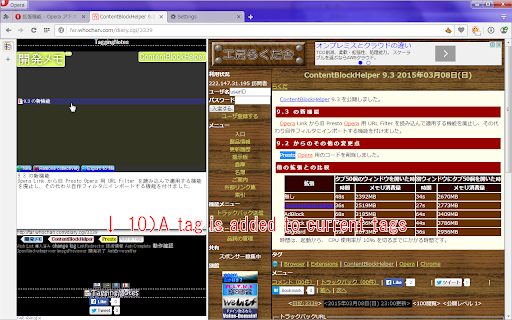
* Add tag by context menu of page
= Usage
# Write anything to textarea of panel or copy to notes by context menu on selected text of page.
# Add tags by input to bottom of textarea or context menu on selected text of page.
# Click tags on top of panel to search notes, click again it to unchecked.
# If you don't check any tags, then all notes are shown.
# Click any note shown to edit it.
# Click add here to create a new note tagged by selected tags on top of panel.
# You can delete a note/tag by context menu or delete key on it.
# Deleted note is tagged as "Trash", and delete it again, then it will be deleted completely.


Reviews
Loading reviews...
Permissions (4)
Permissions
contextMenusℹ Can add items to the right-click menu sidePanel storageℹ Can store data locally in your browser unlimitedStorage
Details
| Version | 2.1 MV3 |
| Updated | May 17, 2024 |
| Size | 174KiB |
| First Seen | Mar 26, 2026 |
Popular in workflow

Adobe Acrobat: PDF edit, convert, sign tools
by Adobe Inc.
330M
★ 4.40
workflow
330M
★ 4.40
workflow

Chrome Remote Desktop
by Chrome Remote Desktop Release Managers
38M
★ 3.14
workflow
38M
★ 3.14
workflow

MetaMask
by metamask
13M
★ 2.68
workflow
13M
★ 2.68
workflow

Microsoft Power Automate
by Microsoft Corporation
10M
★ 1.99
workflow
10M
★ 1.99
workflow

Screencastify - Screen Video Recorder
by castify-ext-dev
9M
★ 3.95
workflow
9M
★ 3.95
workflow
Popular Extensions
Adobe Acrobat: PDF edit, convert, sign tools
by Adobe Inc.
330M
★ 4.40
workflow
330M
★ 4.40
workflow
Chrome Remote Desktop
by Chrome Remote Desktop Release Managers
38M
★ 3.14
workflow
38M
★ 3.14
workflow

Cisco Webex Extension
by cisco.chromestore
24M
★ 2.34
social
24M
★ 2.34
social

Kami for Google Chrome™
by Kami
17M
★ 4.56
education
17M
★ 4.56
education

Read&Write for Google Chrome™
by Texthelp
17M
★ 3.44
accessibility
17M
★ 3.44
accessibility