
Description
Speed Dial is an extension to help you browse your favorite sites much faster.
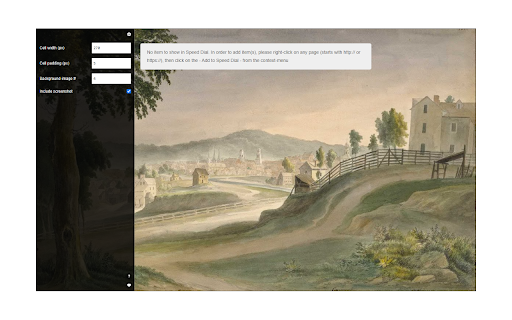
On any page, please right-click and then select Add to Speed Dial. You can also right-click on the toolbar button and then click on the add to speed dial from there. The website will be added to the speed dial page with a screenshot included. To open the speed dial, click on the toolbar icon. Within the speed dial UI, there is a settings sidebar that lets you adjust some aesthetic options. This extension includes several background images (open sidebar to change). Please note that all the options are auto-saved to the memory.
Note 1: when you first install the extension, a few websites are added to the speed dial automatically from your history (most visited websites). These websites do not have any screenshots included.
Note 2: all cells within the speed dial UI are drag-able. Simply drag and drop the cell to your desired location; all cells will be reordered automatically and saved to the memory.
Note 3: The speed dial add-on, does NOT change the look of the new tab in your browser. It just adds a stand-alone page rendered with Speed Dial UI.
Note 4: use the keyboard shortcut (Alt + Shift + A) to add desired pages to the speed dial.
Note 5: use the toolbar button's context menu item to add the current tab or, all tabs, to the speed dial automatically. If you choose all tabs, the extension will ask for broad host permission.
If you have a feature request or found a bug to report, please fill out the bug report form on the addon's homepage (https://mybrowseraddon.com/speed-dial.html).


Reviews (5 cached)
★☆☆☆☆2024-11-07
Buddha R
I like the simplicity but might be too simple. 3 Thing sfor 5 Star: 1 - Should be able to add from the interface 2 - Setting for opening in new tab 3 - Open source the code to gain more trust
★☆☆☆☆2017-02-27
X
This is not a speed dial, it is a standalone "web page menu" extension. A true speed dial should have the ability to replace the new tab page, otherwise the purpose is defeated.
★★☆☆☆2025-08-20
David Leung
I don’t really like this version of Speed Dial. I much prefer the colorful and meaningful icons rather than plain letter icons. I don’t understand why this change was made, and unfortunately, I now have to spend a lot of time resetting all the buttons.
★★☆☆☆2022-02-17
Леопольд Аркадьевич
Can't set it as a startup page.
★★☆☆☆2017-11-28
Artem Zaytsev
Too simple; Doesn't substitude the origianl speed dial; Huge (15 MB) size.
Permissions (2)
Permissions
contextMenusℹ Can add items to the right-click menu storageℹ Can store data locally in your browser
Details
| Version | 0.2.2 |
| Updated | Aug 28, 2025 |
| Size | 15.45MiB |
| First Seen | Mar 26, 2026 |
More by Jorvi

Block Site
by Jorvi
100K
★ 3.85
tools
100K
★ 3.85
tools

Password Lock for Messenger™
by Jorvi
30K
★ 3.45
social
30K
★ 3.45
social

Print Button
by Jorvi
20K
★ 4.20
tools
20K
★ 4.20
tools

Piano Prime
by Jorvi
10K
★ 4.53
entertainment
10K
★ 4.53
entertainment

Block Image|Video
by Jorvi
7K
★ 3.68
tools
7K
★ 3.68
tools
Popular in functionality

Hola VPN - Your Website Unblocker
by Hola VPN LTD.
4M
★ 4.84
functionality
4M
★ 4.84
functionality

Video Speed Controller
by igrigorik
3M
★ 4.54
functionality
3M
★ 4.54
functionality

SponsorBlock for YouTube - Skip Sponsorships
by Ajay
2M
★ 4.65
functionality
2M
★ 4.65
functionality

OneTab
by OneTab
2M
★ 4.45
functionality
2M
★ 4.45
functionality

VPN Chrome extension - Best VPN by uVPN
by uVPN
900K
★ 4.52
functionality
900K
★ 4.52
functionality
Popular Extensions

Adobe Acrobat: PDF edit, convert, sign tools
by Adobe Inc.
322M
★ 4.40
workflow
322M
★ 4.40
workflow

AdBlock — block ads across the web
by AdBlock
62M
★ 4.48
workflow
62M
★ 4.48
workflow

迅雷下载支持
by Shenzhen Xunlei Network Technology Co., Ltd.
59M
★ 2.77
workflow
59M
★ 2.77
workflow

Grammarly: AI Writing Assistant and Grammar Checker App
by Grammarly
42M
★ 4.50
communication
42M
★ 4.50
communication

Adblock Plus - free ad blocker
by eyeo GmbH
40M
★ 4.39
workflow
40M
★ 4.39
workflow