Popup Blocker (Lite) icon

Popup Blocker (Lite)

by Jorvi

v0.2.1 Updated Aug 11, 2025 72.31KiB
CWS
3K
Users
★ 3.85
27 reviews
#7993
of 121.9K
tools
#1607 of 37.7K
⚠️Requests 1 sensitive permission

Description

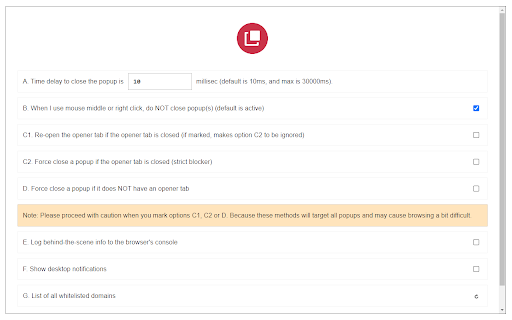
Popup Blocker (Lite) is a browser extension to block all annoying pop-ups and pop-unders. When the addon detects a popup, it will block it immediately and the badge icon will show the blocked item (number will increase). If you want to see notifications about the blocked popup, please enable desktop notifications from the options page. Some features: a. Allows you to block all unwanted popups and pop-unders. b. Has a built-in feature to whitelist the desired domain to show popups. c. Works fundamentally different than other popup blockers, therefore it works in almost all cases. d. Has a switch to turn the addon ON or OFF from toolbar popup UI. e. Several settings in the options page to adjust the addon's functionality to your need. f. Has badge icon text to show you the number of blocked popups. g. Very lite addon with no significant CPU and memory usage. When you first install the addon, some websites are added to the whitelist table by default (open the options page to see or edit the list). When a domain is whitelisted, the addon's toolbar button icon is green. When the addon is disabled or a website URL is invalid (i.e. chrome://) the icon is dark gray. In all other cases, the toolbar icon is red. So, while browsing with this addon, please be aware of the icon color to make sure it is set based on your desire. Note: to report bugs, please fill out the bug report form on the addon's homepage (https://mybrowseraddon.com/popup-blocking.html)
Popup Blocker (Lite) screenshot 1Popup Blocker (Lite) screenshot 2

Reviews (9 cached)

★☆☆☆☆2021-01-22
Slim Natural

it works poor and closes several of my tabs on its own !

★☆☆☆☆2018-07-18
Ace

function "When I use mouse middle or right click, do NOT close popup" is not working

★☆☆☆☆2017-07-15
SA CARTER

Has made it so chrome does not work!

★★☆☆☆2021-06-17
Tripple-A

Doesn't block all pop ups, almost useless.

★★☆☆☆2021-04-11
Lucian Andries

Please do this: Remove desktop notifications, and put normal in browser notifications! With Allow and Forever Block buttons, etc.

★★☆☆☆2020-10-03
Sergey Rozhenko

Cons: Blocks every page you open with middle click. The option to prevent it doesn't work. Pros: I use it only on specific popup-infested site where it works well: In Extensions page go to extension properties and there select "On specific sites" under "Allow this extension to read and change all your data on websites you visit"

★★★☆☆2024-02-11
James Utting

NO Option to use this in a Black List Mode. By default this blocks every popup on most websites, this gets to be a real pain when you have to constantly add safe websites like ebay.com to a White List. This would be a much better add-on if you could use it in a Black List mode and only add those badly behaving websites to a Black List.

★★★☆☆2020-09-28
John Magdy (Zorono)

most of the Tests at https://webbrowsertools.com/popup-blocker/ is success with running popups!!!! specifically that "new window" and "document.write"

★★★☆☆2017-04-16
Remco van Egmond

* it blocks many popup/unders, not all.... i still need to use 2 blockers to stop them. * this blocker sometimes blocks open in new tab with middle mouse on non whitelisted sites. * some sites are shut down that were opened during an "off period" of the blocker. have to shut off the blocker again to reclaim these sites by right click on tabs then choose re-open last closed tab.

Permissions (5)

Permissions

notifications Can show desktop notifications scripting Can inject scripts into web pages storage Can store data locally in your browser tabs Can see your open tabs and their URLs webRequest Can observe and analyze network traffic

Details

Version 0.2.1
Updated Aug 11, 2025
Size 72.31KiB
First Seen Mar 25, 2026