
⚠️Not updated in over 2 years
Description
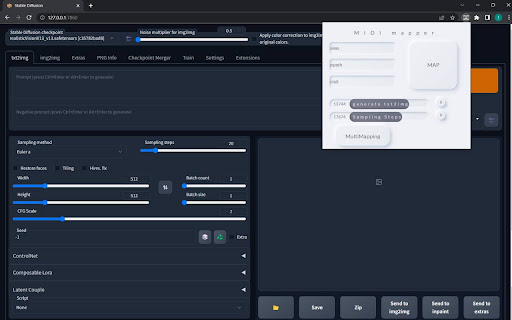
MIDIMapper is a powerful and intuitive chrome extension that allows you to control buttons and sliders on any webpage using a MIDI controller. With MIDIMapper, you can easily assign MIDI commands to elements on a webpage by copying the JSpath from the HTML inspector and toggling the commands from your MIDI controller.
Originally designed to control certain UI elements for AI models, MIDIMapper can be used on any website with buttons and sliders. The extension lets you assign an alias to each map, making it easy to keep track of your mappings.
MIDIMapper is perfect for artists, visual designers, musicians, producers, or anyone who wants to streamline their workflow and have more control over their browsing experience. Whether you're working with AI models or just want to streamline your workflow, MIDIMapper is the ideal tool for enhancing your productivity.
Try MIDIMapper today and see how it can enhance your web browsing experience!
Reviews
Loading reviews...
Permissions (1)
Permissions
storageℹ Can store data locally in your browser
Details
| Version | 1.0 |
| Updated | Mar 29, 2023 |
| Size | 29.05KiB |
| First Seen | Mar 26, 2026 |
Popular in workflow

Adobe Acrobat: PDF edit, convert, sign tools
by Adobe Inc.
330M
★ 4.40
workflow
330M
★ 4.40
workflow

Chrome Remote Desktop
by Chrome Remote Desktop Release Managers
38M
★ 3.14
workflow
38M
★ 3.14
workflow

MetaMask
by metamask
13M
★ 2.68
workflow
13M
★ 2.68
workflow

Microsoft Power Automate
by Microsoft Corporation
10M
★ 1.99
workflow
10M
★ 1.99
workflow

Screencastify - Screen Video Recorder
by castify-ext-dev
9M
★ 3.95
workflow
9M
★ 3.95
workflow
Popular Extensions
Adobe Acrobat: PDF edit, convert, sign tools
by Adobe Inc.
330M
★ 4.40
workflow
330M
★ 4.40
workflow
Chrome Remote Desktop
by Chrome Remote Desktop Release Managers
38M
★ 3.14
workflow
38M
★ 3.14
workflow

Cisco Webex Extension
by cisco.chromestore
24M
★ 2.34
social
24M
★ 2.34
social

Kami for Google Chrome™
by Kami
17M
★ 4.56
education
17M
★ 4.56
education

Read&Write for Google Chrome™
by Texthelp
17M
★ 3.44
accessibility
17M
★ 3.44
accessibility