
⚠️Not updated in over 2 years
Description
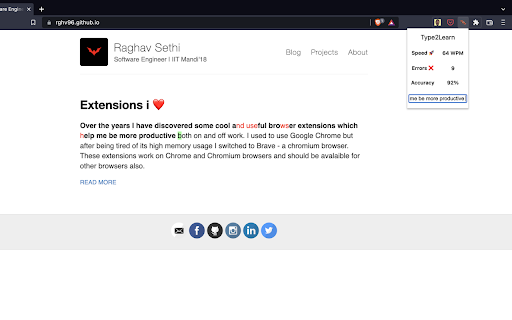
Ever happened that you are unable to concentrate and read the same line again and again? Or bored of typing random text on the typing tests? Try this extension now! Read the text by typing it on the webpage itself. You can monitor your speed, errors you make, and accuracy in real-time!
Steps to use the extension:
1) Select a paragraph by clicking on it or selecting any word from it
2) Click on the extension icon in the toolbar. A popup will appear.
3) Click on the button - Prepare Text. You should see the first letter of the paragraph highlighted.
4) Start typing from the beginning of the selected paragraph.
PS: this extension version currently works on the pages in which the text selected is in paragraph HTML tag
Reviews
Loading reviews...
Permissions (3)
Permissions
activeTabℹ Can access the current tab when you click the extension scriptingℹ Can inject scripts into web pages storageℹ Can store data locally in your browser
Details
| Version | 0.0.4 |
| Updated | Mar 24, 2022 |
| Size | 2.69MiB |
| First Seen | Mar 26, 2026 |
Popular in workflow

Adobe Acrobat: PDF edit, convert, sign tools
by Adobe Inc.
330M
★ 4.40
workflow
330M
★ 4.40
workflow

Chrome Remote Desktop
by Chrome Remote Desktop Release Managers
38M
★ 3.14
workflow
38M
★ 3.14
workflow

MetaMask
by metamask
13M
★ 2.68
workflow
13M
★ 2.68
workflow

Microsoft Power Automate
by Microsoft Corporation
10M
★ 1.99
workflow
10M
★ 1.99
workflow

Screencastify - Screen Video Recorder
by castify-ext-dev
9M
★ 3.95
workflow
9M
★ 3.95
workflow
Popular Extensions
Adobe Acrobat: PDF edit, convert, sign tools
by Adobe Inc.
330M
★ 4.40
workflow
330M
★ 4.40
workflow
Chrome Remote Desktop
by Chrome Remote Desktop Release Managers
38M
★ 3.14
workflow
38M
★ 3.14
workflow

Cisco Webex Extension
by cisco.chromestore
24M
★ 2.34
social
24M
★ 2.34
social

Kami for Google Chrome™
by Kami
17M
★ 4.56
education
17M
★ 4.56
education

Read&Write for Google Chrome™
by Texthelp
17M
★ 3.44
accessibility
17M
★ 3.44
accessibility