
Description
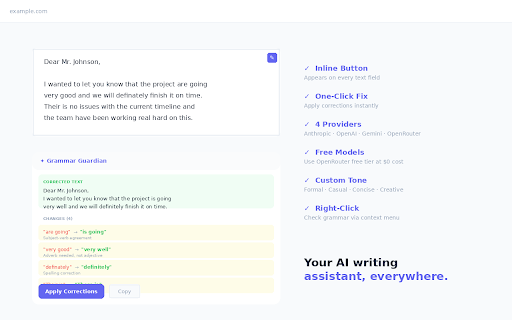
Grammar Guardian uses AI to check your grammar, fix spelling mistakes, and suggest better phrasing — right inside any text field on any website. Bring your own API key from Anthropic (Claude), OpenAI, Google Gemini, or OpenRouter (which offers free models).
HOW IT WORKS
• Focus any text field on any website — a small check button appears
• Click it to send your text for grammar checking
• Review corrections with clear before/after comparisons and explanations
• Apply fixes with one click, or copy the corrected text to clipboard
• Right-click selected text anywhere to check grammar via context menu
SUPPORTED PROVIDERS
• OpenRouter — recommended, offers free models like Gemini Flash and DeepSeek at zero cost
• Anthropic — Claude Haiku, Sonnet, and Opus
• OpenAI — GPT-4o, GPT-4o-mini, GPT-3.5 Turbo
• Google Gemini — Gemini 2.0 Flash, Gemini 1.5 Pro
• Type any custom model ID for OpenRouter (hundreds of models available)
FEATURES
• Inline grammar check button on every text field (textarea, input, contentEditable)
• Detailed change explanations — see why each correction was made
• Style suggestions — optional improvements beyond grammar fixes
• Configurable writing tone — neutral, formal, casual, concise, or creative
• Custom instructions — add rules like "Use British English" or "Keep technical jargon"
• Works with React, Vue, Angular, and other framework-based inputs
• Right-click context menu for checking selected text anywhere
• Quick-check text area in the extension popup
PRIVACY & SECURITY
• Your API key stays in local Chrome storage — never sent to any server except the provider you choose
• No data collection, no analytics, no tracking
• No account required — just your own API key
• All API calls happen in an isolated background service worker
• Fully open source
GETTING STARTED
1. Install the extension
2. Click the Grammar Guardian icon → "Settings & API Key Configuration"
3. Choose a provider and enter your API key (get a free OpenRouter key at openrouter.ai/keys)
4. Start typing in any text field — the check button appears automatically
COST
• Completely free with OpenRouter free models (openrouter/free)
• Paid providers cost ~$0.0001–0.001 per grammar check depending on text length and model
Perfect for writers, students, professionals, non-native English speakers, and anyone who wants polished writing everywhere on the web.

Reviews
Loading reviews...
Permissions (3)
Permissions
activeTabℹ Can access the current tab when you click the extension contextMenusℹ Can add items to the right-click menu storageℹ Can store data locally in your browser
Details
| Version | 1.1.0 |
| Updated | Feb 17, 2026 |
| Size | 38.09KiB |
| First Seen | Mar 22, 2026 |
Popular in communication

Loom – Screen Recorder & Screen Capture
by Loom
8M
★ 4.58
communication
8M
★ 4.58
communication

Compose AI: AI-powered Writing Tool
by Compose.ai
300K
★ 4.07
communication
300K
★ 4.07
communication

Notifier for Gmail™
by InBasic
200K
★ 4.38
communication
200K
★ 4.38
communication

Gmail™ Email Templates by cloudHQ
by cloudHQ
200K
★ 4.17
communication
200K
★ 4.17
communication

ScreenPal - Screen Recorder & Video Editor
by ScreenPal (formerly Screencast-O-Matic)
100K
★ 4.31
communication
100K
★ 4.31
communication
Popular Extensions

Adobe Acrobat: PDF edit, convert, sign tools
by Adobe Inc.
330M
★ 4.40
workflow
330M
★ 4.40
workflow

Chrome Remote Desktop
by Chrome Remote Desktop Release Managers
38M
★ 3.14
workflow
38M
★ 3.14
workflow

Cisco Webex Extension
by cisco.chromestore
24M
★ 2.34
social
24M
★ 2.34
social

Kami for Google Chrome™
by Kami
17M
★ 4.56
education
17M
★ 4.56
education

Read&Write for Google Chrome™
by Texthelp
17M
★ 3.44
accessibility
17M
★ 3.44
accessibility