Quick Find for Google Chrome™ icon

Quick Find for Google Chrome™

by Peter Shin

v0.0.14 Updated Jun 10, 2024 260KiB
CWS
4K
Users
★ 4.12
135 reviews
#2419
of 49.1K
tools
#479 of 12.2K
⚠️Not updated in over a year

Description

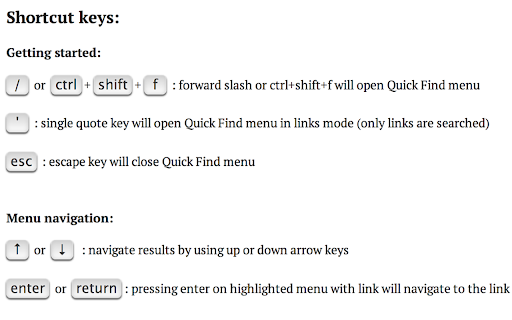
For a more easily readable description please visit: https://github.com/peterdotjs/quick-find **** Change Log: 0.0.14 - Manifest v3 support 0.0.13 - Updated reference url 0.0.12 - Added ability to change default shortcut keys 0.0.11 - Fixed issue where search is broken in Chrome 40. Motivation -------------------- I’ve always wanted the ability to see all the search results in a text search rather than just seeing them highlighted and scattered across the page and out of view. This was the start of the idea and it soon became mashed up with all the great Firefox quick find features that Chrome is missing. If you like it please rate it and if you have any feature requests, questions or bugs you file it here: https://github.com/peterdotjs/quick-find/issues Demo ------------ https://www.youtube.com/watch?v=x2PEyTyJ6iM Description -------------------- Next generation text search. A new text search tool for your Chrome web page. Start a search and simply press enter/return on a highlighted link and you’ll instantly navigate to that page. A mashup of Firefox quick find features (case match, links only search, highlight all, search selected text) as well as awesome new ones (scroll/navigate through all search results with context) - brought to Chrome. SHORCUT KEYS --------------------------- Getting started ----------------------------- / or ctrl + shift + f : forward slash or ctrl+shift+f will open Quick Find menu ' : single quote key will open Quick Find menu in links mode (only links are searched) esc : escape key will close Quick Find menu Menu navigation ------------------------------- ↑ or ↓ : navigate results by using up or down arrow keys enter or return : pressing enter on highlighted menu with link will navigate to the link Search Options ----------------------------- alt + a : toggle highlight all results mode alt + c : toggle match case mode alt + l : toggle links mode Tips ------------------- Quick Find search box is pre-populated with any selected/highlighted text prior to opening the search menu. Toggle occurs only when cursor focus is on the Quick Find menu. Limitations ------------------------- Extension only works on sites that allow content scripts. The chrome webstore page itself for example doesn't even allow content scripts to be run. After you've installed it make sure you are using it on a newly loaded or refreshed page. The script won’t be loaded on existing tabs without a refresh. Quick find does not search through iframes, script, or code html elements. When results show up in same html element, will be shown only as one result. Other website shortcuts or extensions may conflict with these shortcuts. A future enhancement can be to select your own shortcuts to open the menu. Additional Notes ------------------------------- Anonymous page view tracking is used to improve the extension and user experience. You can opt out in the options menu. Chrome is a trademark of Google Inc. Use of this trademark is subject to Google Permissions.
Quick Find for Google Chrome™ screenshot 1Quick Find for Google Chrome™ screenshot 2Quick Find for Google Chrome™ screenshot 3Quick Find for Google Chrome™ screenshot 4

Reviews (22 cached)

★☆☆☆☆2026-01-29
dagreenllama

simply doesnt work

★☆☆☆☆2025-01-03
Ralseia Drake

ligit just doesn't work, wanted it for pdf ctr f is functioning kinda just not highlighting which is what i was hoping this would do. but, it just doesn't do literally anything

★☆☆☆☆2024-01-07
Mobile Phone7531

not working

★☆☆☆☆2022-08-10
Mohammed Baeissa

not working

★☆☆☆☆2019-04-08
Federico Eloy Labat (NEWDEVICE)

With the most basic ting (a pdf) does not works, regular search in page works but this extension it is unable to find inside the pdf.

★☆☆☆☆2018-12-19
Justin Liller

Didn't work at all for the multiple pages I tried.

★☆☆☆☆2018-09-12
Dylan

Doesn't work in latest Chrome.

★☆☆☆☆2018-08-17
r r

instead of installing takes you to some weird web site...why is google even allowing this ??

★☆☆☆☆2018-08-04
Mechknight5656 (Alex Hoppe)

This doesn't work on Fandom wiki even with altered keybinds.

★☆☆☆☆2018-05-16
リョウイチ

Does not work well with google play music on the dynamically loading text, despite scroll locations being consistent and triggering it aot.

★☆☆☆☆2017-10-23
George Papadimitriou

doesn't work at all - icon stays grey, doing nothing, on any page

★★☆☆☆2024-03-14
Amelia

Does not seem to be working for me. Have tried resetting shortcuts as well.

★★☆☆☆2023-04-22
Greg Shaw

I really liked the look of this, and it would be awesome except it doesn't appear to be working anymore. I hope maybe the developer, Peter Shin will be able to update it. If I could get it to work, it looks like a 5 star and I would be happy to update my review.

★★☆☆☆2019-01-01
Michael Olson

Immediately after installing this extension it attempted to open the creator's website in a new window. It appears the creator no longer owns the domain however, as it redirected me to another domain (click.bounceads.net) which would have then taken me to an advertisers page if my script blocker hadn't stopped it.

★★☆☆☆2017-08-11
J Russell

Doesn't work on pages with frames. I really need the advanced search, in particular case sensitive search, but standard Chrome Find will work on entire page, including frames.

★★★☆☆2022-04-18
Kyle Miller

While I love the idea of it, it doesn't seem to work anymore. Granted, I recently updated, so it'll be impossible for you to update it. While this would be a one or two, I find it potentially useful. But please fix it. Thanks.

★★★☆☆2019-03-20
Narayanan Subbiah

Would be nice if you could include "History of Find Keywords" in a drop down kind of list, will be really helpful. + a keyboard shortcut to browse thru' all the previously searched keywords.

★★★☆☆2018-01-31
Sam Owen

I was pretty excited when I found this extension, but it works spotty at best. I can go to a page where I see the "AND" clearly written on it, the built-in Chrome Ctrl+F can find it (though it's not case sensitive obviously), but this tool says there are no results found :(

★★★☆☆2017-12-01
Matthew Eng

Works great on most pages but does not work on frames as well as many Google websites such as Gmail, Google Drive, Docs, etc.

★★★☆☆2017-11-18
Jason Diep

doesnt allow search function for scholarly documents such as pdf files which the normal ctrl+f can find

★★★☆☆2016-11-04
Noriko Oshima

Doesn't work with Chinese

★★★☆☆2014-12-10
Dragomir Draganov

Almost what I needed only if it worked on locally stored files.

Details

Version 0.0.14
Updated Jun 10, 2024
Size 260KiB
First Seen Mar 22, 2026



