Tab Resize - split screen layouts icon

Tab Resize - split screen layouts

by Peter Shin

v3.0.1 Updated Jun 11, 2024 267KiB
CWS
1M
Users
★ 4.31
1.1K reviews
#26
of 31.9K
workflow
#7 of 4K
⚠️Not updated in over a year 1M+ users

Description

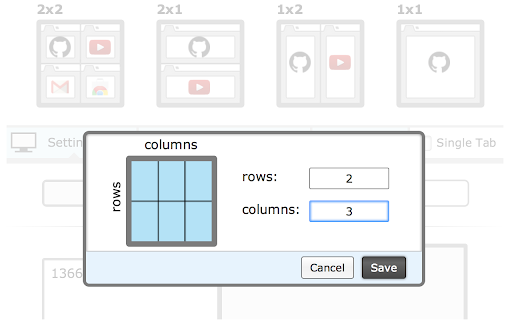
For a more easily readable description please visit: https://github.com/peterdotjs/tab-resize ***** Version 3.0.0 -------------------------- Manifest V3 support added. Major extension overhaul to support manifest guidelines with minimum product changes. Version 2.3.0 -------------------------- Added default shortcut keys for: Ctrl + Shift + Z: Undo Last Resize Ctrl + Shift + 1: 1x1 Resize Ctrl + Shift + 2: 1x2 Resize Ctrl + Shift + 4: 2x2 Resize Can still be changed through shortcut key menu. Version 2.2.0 -------------------------- Added support for shortcut keys and scaled split screen layouts. Version 2.1.1 -------------------------- HIGHLIGHTED TABS NOW CAN BE RESIZED (not only tabs to the right) - when 2 or more tabs are highlighted, only these tabs will be considered for resize. In Chrome, you can select multiple tabs by clicking on tabs while holding down the Ctrl (Command for Mac) key or select a range of tabs by holding down the Shift key and clicking. Version 2.1 -------------------------- Added support for multiple monitors, left and right alignment, empty tab mode, drag and drop to rearrange layouts and highlighted tab mode. Fully supports Windows, Mac and Linux OS. ***** @everyone that's liked it, thanks a lot for the support! I'm really glad you guys found it useful. You're pretty much the motivation continuing to build and improve the extension. =) This extension will not resize within the same tab (multiple panes with only ONE url bar). Other Chrome extensions with multiple panes in one tab have security limitations (i.e. you can't see any https site like Gmail or Facebook). With these types of extensions you also won't be able to access any of your favorite extensions on the individual panes. Tab Resize has none of the limitations listed previously because it splits tabs into separate windows. Thanks for checking it out! =) Cheers, Peter Video DEMO ---------------------- http://www.youtube.com/watch?v=GFHl98nAV04 If you like it please rate it and if you have any feature requests, questions or bugs you file it here: https://github.com/peterdotjs/tab-resize/issues?state=open What -------- ✓A simple extension designed to provide ease in resizing your tabs. A set of default layouts are provided but you can add and remove from the list of layouts to fit your needs. With multiple monitor support you can move windows from one screen to the next with ease. ✓Has the functionality of Tab Scissors and much much more! Why ------- ✓Manually resizing windows is no fun. ✓You have a very large monitors and have more pixels than you know what do with. ✓Quick side by side comparisons. How it works ------------------- ✓The selected/highlighted tab along with all tabs to the right of it will be considered. Whether you have more or less tabs than are needed the extension will resize only the available tabs. ✓Undo button will undo the previous layout resize. You can only perform undo once at any time. ✓In 'single tab' mode, only the selected/highlighted tab will considered. Only the current window/tab will change in size, all other tabs to the right will be ignored. ✓In 'empty tab' mode, new windows with empty tabs will be created if there are not enough tabs to fill your selected layout. ✓You can select left or right alignment for your resize ✓You can create your own custom layouts within reason and reset to default configurations if desired. Layouts are sorted most recently created on top right. ✓Click and hold on any layout and drag to rearrange order to your liking ✓Highlighted tabs now can be resized - when 2 or more tabs are highlighted, only these tabs will be considered for resize. Credit goes to F.C. for the idea. In Chrome, you can select multiple tabs by clicking on tabs while holding down the Ctrl (Command for Mac) key or select a range of tabs by holding down the Shift key and clicking. Additional Notes ------------------------ Only tab/window id info is being used; browsing activity is not. Tabs and browsing activity access are bundled together. "tabs" permissions is one of the least invasive permissions that are available. Browsing activity you should note is NOT the same as Browsing History. "Browsing activity" means the current tabs that are open not your previously closed tabs. This permission is required because this extension needs to manipulate and move tabs around (an essential feature of this extension) If you feel uncomfortable with this basic permission please don't install it. Giving it a bad review because you don't understand or like the permissions doesn't do anything productive. All my code is open sourced on github (https://github.com/peterdotjs/tab-resize) so feel free to look at how I'm using this permission. It's good to be informed and understand the permissions of any extension you install. For more chrome permission information go here: https://developer.chrome.com/extensions/declare_permissions Anonymous usage tracking (# clicks on the different resize options) is used to improve the extension and user experience. You can opt out in the options menu.
Tab Resize - split screen layouts screenshot 1Tab Resize - split screen layouts screenshot 2Tab Resize - split screen layouts screenshot 3Tab Resize - split screen layouts screenshot 4

Reviews (111 cached)

★☆☆☆☆2026-02-11
Kavikondala Manoj

Time waste and data waste it try to add 4 different windows not 4 tabs under the single window with 4 URLs.

★☆☆☆☆2025-10-15
Google User (M. B.)

Awfully buggy. Can't use. Previous detailed review auto-deleted by Google. Uninstalled.

★☆☆☆☆2025-07-27
Tùng Trần

Creates new window, not split tabs within a window

★☆☆☆☆2024-11-06
Zach Gallon

eff the words efr the high syllable count despondence, u need to do better.

★☆☆☆☆2024-10-23
Xenos

This is not split screen. We know split screen is 2 tabs in a single tab. This only separtes into multiple windows making it worse. Edge is better

★☆☆☆☆2023-06-13
Víðarr Kerr

At least the author explained what this was in a popup before you use it. But, even still, it is misleading; all this does is create a giant mess of open windows that have to be manipulated one at a time, each its own. If you have four tabs open and you want to split in four, you cannot do it. You get 4 tabs in your one, existing window and three new windows with blank tabs. If you go to split two of the new tabs, you get two new tabs and the others are buried. Then, you have to close them All One At A Time. There is also no way to toggle them at once. A GIANT MESS is what you get. Useless.

★☆☆☆☆2023-03-25
Kingsley Foote

Has been working perfectly for months. Stopped Working. does not work anymore :(

★☆☆☆☆2023-02-11
Rick Miller

I actually like the extension and would use it but it kills my tab groups.

★☆☆☆☆2022-11-28
Chris Nordin

Splits windows, not tabs. Should have read the reviews first..

★☆☆☆☆2022-07-06
Dragan Filipovic

Terrible approach, Ok, it's stated that it splits windows, not tabs. That was expected. - But once you split into windows there is no going back anymore. - Splitted window will lose all grouped tabs I've lost months of tabs grouping and arrangements. What this extension can do, you can easily do manually without negative sideffects. If extension only affects current and only next tab(s) based on the layout, not all next tabs, then this would make sense.

★☆☆☆☆2022-04-07
profcfuller

Not multiple tabs in one window, just opens a new window...we already know Microsoft+left

★☆☆☆☆2021-02-03
Jack Koomans

Just pops up a new windows. No Spits, not intuitive on how to make it split. Bad product.

★☆☆☆☆2021-01-11
Konstantin Tulupov

Causes errors and other problems in google docs. I couldn't work!

★☆☆☆☆2020-10-21
Marin

You can do better, faster and without addons with built in windows features. When it makes the windows it doesn't fill the whole screen instead it leaves a big gap in between which is a lot of screen estate lost. also there is no way to make two screens on top and one on bottom. There is 0 modifications to it. and it always opens empty tabs which for chrome is a lot more memory consumption. There is no way to say which windows will open in each tab which is also a letdown.

★☆☆☆☆2020-07-18
Fran McKay

This does literally nothing that you cant already do with Windows. I want to tile tabs IN ONE CHROME WINDOW.

★☆☆☆☆2020-07-08
Jojo A

Well their pop up didn't go and it didn't work so...

★☆☆☆☆2020-01-23
Giuseppe Sgandurra

Only the current tab is resized and the others are separated but not resized! This way it is completely unuseful... what a pity!

★☆☆☆☆2019-07-13
Jav Bukkake

There is a gap between windows. It does not split a tab. The same can be done in Windows by dragging chrome to the sides of the screen. 100% Useless.

★☆☆☆☆2018-10-11
Bright Out

THIS IS STUPID! LUDICROUS! I can do that myself! IDIOT! You claim it splits tabs, but it doesn't. It moves tabs to new windows and adjusts the layout of the windows to match the layout. There is no split pane or browser window. TERRIBLY disappointed.

★☆☆☆☆2018-08-20
Greg Ohlsen

Like doing acid

★☆☆☆☆2018-04-24
Robert

Doesn't work at all. Waste of time to figure out what the author had in mind.

★☆☆☆☆2018-02-28
Austin Drabick

it is stuped

★☆☆☆☆2018-01-09
Jeffrey Dyer

The buttons and links do not even align with the mouse. In order to click "rate it" I had to find the hyperlink by hovering over to the left of "rate it." It also does not resize the tabs themselves. It resizes the windows. It should be called "Chrome Window Resize."

★☆☆☆☆2017-12-18
L V

All this does is open a new chrome window and splits them on the screen. I can already do that WITHOUT the extention. Its native to Windows. and in win10 i can already do 2 or 4. Had this done it WITHIN the ONE browser window, it would have been useful. But.. alas this is worthless

★☆☆☆☆2017-12-04
halosAbound 360

Tried multiple times but could not get it to work on Windows 10.

★☆☆☆☆2017-08-23
Hello There

thought this addon would split one WINDOW in two parts. Not even does it only split one indow in two and resize them what Windows does itself (since Win7), but it even splits ALL tabs left from the open tab into the left window and ALL other tabs into the right window and even UNPINS THEM ALL.. Absolutely worthless..

★☆☆☆☆2017-03-20
Naveed Shaikh

opens a new chrome windows

★☆☆☆☆2016-12-06
s handral

Doesn't let me do anything!!

★☆☆☆☆2016-09-02
Ty Buchanan

You can only go as high as 2 x 2. The 6 x 4, 7 x 3 and other customs settings do not work!

★☆☆☆☆2016-08-03
Jožo Prečo

This is windows resize, not tab

★☆☆☆☆2015-11-10
Nick Curties

What's the point if it just opens another window.

★☆☆☆☆2015-10-22
Tony Haagen

all bars are visable..

★☆☆☆☆2015-08-31
Horza Redfield

Or you can just press WinKey + Left Arrow/Right Arrow

★☆☆☆☆2015-01-30
Ken de Jong

This is not split screen layout, this is creating of anh entire new window which is a functionality nobody should need...

★☆☆☆☆2015-01-17
Quinton Edwards

You can also just press Windows key + left or right. Its not multiple tabs in one.

★☆☆☆☆2014-09-03
Alexi Marcolino

Would be nice if the split remains in one window so I can work only on the tabs in one browser. Having this, i will give it a 5*

★☆☆☆☆2014-05-24
Sarah Oppelt

I have to agree with other here who have said that this was not at all what I expected. I could just as easily move these tabs to separate windows myself. I hoped for a split screen within one window, not several separate windows.

★☆☆☆☆2014-04-28
Raffaele Garofalo

Maybe I didn't get it but this extension doesn't split a chrome screen into multiple but simply resize the active Browser instance .... Another waste of time.

★☆☆☆☆2014-04-27

useless.. same things I could do without any extensions. Why nobody can do it like window slit in excel word etc...

★☆☆☆☆2014-04-09
Brad Allison

I installed this for the "Single Tab" feature, but it does not work at all. If you click "Single Tab" and try to split to 2 windows it resizes the first window and does nothing. Broken failed plugin.

★☆☆☆☆2013-12-31
Howard Giles

The most basic setting-one browser window with two vertical tabs-cannot load. All it does is re-size the browser window to 50% of its original width. This add-on is a useless piece of crap.

★☆☆☆☆2013-12-19
Scott Diemer

Doesn't work at all.

★☆☆☆☆2013-11-15
adam mazur

Doesn't work at all. Nothing happens..does not operate as shown in the preview. Has no effect whatsoever on anything.

★☆☆☆☆2013-10-29
ani kononova

does not work at all

★☆☆☆☆2013-10-10
Kjetil Rodal

unfortunately this only resizes the chrome WINDOW not the TAB (inside chrome)

★☆☆☆☆2013-10-05
YF YF

Not work both for chrome and chromium. don't waste your time to try it.

★☆☆☆☆2013-10-03
Alessandro P

doesn t works waste of time

★☆☆☆☆2013-09-26
Joe D'Armiento (Giusep)

It works terribly. Doesn't split them evenly, doesn't go back to recombined one screen, they overlap, sends everything to one corner when I hit the quad split. I am removing.

★☆☆☆☆2013-09-23
Vincent Bevort

Sorry to say but this is a rather lousy and really unnecessary add on. 1st it doesn't work as promised. My tabs are not split in one single window as the button promises. they end up rather unsorted on my screen and I have to find them back behind other windows. 2nd: ever heard of drag and drop. just grab a tab and drag it outside the browser window. Gives exactly the same result The idea is good but needs loads of work to get it right

★☆☆☆☆2013-09-18
Luca Bruno

Does not seem to work on ersion 28.0.1500.52 Ubuntu 13.04 (28.0.1500.52-0ubuntu1.13.04.3) with Gnome 3 desktop. I click on a layout, and nothing happens.

Permissions (4)

Permissions

favicon storage Can store data locally in your browser system.display tabs Can see your open tabs and their URLs

Details

Version 3.0.1
Updated Jun 11, 2024
Size 267KiB
First Seen Mar 21, 2026



