
Google Dictionary (by Google)
Description


Reviews (200 cached)
*Was*a great, simple extension you could use either by highlighting a word and clicking the extension, or clicking the extension and typing a word into the search box. It returned both the definition of the queried word and provided a list of synonyms--which, you could click on within the same window to see their definitions. Now, it's NOTHING. Every word you select or search returns a,"no definition found," message. What a shame. Hope they actually fix it and aren't just trying to force us into using Gemini--but, if they don't do it soon, I'll never know because I'll have moved onto another extension.
Not working anymore properly! "No definition found." If you spam button, you may get the result randomly!! Please fix it. Thank You.
couldn't define complex, installed, page, ratchet, Russian and too many more. I was just playing with it and was amazed at how many common words it couldn't find.
is this still working? everything is now "no definitions found". is this another way of Google trying to push gemini? i just want a simple definition, not a hallucinating definition.
Not working anymore, just say it "No definition found." and if you click few more time, you may get the result randomly!! Please fix it. Thank You.
It is not working properly. For most words, nothing appears at all. Only for a few words does it show the definition. Please fix this issue as soon as possible. Thank you.
someone, fix this. it stopped working, like my ex when she stopped responding to my texts
Shoddy!
Not working for pdf and also many words are not available
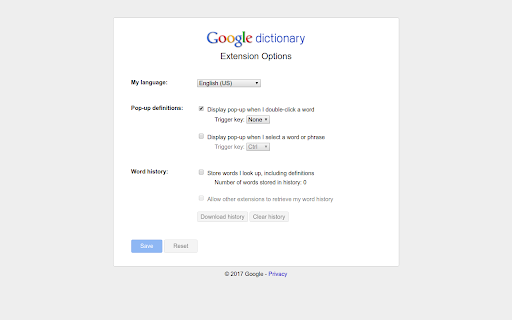
Doesn't work like the picture...pop up doesn't work. It just is a little dictionary icon you have to click on, use their search bar, and DRAGGING the word so you don't have to copy it doesn't even work...might as well use google then. Search bar is faster.
Such a lousy and trashy extension. It wasted my time.
it annoys me, it always shows "No definition found." so I launched my extension :"OMG Dictionary and Word Collector"
its so trash
The plugin is meant to show definitions when you highlight or double click a word. When I double clicked to highlight a word, no definitions popped up. Because this is the entirety of the plugins' function and it does not work, I have uninstalled it. Please fix it so it shows definitions when you highlight words and I will reinstall because I need a plugin like this. Also ignore the idiots saying to update to Manifest V3. V3 is garbage and should be thrown into the trash bin. Please keep this plugin on V2. Stop trying to break ad blockers. People can refuse to run whatever code you try to run on their computers. Scam ads and malvertising codes is one of them.
Double click action Not working
This extension has always ben one of my favorites, but for the past several months, it just stays stuck on "Searching..." forever. Not sure why. I just tried reinstalling it but nothing. Will update review once it gets fixed.
This extension has always ben one of my favorites, but for the past several months, it just stays stuck on "Searching..." forever. Not sure why. I just tried reinstalling it but nothing. Will update review once it gets fixed.
suddenly the theme turned into dark and now you can't see anything.
Doesn't work. Popup show ups & indefinitely 'Searching'.
sometimes it search and finds the definition. most often it doesn't work
Does not work at all. I've tried disabling all of my other extensions, reloading webpages, trying on different websites, restarting chrome. Nothing works. It gets stuck on "Searching..." and never resolves. And the link above to report issues is broken.
This extension is broken, can no longer look up words with a double click like I used to
Absolutely useless. Does not work with pdfs
no updates since last 3 years
bad
It is stuck on searching and not working neither double click nor searching in the extension itselg
this thing stuck on searching... my chrome is up to date internet connection is right i installed this extension fresh but...
two issues I encounter: 1, pop-up not work always, sometime works and sometimes not; 2, the pronunciation of a term works sometimes, not always, try to find a way to resolve but fail... pls provide a robust solid extension, thx.
BUG REPORT: Subject: Bug Report - Google Dictionary Extension Stuck on "Searching..." Dear Google Dictionary Support Team, I am writing to report a recurring issue I've encountered with the Google Dictionary Chrome extension. The extension is an invaluable tool for my daily browsing, and I've come to rely on its functionality. Unfortunately, I've recently run into a problem that is affecting its performance. Issue Description: When I select a word or phrase to look up, the extension's pop-up box appears but remains stuck on the "searching..." status and does not provide any definitions or related information. This issue persists across various websites, including Wikipedia. Troubleshooting Steps Taken: I have confirmed that my internet connection is stable and functioning. I have updated Chrome to the latest version. I have removed and reinstalled the latest version of the Google Dictionary extension. I have checked the extension on multiple websites to ensure it's not an isolated issue. I have looked into the Chrome Developer Tools Console and Network tabs for clues. Developer Console Findings: The Developer Console has flagged a couple of errors which seem to be related to Content Security Policy (CSP) violations. Here are the error messages for your reference: Refused to execute inline script because it violates the following Content Security Policy directive... Refused to load the script 'https://apis.google.com/js/googleapis.proxy.js?onload=startup' because it violates the following Content Security Policy directive... It appears that the extension is attempting to execute inline scripts or load external resources that are not allowed by the CSP of the page. Request for Assistance: I understand that resolving such issues can be complex, especially when it comes to maintaining security standards. However, I hope that by providing this information, I can assist you in identifying and resolving the problem more quickly. Many users like myself would greatly appreciate a timely fix for this issue. Thank you for your dedication to creating helpful tools and for your attention to this matter. I look forward to your response and a resolution to the issue. Best regards,
The extension wasn't working for over a year but now it's back to normal, love this. edit: never mind, it's not working anymore...
it doesn't work for me. it's stuck on "searching" like others have said.
This extension is completely useless so don't even waste your time. Such an embarrassingly trash extension coming from a company you would expect decent performance from. 0/5 Stars
i really needed this extension like on chrome android i can select the text and a pop up will appear below with definition, it was really cool but this extension is not like that. it do not give the definition in popup instead it says to google it.
Chrome is now such a dumb outdated browser. Needs an extension for every basic thing you would expect a modern browser to have. So dumb. It's like using a browser from the 90s
it stops to work, stuck on searching
Stuck on "Searching..." Exhausted all possible solutions on resolving this with no avail.
its just me but this extension searches for the word and takes a long as time so 1 star for me
It stopped working a couple weeks ago, Ive reinstalled cleared cache, everything still doesnt work.
it worked for a little awhile ago but now it doesnt at all, </3 :(
Was working fine up until a few days ago, now just says searching. 1 star. Fix it.
Doesn't work at all for me on my Pixelbook Go. I tried various options and none opened a definition. I uninstalled it.
Won't load any words I search up :(
it no longer works, it remains stuck on "searching" I have tried disabling/re-enabling the extension and uninstalling/reinstalling it to no effect.
it works fine but, when i go to see my words, first of all it opens in exel and it looks so messy, its stupendously hard to understand. And all the words have en or enen in front of it. its sp hard to understand what the actual word is , please make the viewing of our words more efficient.
No longer works
not working
After adding the extension to my browser(Chrome), it hasn't provided me a single definition for a word I double click. I don't know the problem but the extension does not work.
tried to use it for translating german words to russian, in "pop-up" and by extension "define" button translation is wrong, if click "more" on pop-up translation on google-translate is correct.
Just totally broken. Words are never defined anymore, the pop up is inconsistent. I am think of leaving Chrome altogether.
not working
Permissions (1)
Permissions
Details
| Version | 4.2.6 |
| Updated | Feb 9, 2026 |
| Size | 50.5KiB |
| First Seen | Mar 22, 2026 |
Popular in tools




Popular Extensions




