
✅Recently updated
Description
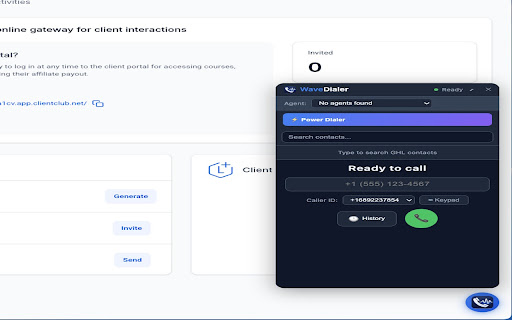
WaveDialer adds a floating phone dialer directly inside GoHighLevel CRM. Your sales team can make and receive calls without switching tabs, windows, or apps.
FEATURES:
- Click any phone number in GHL to dial instantly
- Floating dialer panel — stays open while you navigate contacts
- Incoming call notifications with caller ID and contact lookup
- Call recording with automatic upload
- Post-call dispositions (Interested, No Answer, Voicemail, etc.)
- Power Dialer mode for high-volume outbound campaigns
- Call history with duration and status tracking
- Agent identification — each rep selects their name once
- Keyboard shortcut: Ctrl+Shift+D to open/close the dialer
- Connection status badge in Chrome toolbar
HOW IT WORKS:
1. Install the extension
2. Open GoHighLevel (app.gohighlevel.com)
3. A blue phone button appears in the bottom-right corner
4. Click it to open the dialer, or click any phone number to call directly
5. All calls are automatically logged in GHL Conversations
REQUIREMENTS:
- Active GoHighLevel account
- WaveDialer server configured by your agency admin
- Chrome browser (desktop)
Built by SmartWave for agencies using GoHighLevel as their CRM.
Reviews
Loading reviews...
Permissions (2)
Permissions
activeTabℹ Can access the current tab when you click the extension notificationsℹ Can show desktop notifications
Details
| Version | 1.1.0 |
| Updated | Mar 2, 2026 |
| Size | 43.66KiB |
| First Seen | Mar 22, 2026 |
Popular in communication

Loom – Screen Recorder & Screen Capture
by Loom
8M
★ 4.58
communication
8M
★ 4.58
communication

Compose AI: AI-powered Writing Tool
by Compose.ai
300K
★ 4.07
communication
300K
★ 4.07
communication

Notifier for Gmail™
by InBasic
200K
★ 4.38
communication
200K
★ 4.38
communication

Gmail™ Email Templates by cloudHQ
by cloudHQ
200K
★ 4.17
communication
200K
★ 4.17
communication

ScreenPal - Screen Recorder & Video Editor
by ScreenPal (formerly Screencast-O-Matic)
100K
★ 4.31
communication
100K
★ 4.31
communication
Popular Extensions

Adobe Acrobat: PDF edit, convert, sign tools
by Adobe Inc.
330M
★ 4.40
workflow
330M
★ 4.40
workflow

Chrome Remote Desktop
by Chrome Remote Desktop Release Managers
38M
★ 3.14
workflow
38M
★ 3.14
workflow

Cisco Webex Extension
by cisco.chromestore
24M
★ 2.34
social
24M
★ 2.34
social

Kami for Google Chrome™
by Kami
17M
★ 4.56
education
17M
★ 4.56
education

Read&Write for Google Chrome™
by Texthelp
17M
★ 3.44
accessibility
17M
★ 3.44
accessibility