
Description
The Bridge: Global Context AI - Your Intelligent Communication Co-Pilot 🚀
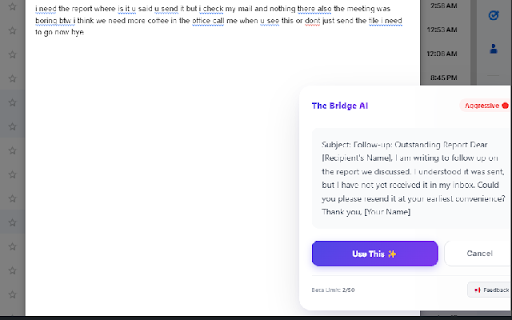
The Bridge is not just a rewriter; it’s your intelligent communication partner that bridges the gap between your raw thoughts and polished, professional delivery. Whether you’re writing a critical email, a LinkedIn post, or a sensitive WhatsApp message, The Bridge ensures your tone is perfect every time.
✨ What's New in Version 1.1?
Visual Tone Radar: See exactly how your message lands with our new real-time graph measuring Professionalism, Friendliness, Clarity, and Constructiveness.
Digital Lawyer Mode ⚖️: Faced with an unfair situation? Activate the "Digital Lawyer" to instantly draft firm, legally-sound, and assertive replies that protect your rights.
Shield Mode 🛡️: Set boundaries effectively with one click.
Enhanced WhatsApp Support: Now works seamlessly on complex chat platforms with our new "Phantom Typing" technology.
🌟 Key Features:
🧠 Smart Context Detection
Automatically understands where you are writing (LinkedIn, Gmail, Facebook, WhatsApp) and adapts the tone to match the platform's culture perfectly.
🎯 One-Click Rewrite
Turn "this is garbage" into "This does not meet our quality standards" instantly. Convert casual notes into executive summaries without thinking.
📊 Advanced Tone Analysis
Don't guess how you sound. The new Radar Chart visualizes your communication style before you hit send, ensuring you strike the right balance between friendly and professional.
💬 Contextual Awareness
Right-click on any text or selection to use "Generate Reply with The Bridge". It reads the conversation context to suggest the most appropriate response.
🔒 Privacy First
Your drafts and context are processed securely and never stored. We bridge the gap, we don't keep your data.
Download The Bridge today and communicate with confidence!


Reviews
Loading reviews...
Permissions (4)
Permissions
contextMenusℹ Can add items to the right-click menu identityℹ Can use your Google account identity sidePanel storageℹ Can store data locally in your browser
Details
| Version | 1.3 |
| Updated | Feb 12, 2026 |
| Size | 121KiB |
| First Seen | Mar 22, 2026 |
Popular in communication

Loom – Screen Recorder & Screen Capture
by Loom
8M
★ 4.58
communication
8M
★ 4.58
communication

Compose AI: AI-powered Writing Tool
by Compose.ai
300K
★ 4.07
communication
300K
★ 4.07
communication

Notifier for Gmail™
by InBasic
200K
★ 4.38
communication
200K
★ 4.38
communication

Gmail™ Email Templates by cloudHQ
by cloudHQ
200K
★ 4.17
communication
200K
★ 4.17
communication

ScreenPal - Screen Recorder & Video Editor
by ScreenPal (formerly Screencast-O-Matic)
100K
★ 4.31
communication
100K
★ 4.31
communication
Popular Extensions

Adobe Acrobat: PDF edit, convert, sign tools
by Adobe Inc.
330M
★ 4.40
workflow
330M
★ 4.40
workflow

Chrome Remote Desktop
by Chrome Remote Desktop Release Managers
38M
★ 3.14
workflow
38M
★ 3.14
workflow

Cisco Webex Extension
by cisco.chromestore
24M
★ 2.34
social
24M
★ 2.34
social

Kami for Google Chrome™
by Kami
17M
★ 4.56
education
17M
★ 4.56
education

Read&Write for Google Chrome™
by Texthelp
17M
★ 3.44
accessibility
17M
★ 3.44
accessibility