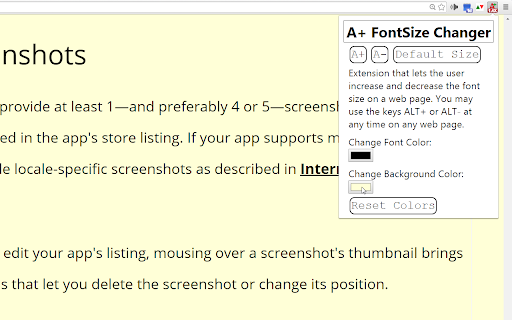
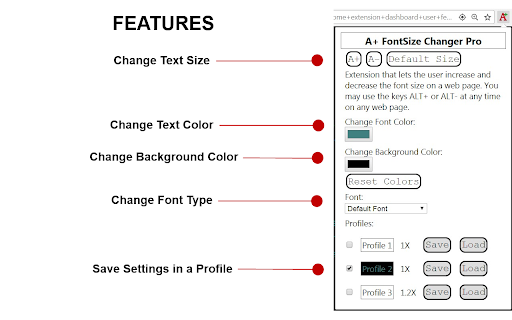
A+ FontSize Changer is a Chrome Extension and Edge Chromium add-on that lets the user customize the font text size, font text color, background color and font family on a page. It actually changes the fontSize of each element unlike Chrome's action with CTRL+ and CTRL- which zooms the page. Sometimes you wish to increase the text size without zooming the page so that paragraphs do not scroll past the edge of the screen.
A+ FontSize Changer works where others fail! Even on pages with dynamic (ajax) content! Even on pages with iFrames! Just use the buttons to change the fontsize or use keyboard shortcuts ALT+ and ALT- ( or use ALT+Up Arrow and ALT+Down Arrow. You can change these hotkeys at chrome://extensions/shortcuts )
Some website authors use a gray text color instead of black which can be hard on the eyes. With A+ FontSize Changer you can also change the text color and background color on a page. With this feature you can also create your own custom Night Mode where you choose the text color and background color yourself and it does not invert image or video colors so that they are still viewable.
NOTES:
If ALT+ and ALT- are not working on a website then try these steps:
1. Reload the website (F5 key) or restart Chrome or Edge.
2. Click on a blank space on the website page before using the ALT+ or ALT- key.
3. Extensions are not allowed to work at Chrome Web Store, Edge Add-ons store or a chrome:// or edge:// page or the new tab page. The extension popup will display a red notice with "NOTE:" if you are on one of those pages.
4. If the website has disabled keyboard keys then click on the extension icon in the toolbar and use the buttons there.
5. If ALT+Up Arrow and ALT+Down Arrow are not working then see if they are active on the extension at chrome://extensions/shortcuts
FREE FEATURES:
* Change font type for the current webpage
* Change text size for the current webpage
* Change text color for the current webpage
* Change background color for the current webpage
PRO FEATURES (IN-APP PURCHASE):
* Create profiles to save text settings and color schemes.
* Saves custom font type for each website you visit
* Saves custom text size for each website you visit
* Saves custom text color for each website you visit
* Saves custom background color for each website you visit
VERSION HISTORY
1/11/2026 - Version 1.5.4
+ Some Youtube captions were sometimes displaying at default text size instead of the size set by the extension. Fixed!
7/25/2025 - Version 1.5.3
+ New payment processor
8/23/2024 - Version 1.5.2
+ Better support for Opera browser.
+ Extension popup now tells the user if the current website needs to be reloaded.
12/25/2022 - Version 1.5.1
+ Added "Blacklist" for locked profiles so that users can add websites that will not be changed by the profile that is checked.
+ Grammar correction: from "it's" to "its".
+ Fixed bug of font-family not loading a profile with "Load" button until page was reloaded.
8/20/2022 - Version 1.5.0
+ Updated to Manifest V3
+ Checked (or locked) profiles no longer save the values to each website so that you can uncheck the profile and those websites will default to normal.
8/19/2022 - Version 1.4.9
+ Performance improvements
+ Extension badge now displays if the user has changed the font color, background-color, font-family or as usual the font-size multiplier for a website.
1/10/2022 - Version 1.4.8 - Corrected some German spelling.
1/10/2022 - Version 1.4.7 - Added Portuguese language. (Português)
1/6/2022 - Version 1.4.6 - Added Chinese Traditional (zh-TW) and Chinese Simplified (zh-CN).
9/7/2021 - Version 1.4.4 - Fixed some license issues. No longer puts gray translucent background under Youtube video controls.
4/7/2021 - Version 1.4.3 - Cosmetic changes. Changed buttons and input fields to use font-family: Consolas, monospace. Changed footer background color. Added German language.
4/7/2021 - Version 1.4.3 - Cosmetic changes. Changed buttons and input fields to use font-family: Consolas, monospace. Changed footer background color. Added German language.
3/4/2021 - Version 1.4.2 - Now displays a notice if the user did not allow the extension to use the user's email address to check for license status from servers. Hopefully fixed it so that text size does not get larger than set size on some websites on page refresh because of slow loading external stylesheets or dynamic content. It will not work in all cases, otherwise the extension would have to be delayed for 10 seconds or more on some websites with many external resources.
2/16/2021 - Version 1.4.1 - Fixed a bug where the extension would not work when first installed on websites that were already open in the browser. Now it will work on a fresh install without refreshing the page. Also added better support for Edge Chromium browsers.
2/11/2021 - Version 1.4.0 - Fixed a bug in the license status check. It will now display an error message if the user did not approve access for the extension to check license status or if the user is not signed into Chrome and therefore the license status cannot be checked.
2/10/2021 - Version 1.3.9 - Fixed a bug from version 1.3.7 where backgrounds with url images with partial transparency would get a partial transparent background so that some video players like jw-player would not get the video blocked out. But the fix was being applied to the body tag as well. Fixed so that the body tag will always get a solid color and no transparency. Also added more error checking to license status check.
2/2/2021 - Version 1.3.8 - Added a filter to lower the brightness on page load for users that set the background-color to black or a dark color to try and prevent the original white background from showing. Unfortunately, it only works well some of the time. But the original white background is less bright more quickly than before. Also fixed a bug where Pro users that already paid were not getting the correct license.
1/31/2021 - Version 1.3.7 - A number of performance improvements. It should use less resources now. Added Dark Mode support for the A+ popup. Added colors for hyperlinks including visited hyperlinks being a different color! Also boxes and buttons that do not have a default white background will now have a slightly different color than the color chosen by the user so that boxes and buttons are easier to identify. Version 1.3.5 was not converting background colors for elements with full transparency but was still converting elements with partial transparency. Now it will convert colors but with the transparency value also saved with the conversion. Hopefully this will help some video players like jw-player controls that use alpha to display correctly. Also elements with IMG or background-image with url images will have a slightly different color background. This helps if the image has a transparent background and a dark icon such as icons and the user has selected a black background color. IMPORTANT UPDATE: Chrome Web Store Payments in being deprecated by Google, therefore this update has a new permission to read a user's email address to process license information for both old Chrome Web Store payments and the new payments processor.
5/22/2020 - Version 1.3.6 - It seems that font changes and color changes were not working in iFrames since about version 1.2.5. This has been fixed. Previously, font size changes were only working if the user clicked on the iFrame first and used ALT+ or ALT- to change the size. Now pressing ALT+ ALT- and ALT-Backspace on the main page will change the text size for both the main document and iFrames without having to click on the iFrames first. Known Issue: Some iFrames with content like Disqus comments may have a problem loading saved settings correctly because of the delayed way that Disqus loads content and css. Text may get too large and crowded (line-height). This may also cause "Reset Colors" to not reset the iFrame without refreshing the webpage (F5 key).
Now removes the default font from saving if reverting back to the default font on the page.
4/18/2020 - Version 1.3.5 - It now does not change the background color of elements that have a transparent background so that they can still be seen through. Also if the background-image is a gradient instead of a url then it will set the background-image to "none".
9/24/2018 - Version 1.3.4 - Added Languages in pop up.
4/16/2018 - Version 1.3.3 - Added "user-select:none" to css of the buttons in the popup.
4/6/2018 - Version 1.3.2 - Now you can use ALT+Up Arrow and ALT+Down Arrow to change text size. You can also change these hotkeys at chrome://extensions/shortcuts
3/30/2018 - Version 1.3.1 - Removed trying to make it work with Google's new tab page. With apologies it was not realized that there is no way to tell the difference between chrome://newtab and extensions that created their own new tab.
3/22/2018 - Version 1.3.0 - Lite and Pro Edition - Now the Lite Edition also changes font size by .1 increments instead of .2 increments, just like Pro. Also fixed in Lite Edition the contentEditable bug that would change size when the user changes to bold or italics.
Bug Fix: Keeps the current page view scroll position in the same place after a font size adjustment for most pages by calculating the position before the change and then setting the scroll position after the change.
This version also shows the color picker and the text input for color hex values, so you can manually enter hex colors or use the color picker.
Also new setting added "Underline Links". So users can choose if links are underlined or not when the color is changed. The default is to "Underline Links" because on most websites it would be difficult to see the links when they are the same color as the rest of the text on the page. But some users prefer not to have links underlined.
Also now line-height is adjusted if line-height is too small after a text size change.
3/21/2018 - Version 1.2.9 - Pro Edition and Version 1.2.5 - Lite Edition - Now using the custom color picker instead of the HTML 5 color picker because now some Windows users were having the same bug that Mac OS users were having of the HTML 5 color picker window opening and the extension popup closing. Using the custom color picker fixes that bug.
5/8/2017 - Version 1.2.4 - In the Pro edition you can now change the font type (font-family) for each website you visit and the font family will be saved.
4/20/2017 - Version 1.2.3 - Added note in extension popup that explains that extensions do not work in special chrome:// pages or at the Chrome web store.
4/12/2017 - 1.2.2 - Bug Fix for Mac OS X. I believe I have fixed the bug that some Mac users are experiencing of not being able to change the color. Apparently Chrome extensions have a bug with Mac OS using the HTML 5 color picker where when the color picker opens the extension popup closes causing the popup to not recognize the color commands. Now using a different color picker for Mac users.
4/9/2017 - 1.2.1 - Added change event to color picker to see if it would fix the problem for some users not able to get the text color or background color to change.
9/12/2016 - 1.2 - Now you may not have to reload the current page when you first install this extension or if you disable it and re-enable it.
08/12/2015 - 1.1 - Fixed alert "ERROR: Could not establish connection." when clicking on A+ icon when the extension is first installed. Now it tells the user to refresh the page.
08/12/2015 - 1.0 - A+ FontSize Changer created