
Youfy - YouTube to Spotify icon

Youfy - YouTube to Spotify

by youfyapp

v1.2.1 Updated May 19, 2023 1.37MiB
CWS
8K
Users
★ 3.07
27 reviews
#1290
of 35.6K
workflow
#376 of 4.4K
⚠️Not updated in over 2 years ⚠️Requests 1 sensitive permission

Description

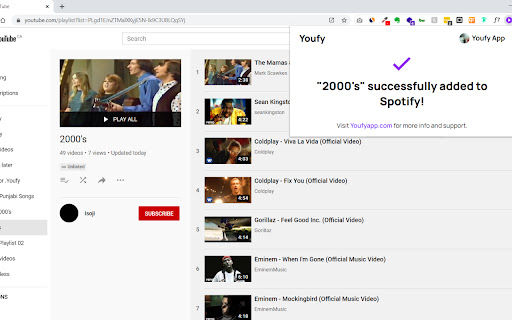
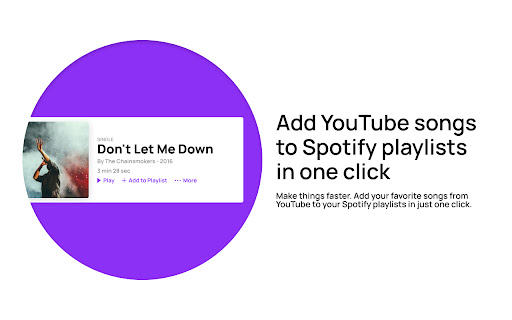
With Youfy, you can quickly and easily transfer your favorite YouTube songs and playlists to your Spotify account without ever leaving YouTube. Our extension is simple to use - just navigate to any YouTube video or playlist page, click on our extension icon from your extensions list, and start converting your music. You can even export YouTube playlists as .txt files. Plus, with Youfy, you can open YouTube songs on Apple Music and Amazon Music. Try it out today and see how easy it is to move your music to your preferred platform! Features: 🌟 Add any YouTube song to your Spotify account 🌟 Transfer any YouTube playlist to your Spotify account (up to 50 videos per playlist) 🌟 Open YouTube songs on Apple Music and Amazon Music 🌟 Export any YouTube playlist as a .txt file Frequently Asked Questions: Q: Am I required to pay to use any feature of the extension? A: No, our extension is completely free to use. Q: Do I need to provide any personal information? A: No, we do not store or ask for any personal information from our users. The only requirement is for users to log in to their Spotify account. Q: How many songs can I transfer at once? A: Currently, our extension allows up to 50 songs per playlist to be transferred at once. This number might increase in the near future. Q: Can I transfer any type of playlist? A: Since we don’t require users to log in to their YouTube account, users can only transfer public and unlisted playlists. If you wish to transfer a private playlist, we suggest making it public or unlisted beforehand. Don't miss out on the convenience and ease of use that Youfy offers - try it today and start transferring your favorite YouTube songs and playlists to your Spotify account in just a few clicks! With Youfy, you can take your music with you wherever you go and never miss a beat. Plus, our extension is constantly being updated with new features and improvements, so you can always enjoy the best possible experience. Give Youfy a try now and see the difference it can make for your music collection! Changelog: v1.2.0 - Upgraded manifest version to 3 v1.1.1 - Changed Spotify URLs to use open.spotify.com again because spotify: URLs don't work when the user doesn't have the desktop app installed v1.1.0 - Minor bug fixes - Changed Spotify URLs to use Spotify encoding instead of open.spotify.com - Changed Spotify playlist page to show only collaborative or owned playlists v1.0.0 - Initial Release If you enjoy using Youfy, would you mind taking a moment to rate it? Thanks for your support!
Youfy - YouTube to Spotify screenshot 1Youfy - YouTube to Spotify screenshot 2Youfy - YouTube to Spotify screenshot 3Youfy - YouTube to Spotify screenshot 4Youfy - YouTube to Spotify screenshot 5

Reviews (13 cached)

★☆☆☆☆2025-04-16
Rob Fowler

Does not seem to work at all anymore.

★☆☆☆☆2025-03-29
Volkan Akin

The UI is fine but, It has bugs: It gives an error when i click add. I've checked the extension dev tool, seeing the error. sometimes it shows the wrong song. Play button opens Spotify instead of playing the sample. I can't logout the app. I have to login every now and then. Seems like the permissions have been changed sometimes? asking me to give more consent. Why does this extension need to ask google identity(I only need to login to Spotify), And also, I see cookie permission in manifest.json file. what is it cookie you need? manifest host_permissions => "permissions": [ "activeTab", "tabs", "identity", "cookies" ]

★☆☆☆☆2025-01-20
Adam Harris

Does not work. Requires the exact same track to be listed on Spotify. You cannot add any youtube video audio - very misleading

★☆☆☆☆2024-12-12
Drakor Darkstar

doesn't do anything, all it does is turn itself into a little white bar in the upper right whenever I click to do anything in it, a broken waste of time that isn't worth your patience

★☆☆☆☆2024-08-27
Doggo

cannot transfer specific youtube video

★☆☆☆☆2024-07-14
Leon Greige

Can't even login to the app, tried multiple times and even changed my password to see if it would work. This app is worthless. I'll try on my phone, and i'll let you know.

★☆☆☆☆2024-06-12
Belen Van Der Werth

First try - Created an empty list in Spotify. Second try - didn't even work.

★☆☆☆☆2024-05-20
Kevin van de Velde

Does not work ...

★☆☆☆☆2023-03-08
Matt

Broken: After signing into Spotify, I get the message "⚠️ No YouTube song or playlist found! Youfy extension only works when you have a song or playlist open on Youtube.com"

★★☆☆☆2024-10-02
Robert Talbert

Doesn't appear to actually take specific YouTube audio and add to Spotify. What it seems to be doing instead is, when you have a YouTube video open and activate the extension, it searches Spotify for a close match and then asks you to add that matching song to your Spotify playlists. So it's not very useful if you are wanting to add audio that isn't already in Spotify, like a video of a live performance.

★★☆☆☆2023-12-16
Logan Headrick

Only works for songs that are popular, it seems! I have a few songs on youtube from artists that are less popular. When I am on the youtube video and click the extension, it brings up a completely different song to convert. Am I doing something wrong? I was really excited to be able to quickly add to spotify

★★★☆☆2024-03-27
Andy Thomson

It worked fine for a while but then it stopped displaying my Spotify playlists. What is wrong?

★★★☆☆2022-08-31
Emmi Ari

Only shows a handful of playlists and includes playlists you can't add songs to. Spotify links get opened in the browser instead of using the spotify:// URI schema.

Permissions (4)

Permissions

activeTab Can access the current tab when you click the extension cookies Can read and modify browser cookies identity Can use your Google account identity tabs Can see your open tabs and their URLs

Details

Version 1.2.1
Updated May 19, 2023
Size 1.37MiB
First Seen Mar 21, 2026



