Vmaker - Free Screen Recorder icon

Vmaker - Free Screen Recorder

by Vmaker

v5.2.0 Updated Jan 14, 2026 8.58MiB
CWS
70K
Users
★ 2.81
62 reviews
#333
of 33.4K
workflow
#109 of 4.2K
⚠️Requests 1 sensitive permission ⚠️Below average rating

Description

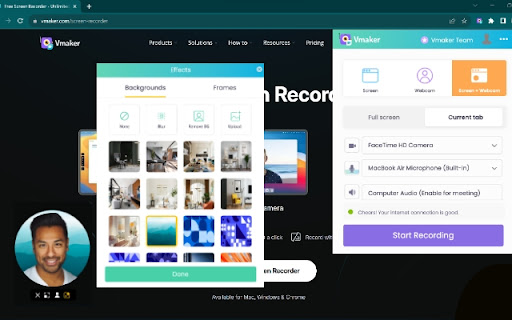
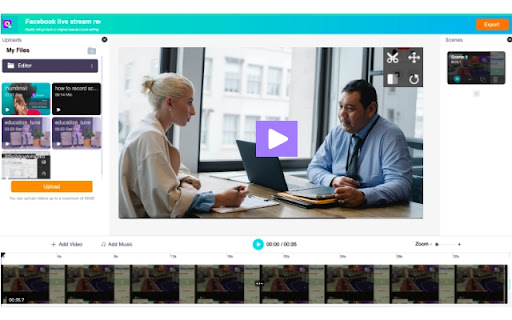
Record your screen, webcam, mic, and computer audio in just a click. Vmaker is a free screen recorder that can easily be downloaded as a Chrome Extension. The Vmaker Chrome Screen Recorder lets you record, edit, host, and share your videos effortlessly in just a matter of a few minutes. It has no watermark, comes with a built-in video editor, and allows you to export your recordings in MP4 file format. KEY FEATURES 🎥 Screen + Webcam Recording 🎥 ▪️ Record multiple tabs and windows ▪️ Record videos without any watermark ▪️ Record unlimited videos ▪️ Record dual screen ▪️ Record screen, webcam, or screen + webcam ▪️ Record both computer and mic audio ▪️ Highlight mouse clicks and add annotations ▪️ Customize webcam background with AI-powered virtual backgrounds (for screen + webcam mode) ▪️ Blur Tool: blur sensitive information before or while recording ▪️ Save your videos to the cloud ✂️ Video editing ✂️ ▪️ Trim, rotate, flip, or resize your recording ▪️ Merge external videos with your existing recording ▪️ Add cool intros and outros ▪️ Export in MP4 format at HD quality 💾 Video hosting, sharing, analytics, and more 💾 ▪️ Host and save unlimited videos to the cloud ▪️ Track view data ▪️ Add brand colors, logo, and CTA to your videos ▪️ Share the video as a copied link ▪️ Upload the video directly to social media platforms like YouTube, Facebook, Twitter, LinkedIn, etc. ▪️ Embed your video to your blog or website 👀 AVAILABLE FOR FREE 🚀Join our massive community of video creators today! ✔ 1 Million + videos recorded ✔ 350K+ users worldwide ✔ Available in 7 global languages ✔ Works on all versions of Chrome browsers ✔ Also available as Mac and Windows standalone applications. —------------------------------------------------------------------------------------------------------------------------- How to Record Your Screen Using Our Screen Recorder Chrome Extension? Step 1: Download Vmaker's Chrome plug-in Step 2: Pin the plug-in to your Chrome browser Step 3: Launch the plug-in Step 4: Customize your recording requirements Step 5: Record your video, edit, and share with everyone —------------------------------------------------------------------------------------------------------------------------- How Does Vmaker's Chrome Screen Recorder Promote Communication & Collaboration? 📚Education ▪️ Record training videos, how-to videos, tutorials, and presentations ▪️ Provide video feedback for students ▪️ Record FAQ videos 🗣️Customer support ▪️ Create troubleshooting guides ▪️ Create detailed report analysis ▪️ Provide personalized video replies to support tickets & mails 👩🏻‍💻Development ▪️ Review code & provide feedback ▪️ Create onboarding guides & manuals for new joinees ▪️ Provide a visual walkthrough of your project status ✍🏻Design ▪️ Share design feedback ▪️ Report UX bugs Record video messages to communicate your ideas with your design team 🎯Marketing ▪️ Record product demonstrations & presentations ▪️ Create onboarding or welcome videos 📈Sales ▪️ Send personalized video notes to book demos ▪️ Create product training videos highlighting its features ▪️ Reach out to leads via personalized cold calls 🎮Gaming ▪️ Record unlimited live streams & game plays ▪️ Record gaming reviews, comparison & highlights with crisp editing 💁🏽Others use cases ▪️ Record online meetings ▪️ Create video resume ▪️ Record instructional guides INFO/ CONTACT US: 📩Email: hola@vmaker.com 🗣Tech support: https://vmaker.com/support 📃Tutorials & Support docs: https://vmaker.com/tutorials
Vmaker - Free Screen Recorder screenshot 1Vmaker - Free Screen Recorder screenshot 2Vmaker - Free Screen Recorder screenshot 3Vmaker - Free Screen Recorder screenshot 4Vmaker - Free Screen Recorder screenshot 5

Reviews (26 cached)

★☆☆☆☆2025-07-23
Sutimon Phannamueang

I lost my file forever

★☆☆☆☆2025-07-11
Trúc Võ

NOT WORK

★☆☆☆☆2025-07-09
Muhammad Alan Nur

fraud

★☆☆☆☆2025-05-21
Snow Hunter

Dumb

★☆☆☆☆2025-03-13
Badr Asiri

it says free export for small recording to 5 minutes. I recorded 6 seconds,, but when i tried to export it says subscribe. this is dishonest and scam.

★☆☆☆☆2024-12-02
Tyson Keane

After getting frustrated with many fake-free recording apps, I finally found this product SCREEN RECORDER - MY SPACE. Capture Screen & Camera. Share via GOOGLE DRIVE and that worked like a charm. it perfectly did what it promised, truly completely, free, loaded with advanced features.

★☆☆☆☆2024-11-29
Kristijan Bugaric

I refused to believe it but it really is only free for 1 minute. For real guys?

★☆☆☆☆2024-09-17
Atousa Darabi

It is just free for one minute not more...

★☆☆☆☆2024-08-09
solo hunter

doesnt save videos will waste your time , then make you pay a fee for no reason

★☆☆☆☆2024-07-09
Brown Family

I can't even get it to work, this app is totally useless.

★☆☆☆☆2024-04-15
Pablo López

A full registration for a background filter video recorder, and the background filters are for premium users. gosh!

★☆☆☆☆2024-02-21
krit

Paid from $7, all we need is a record button and a download button, there’s a whole catalog of something incomprehensible, and what it records is also not clear where the logs are, maybe this extension records cookies and passwords in your browser?

★☆☆☆☆2024-02-17
Kemar Irving

There camera doesn't work and always records in the worst quality based on two different computers used even though similar apps like awesome screenshot records in way better quality.

★☆☆☆☆2023-06-10
Newday Allgood

Very difficult.

★☆☆☆☆2023-06-04
Iflair Web

Worst and they lies that this is a free to use, it allows only for 7 mins for all the videos. so it is better to use screencastify for 10 videos. I will ask to remove my account

★☆☆☆☆2023-05-22
Gautam Kumar

Unable to signup.

★☆☆☆☆2023-02-13
Yvonne Mason

I paid $84 for this extension this morning. It takes FOREVER for the video to be ready for download. When it is ready, it takes another FOREVER to download. Sometimes it is NEVER ready for download. I recorded a video at 8:30am EST today and it is STILL not downloading and it is now noon. This screen recording company is horrible. I contacted them, and customer service doesn't respond to "instant messages" for hours. If you're looking for a screen recording service, and you're paying for it, skip this one. It is not worth the money. I wish I never made this purchase. I have my followers on patreon waiting for a meeting we did this morning, and they have waited close to 4 hours right now. SKIP THIS ONE AND GOT WITH ANOTHER COMPANY.

★☆☆☆☆2022-02-01
Amanda Watkins

You can only record 7 minutes for free, regardless of input or quality of video. 0/10

★☆☆☆☆2021-12-28
Jurjen de Vries

Was advertised as free including tools such as annotation, but as soon as installed and created an account it seems a feature that should be paid for.

★☆☆☆☆2021-08-04
Windows 3.0

WHAT THE HELL ITS CRASHED MY BROWSER WHEN I CLICKED RECORD I DON'T LIKE THIS STUPID SCREENRECORD

★★☆☆☆2022-03-18
Alekss Zeltins

Signup with email didn't work and was frustrating to say the least.

★★☆☆☆2022-01-04
Lê Triệu Vy 2518_I26

first it dont limit my record time but now, just 7 min, too short

★★☆☆☆2021-11-28
jagadesh babu

No option to save locally. I don't understand why login is required for accessing extension settings. Unistalled.

★★★☆☆2021-10-22
Quang Hậu Nguyễn

it can not run the video after i finish record ,it run 99% all day and can not run 100% to upload the video

★★★☆☆2021-08-23
Nabhan Rafli Pratama

Cant start

★★★☆☆2021-06-06
Bradley Elton

I would give this a 5 star review, but whenever I press up once, it's supposed to pause. But when I watch my video back, I CAN STILL SEE THE PARTS I PAUSED. FIX THIS AND I'LL LEAVE A BETTER REVIEW.

Permissions (9)

Permissions

activeTab Can access the current tab when you click the extension desktopCapture Can capture screen, window, or tab content idle Can detect when you're away from the computer notifications Can show desktop notifications scripting Can inject scripts into web pages storage Can store data locally in your browser tabCapture Can capture tab audio/video tabs Can see your open tabs and their URLs unlimitedStorage

Details

Version 5.2.0
Updated Jan 14, 2026
Size 8.58MiB
First Seen Mar 21, 2026



