
⚠️Not updated in over 2 years
Description
Requirements:
- Airtable account
- OpenAI account
- License key - can be purchased via https://businessautomated.gumroad.com/l/airtable-hint
Sometimes, even those of us who are well-versed in formulas (like we are at Business Automated! 😁) struggle with creating the right Airtable formulas. Writing a new formula can be mentally taxing at times 😉. But don't worry, we're here to help!
Whether you're a newbie or an Airtable expert, this Chrome extension can speed up the process of creating formulas in Airtable. If you're just starting with Airtable formulas, this tool can help guide you in the right direction and even provide the final complete formula. For Airtable experts, having an AI robot change all variables in nested IF statements to other ones can be a huge time saver. This tool can also help rewrite formulas, such as from IF to SWITCH.
The Airtable Hint GPT Chrome extension
Our Airtable Hint GPT extension is based on Open AI's GPT language model. This model uses deep learning techniques to generate human-like text based on a given prompt. Our extension utilizes this technology to help users create Airtable formulas more efficiently. You are able to type what you want the formula to do and see result
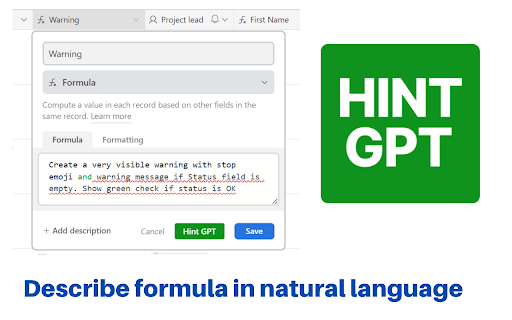
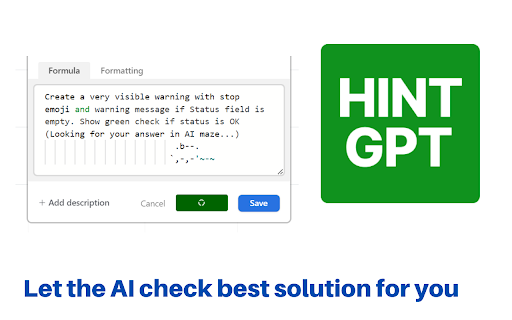
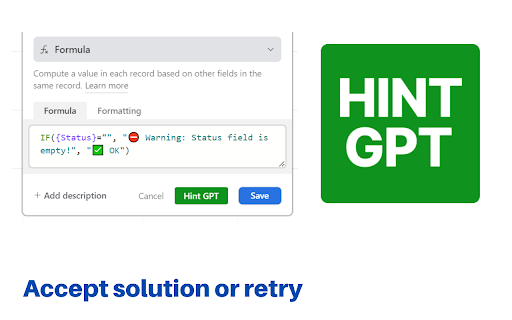
Type your instruction and get back formula!
You can download the extension from the link on the right .
The source code of the extension is available publicly via my open source Github repository. Contributions are welcomed.
Completion modes
We provide two modes of completion:
-ChatGPT based completions - which might sometimes be a bit more verbose
- Regular GPT completions - tend to be shorter, but have higher cost per token
How to test ChatGPT formula suggestions?
Clone this test base
https://airtable.com/shrrM8qIp5XtVvqgD
and try couple of ideas for formula like:
- Create a very visible warning with stop emoji and warning message if Status field is empty. Show green check if status is OK
- How many days between Due date and Kick off
- Check if emails in Email field have correct format using REGEX_MATCH() function. Display visible warning in case emails are not correct
- If Status is Complete display Task name in capitals with excited emoji at the start
Watch full description and walkthrough in this video:
https://youtu.be/QEPW_A93_GI

Reviews
Loading reviews...
Permissions (1)
Permissions
storageℹ Can store data locally in your browser
Details
| Version | 1.1.4 |
| Updated | Apr 12, 2023 |
| Size | 152KiB |
| First Seen | Mar 26, 2026 |
Popular in workflow

Adobe Acrobat: PDF edit, convert, sign tools
by Adobe Inc.
330M
★ 4.40
workflow
330M
★ 4.40
workflow

Chrome Remote Desktop
by Chrome Remote Desktop Release Managers
38M
★ 3.14
workflow
38M
★ 3.14
workflow

MetaMask
by metamask
13M
★ 2.68
workflow
13M
★ 2.68
workflow

Microsoft Power Automate
by Microsoft Corporation
10M
★ 1.99
workflow
10M
★ 1.99
workflow

Screencastify - Screen Video Recorder
by castify-ext-dev
9M
★ 3.95
workflow
9M
★ 3.95
workflow
Popular Extensions
Adobe Acrobat: PDF edit, convert, sign tools
by Adobe Inc.
330M
★ 4.40
workflow
330M
★ 4.40
workflow
Chrome Remote Desktop
by Chrome Remote Desktop Release Managers
38M
★ 3.14
workflow
38M
★ 3.14
workflow

Cisco Webex Extension
by cisco.chromestore
24M
★ 2.34
social
24M
★ 2.34
social

Kami for Google Chrome™
by Kami
19M
★ 4.56
education
19M
★ 4.56
education

Read&Write for Google Chrome™
by Texthelp
17M
★ 3.44
accessibility
17M
★ 3.44
accessibility