
Clipboard History Manager - Secure, Fast, and Open Source
by Andy Young
v1.4.18 Updated Jan 16, 2026 1.31MiB
✅Highly rated
Description
The first open source clipboard history manager Chrome extension. Get all of the productivity benefits of a clipboard history with none of the security risks.
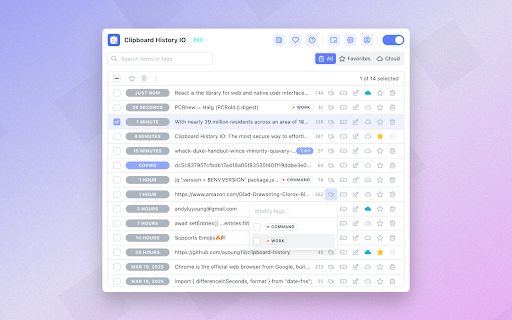
Clipboard History IO offers a simple, efficient, and secure way to manage your clipboard. When the clipboard monitor is enabled, everything you copy to your clipboard will be backed up and saved for easy access later. Never worry about losing important content in your clipboard again!
🛠 Features
• Comprehensive Clipboard History Management: Access and modify a complete history of everything copied to your clipboard.
• Favoriting and Tagging: Mark items as favorites or add tags for faster access through search or filters.
• Customization: Adjust extension settings and themes to suit your preferences.
• Import and Export: Easily import or export items, including those created by this extension or others like Clipboard History Pro.
• Merging: Combine multiple items seamlessly using a powerful merge tool.
• Floating Mode: Open the clipboard history in a separate persistent and resizable window.
• Paste from Context Menu: Conveniently paste recently copied items directly from the context menu on any website.
• Keyboard Shortcuts: Quickly paste items using keyboard shortcuts.
• Cloud Sync (Pro): Manually or automatically store items in the cloud and access them from any of your devices.
🔒 Security & Privacy:
Unrestricted access to your clipboard can raise serious privacy concerns. In an effort to be the most trustworthy clipboard history manager, Clipboard History is fully open-source. You can download or review the source code here: https://github.com/ayoung19/clipboard-history
📝 Changelog:
https://github.com/ayoung19/clipboard-history/releases


Reviews (4 cached)
★☆☆☆☆2025-01-21
Levent
Not working on Brave browser.
★☆☆☆☆2024-12-30
james smith
This app is far from the original CHPRO, just a waste of time. :(
★★☆☆☆2025-04-25
After Burner
UPDATE This WORKS AGAIN JUST NEED TO RESTART IT, UPDATE NOW THIS DOES NOT WORK, REMOVED The PRO, Was NOT Working anymore in Win7 and Can Not Add a Review there as i already reviewed it a few years ago, and can only do 1 review, Anyhow THIS WORKED Right AS SOON As I Installed It SEEMS Like It WILL Be MUCH BETTER THAN PRO NOW So GLAD I DID Not WASTE MY MONEY PAYIN fOR AN UPGRADE IN PRO OR GETTIN THE LICENCE TO USE IT. I WILL DOONATE LATER SOON. THANKS FOR THE EFFORTS MAKING THIS
★★★☆☆2024-10-05
Qaiser Azim
Please add extension option in right context menu So that we can directly taste any text from the right click of mouse
Permissions (9)
Permissions
activeTabℹ Can access the current tab when you click the extension clipboardReadℹ Can read from your clipboard clipboardWriteℹ Can write to your clipboard contextMenusℹ Can add items to the right-click menu offscreen scriptingℹ Can inject scripts into web pages sidePanel storageℹ Can store data locally in your browser unlimitedStorage
Details
| Version | 1.4.18 |
| Updated | Jan 16, 2026 |
| Size | 1.31MiB |
| First Seen | Mar 24, 2026 |
Popular in workflow

Adobe Acrobat: PDF edit, convert, sign tools
by Adobe Inc.
330M
★ 4.40
workflow
330M
★ 4.40
workflow

Chrome Remote Desktop
by Chrome Remote Desktop Release Managers
38M
★ 3.14
workflow
38M
★ 3.14
workflow

Microsoft Power Automate
by Microsoft Corporation
10M
★ 1.99
workflow
10M
★ 1.99
workflow

Screencastify - Screen Video Recorder
by castify-ext-dev
9M
★ 3.95
workflow
9M
★ 3.95
workflow

Mendeley Web Importer
by Mendeley
3M
★ 2.25
workflow
3M
★ 2.25
workflow
Popular Extensions
Adobe Acrobat: PDF edit, convert, sign tools
by Adobe Inc.
330M
★ 4.40
workflow
330M
★ 4.40
workflow
Chrome Remote Desktop
by Chrome Remote Desktop Release Managers
38M
★ 3.14
workflow
38M
★ 3.14
workflow

Cisco Webex Extension
by cisco.chromestore
24M
★ 2.34
social
24M
★ 2.34
social

Kami for Google Chrome™
by Kami
17M
★ 4.56
education
17M
★ 4.56
education

Read&Write for Google Chrome™
by Texthelp
17M
★ 3.44
accessibility
17M
★ 3.44
accessibility