
⚠️Not updated in over a year
Description
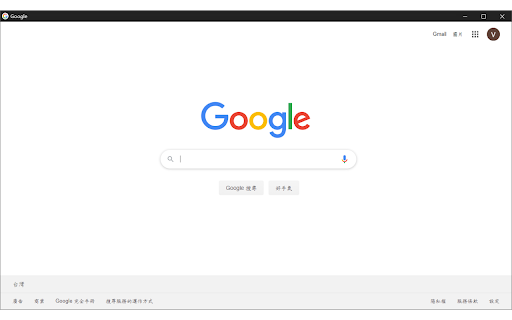
1.點擊擴充插件圖示->以無邊框視窗開啟目前瀏覽的網頁
2.滑鼠對超連結右鍵->以無邊框視窗開啟
(1)Click the button of this extension to browse the current webpage with borderless window
(2)Right click the hyperlink what you want to browse and you will see a option to open the webpage with borderless window
※由於Google對於電腦檔案的存取因安全疑慮有嚴格規定, 目前無法透過此插件開啟電腦檔案!(說不定哪天發現新方法就會更新)
更新日誌(Update Log):
[2025/01/22, v2.0.1]修正開啟瀏覽器後,首次使用無邊框視窗開啟網頁時,總是無效的異常
[2023/12/14, v2.0.0]因為Google政策改變,調整程式以符合最新要求
Reviews
Loading reviews...
Permissions (4)
Permissions
activeTabℹ Can access the current tab when you click the extension contextMenusℹ Can add items to the right-click menu offscreen storageℹ Can store data locally in your browser
Details
| Version | 2.0.1 |
| Updated | Jan 22, 2025 |
| Size | 12.23KiB |
| First Seen | Mar 24, 2026 |
Popular in workflow

Adobe Acrobat: PDF edit, convert, sign tools
by Adobe Inc.
330M
★ 4.40
workflow
330M
★ 4.40
workflow

Chrome Remote Desktop
by Chrome Remote Desktop Release Managers
38M
★ 3.14
workflow
38M
★ 3.14
workflow

Microsoft Power Automate
by Microsoft Corporation
10M
★ 1.99
workflow
10M
★ 1.99
workflow

Screencastify - Screen Video Recorder
by castify-ext-dev
9M
★ 3.95
workflow
9M
★ 3.95
workflow

Mendeley Web Importer
by Mendeley
3M
★ 2.25
workflow
3M
★ 2.25
workflow
Popular Extensions
Adobe Acrobat: PDF edit, convert, sign tools
by Adobe Inc.
330M
★ 4.40
workflow
330M
★ 4.40
workflow
Chrome Remote Desktop
by Chrome Remote Desktop Release Managers
38M
★ 3.14
workflow
38M
★ 3.14
workflow

Cisco Webex Extension
by cisco.chromestore
24M
★ 2.34
social
24M
★ 2.34
social

Kami for Google Chrome™
by Kami
17M
★ 4.56
education
17M
★ 4.56
education

Read&Write for Google Chrome™
by Texthelp
17M
★ 3.44
accessibility
17M
★ 3.44
accessibility