
Description
Save to Day One
Capture what matters while you browse.
The Save to Day One Chrome extension helps you quickly send web links, text highlights, and notes to your Day One journal. Whether you’re researching, bookmarking, or simply want to remember something meaningful, this extension gives you an easy way to preserve it all.
Great for:
• Saving articles to reflect on later
• Capturing research or learning resources
• Bookmarking ideas and inspiration
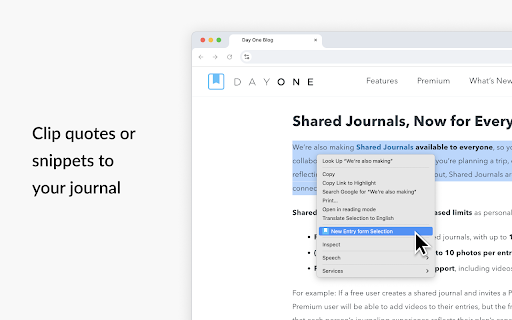
• Clipping quotes and highlights to your journal
• Keeping a digital log of what catches your attention each day
Features
• Save your current page – Click the Day One icon in your browser to instantly capture the title and URL of the page you’re viewing. Add an optional note or tags, then send it to your journal.
• Highlight and save text – Select any text on a webpage, right-click, and choose "Save to Day One" from the menu. The selected text will be saved as a new journal entry.
• Add context – Write a quick note or add custom tags before saving. Every new journal entry becomes part of your personal timeline in Day One.
How It Organizes Your Entries
• New Bookmarks Journal – When you use the extension for the first time, Day One automatically creates a new journal called Bookmarks. All entries saved through the extension go here by default, keeping your web captures organized and separate from your personal entries, unless you choose otherwise.
• Default Journal Control – Prefer to save to another journal? You can set your default journal in the extension settings.
• Optional tags – Add your own tags when saving so you can find entries later by topic or theme.
Settings & Customization
• Default journal – Select which journal new entries are saved to.
• One-click saving – Enable “Save without editing” to skip the entry editor and save instantly.
• Open entries in – Choose whether saved entries open in the Day One Mac app or web app.
• Theme – Set your preferred appearance: Light, Dark, or System.
Private by Design
Like everything in Day One, your content is always yours. Anything saved through the extension is end-to-end encrypted, stored securely in your private account, and synced across your devices. We never collect or share your browsing data.
Syncs Across Your Devices
Entries saved through the extension are instantly available in the Day One app on iPhone, iPad, Mac, and Android. From desktop, you can open entries immediately in Day One for Mac or web. With Premium, your journal stays in sync across all your devices—ready to expand, edit, or revisit anytime.
To use the extension, you’ll need to sign in to your Day One account. If you don’t have one yet, you can sign up here: https://dayone.me
How to Get Started
1. Install the extension.
2. Click the Day One icon in your browser.
3. Sign in with your Day One account. Simply use the QR code for easy login on web if you're logged in on your mobile device.
5. Start saving.
About Day One
Day One is the trusted journaling app used by millions of people to capture life as they live it. With beautiful design, end-to-end encryption, multimedia support, and easy exporting, it’s the best place to write your story.
Learn more at https://dayoneapp.com



Reviews
Loading reviews...
Permissions (5)
Permissions
activeTabℹ Can access the current tab when you click the extension contextMenusℹ Can add items to the right-click menu scriptingℹ Can inject scripts into web pages storageℹ Can store data locally in your browser tabsℹ Can see your open tabs and their URLs
Details
| Version | 1.3.5 |
| Updated | Nov 18, 2025 |
| Size | 881KiB |
| First Seen | Mar 24, 2026 |
More by Automattic Inc.

Popular in workflow

Adobe Acrobat: PDF edit, convert, sign tools
by Adobe Inc.
330M
★ 4.40
workflow
330M
★ 4.40
workflow

Chrome Remote Desktop
by Chrome Remote Desktop Release Managers
38M
★ 3.14
workflow
38M
★ 3.14
workflow

Microsoft Power Automate
by Microsoft Corporation
10M
★ 1.99
workflow
10M
★ 1.99
workflow

Screencastify - Screen Video Recorder
by castify-ext-dev
9M
★ 3.95
workflow
9M
★ 3.95
workflow

iCloud Bookmarks
by Apple Inc.
7M
★ 3.38
workflow
7M
★ 3.38
workflow
Popular Extensions
Adobe Acrobat: PDF edit, convert, sign tools
by Adobe Inc.
330M
★ 4.40
workflow
330M
★ 4.40
workflow
Chrome Remote Desktop
by Chrome Remote Desktop Release Managers
38M
★ 3.14
workflow
38M
★ 3.14
workflow

Cisco Webex Extension
by cisco.chromestore
24M
★ 2.34
social
24M
★ 2.34
social

Kami for Google Chrome™
by Kami
17M
★ 4.56
education
17M
★ 4.56
education

Read&Write for Google Chrome™
by Texthelp
17M
★ 3.44
accessibility
17M
★ 3.44
accessibility