
Description



Reviews (11 cached)
Does not work.
LOL You can use it twice and then it asks you to pay for it. Don't waste your time installing.
1 star. my browser got hijacked and i got linked to this extention.
LOL Flowtime is the opposite of Pomodoro
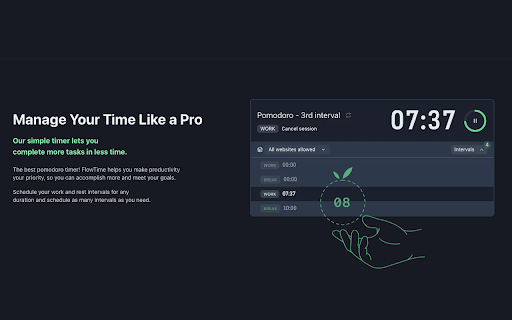
Please bring back the old version. The new version doesn't have support for adding multiple periods at once. This was supposed to a pomodoro like timer but you removed the one thing that makes it better than others. Now there is not option to configure multiple pomodoro's nor the breaks.
Im quite annoyed they changed how this works - the latest update means I can't pause the timer and then pick up where I left off whcih is what I used to be able to do. That's just silly - anytime you might need to answer a call or something and how are you supposed to pick off where you left off? That's a fundamental flaw in the update!
It's a useful app, but I find the timer distracting when working. Is there a way to hide it?
Nice and simple, but maybe too simple. I wish I could add time when I forgot to click the button. The only way to do this is to let it run when I'm not doing work. In the words of my great leader: "SAD!"
This product would have all the amazing features if you could just add multiple phases like you can do with the original flow time 1 where you could have one long session with multiple rest times in between. This would help a lot with stopping burn out. Will rate higher if added but for now Im going to keep it at 3 stars
The time remaining stays visible, but barely. I've gone with another one (Pomodo'more) that's a bit more visible, as a reminder to focus.
Works well, but no pause button? Really? Lost two stars for that. Please add.
Permissions (4)
Permissions
Details
| Version | 4.0.3 |
| Updated | Mar 8, 2024 |
| Size | 231KiB |
| First Seen | Mar 21, 2026 |
Popular in workflow





Popular Extensions


