
Description
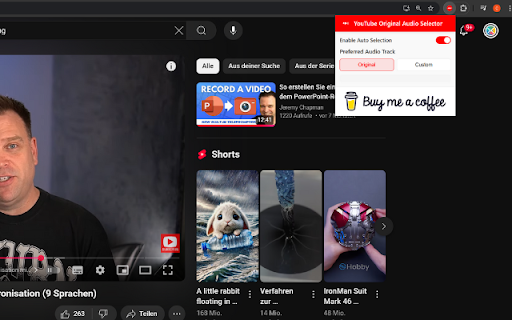
YouTube Original Audio Selector is a simple, lightweight Chrome extension that automatically picks the audio track you want to hear—no clicking around, no guesswork. Whether you're learning a language, watching foreign films, or just want the original voices instead of AI dubs, this tool makes sure you get the real deal.
🎧 Why You'll Love It
Always Picks the Right Audio
Automatically selects the original audio or your favorite language when it’s available.
No More AI Voices
Tired of robotic AI dubbing? This extension skips it in favor of real human voices by default.
Set It Your Way
Prefer English? Spanish? Just want the original? You can choose your go-to audio track.
Works With Multi-Audio Videos
Especially handy for YouTube videos with multiple synced tracks—it just works.
No Interruptions
Runs quietly in the background—no pop-ups, no delays.
Takes Seconds to Set Up
Just install, pick your preference, and forget about it. It’ll handle the rest.
How It Works
When you open a YouTube video that has more than one audio option, the extension checks what’s available and switches to your preferred track automatically. You don’t have to lift a finger.
Who It’s For
🌍 Viewers who want videos in their native or target language
🎓 Language learners looking for real pronunciation
🎬 Film lovers who care about original performances
⏱️ Anyone tired of manually changing audio settings
Your Privacy Matters
We don’t track anything. Your settings stay on your device—no data collection, no sharing, no nonsense.

Reviews (6 cached)
★☆☆☆☆2025-09-23
Kuraiko
It's literally doing nothing.
★☆☆☆☆2025-04-24
mlg dog
sadly i have to agree with yosef. for some reason, this extension closes the settings pop-up when i open it??? since i often use the settings pop-up to adjust playback speed, i could not test the actual functionality of the extension... uninstalled immediately
★☆☆☆☆2025-03-12
Claudio Ettorre
Doesn't work!
★★★☆☆2025-11-04
Mathew Gibbons (Gaiash)
While it works as intended when a video only has one audio track I get an annoying "Video has no alternative audio tracks" pop up.
★★★☆☆2025-06-07
Dark Spectre
Only works in Desktop Mode on Android.
★★★☆☆2025-05-30
Niklas Aumüller
Works as intended for the audio track but blocks the settings menu of the video player from opening, so setting the playback speed or enabling subtitles is not possible while this extension is active
Permissions (2)
Permissions
storageℹ Can store data locally in your browser tabsℹ Can see your open tabs and their URLs
Details
| Version | 1.0.2 |
| Updated | Jun 21, 2025 |
| Size | 133KiB |
| First Seen | Mar 24, 2026 |
Popular in tools

Browsec VPN - Free VPN for Chrome
by Browsec
7M
★ 4.44
tools
7M
★ 4.44
tools

Microsoft Bing Homepage & Search for Chrome
by Microsoft Corporation
4M
★ 3.72
tools
4M
★ 3.72
tools

Monica: All-In-One AI Assist & Smartest AI Agent
by Monica Team
3M
★ 4.89
tools
3M
★ 4.89
tools

Ad Blocker: Stands AdBlocker
by Stands
3M
★ 4.79
tools
3M
★ 4.79
tools

Google Dictionary (by Google)
by dictionary-extension-dev
3M
★ 4.36
tools
3M
★ 4.36
tools
Popular Extensions

Adobe Acrobat: PDF edit, convert, sign tools
by Adobe Inc.
330M
★ 4.40
workflow
330M
★ 4.40
workflow

Chrome Remote Desktop
by Chrome Remote Desktop Release Managers
38M
★ 3.14
workflow
38M
★ 3.14
workflow

Cisco Webex Extension
by cisco.chromestore
24M
★ 2.34
social
24M
★ 2.34
social

Kami for Google Chrome™
by Kami
17M
★ 4.56
education
17M
★ 4.56
education

Read&Write for Google Chrome™
by Texthelp
17M
★ 3.44
accessibility
17M
★ 3.44
accessibility