
⚠️Not updated in over 2 years
Description
With Upbase, you can quickly capture ideas, take notes, make to-do lists, plan your day with time blocking, stay focused with a Pomodoro timer, and many more. Simple, clean, and beautifully designed.
⚫️ FEATURES
◾️ Bookmark manager
Organize your favorite websites on a Kanban-style board. You can drag and drop your bookmarks to quickly change their position and column.
◾️ Private and Team Tasks
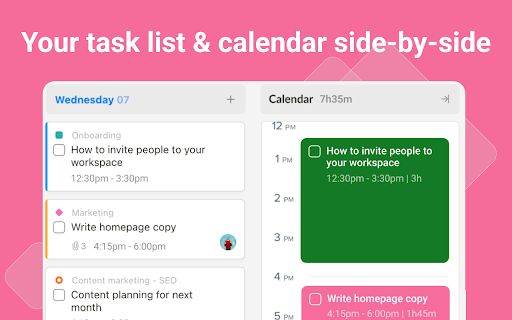
Quickly create monthly, weekly, and daily tasks. Add subtasks, detailed description, set priority, attach files, and collaborate with your teammates.
◾️ Notepad and Daily Notes
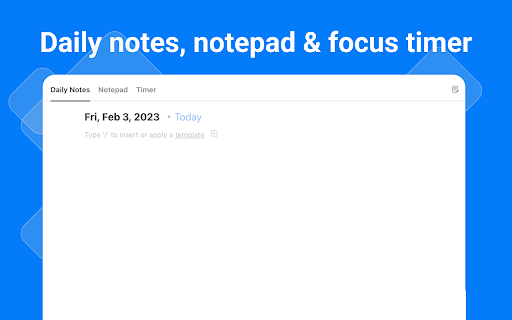
Got something on your mind? Open the Notepad or Daily Notes and quickly jot down your thoughts and ideas.
◾️ Pomodoro Timer
Stay focused and boost productivity with the Pomodoro Technique. Just pick a task you need to work on, start the timer, and focus on the task for 25 minutes. Take a break and repeat. Simple, yet very effective.
◾️ Calendar with Time Blocking
Schedule your daily tasks on the calendar to create a sense of urgency, avoid procrastination and practice deep work.
⚫️ FAQs
➔ Do I need to sign up for an account to use Upbase?
Yes, you need to sign up for an account and create a FREE workspace to be able to use the extension.
➔ What is a workspace?
A workspace is the highest-level organizational unit in Upbase. It's where you organize all your work and collaborate with your teammates. With each account, you can create multiple workspaces.
➔ Is it free to use?
Yes, Upbase is completely free. Also, if you want to use Upbase as a project management tool, you can upgrade to the Premium plan to unlock additional features. Visit upbase.io/pricing for more information.
⚫️ MORE INFORMATION
Website: upbase.io
Help Center: help.upbase.io
Contact Us: help@upbase.io



Reviews (2 cached)
★★★☆☆2023-03-10
Tetiana Bilokin
I can't find a way to quickly add a bookmark. I expected to see a context menu option or clicking on the upbase extension would do the job, but so far the only way to add a bookmark is manually (unless I'm missing something). Ideally, it would be great to be able to import browswer bookmarks or HTML file.
★★★☆☆2023-02-15
Josef Kučera
Not so bad, but it is necessary to improve it yet - Actually I was expecting more, because I use Upbase and compared to that, this is average. However, I believe that in the future it will definitely be a cool extension :)
Permissions (4)
Permissions
identityℹ Can use your Google account identity storageℹ Can store data locally in your browser tabsℹ Can see your open tabs and their URLs unlimitedStorage
Details
| Version | 1.0.3 |
| Updated | Nov 19, 2023 |
| Size | 1.93MiB |
| First Seen | Mar 24, 2026 |
Popular in workflow

Adobe Acrobat: PDF edit, convert, sign tools
by Adobe Inc.
330M
★ 4.40
workflow
330M
★ 4.40
workflow

Chrome Remote Desktop
by Chrome Remote Desktop Release Managers
38M
★ 3.14
workflow
38M
★ 3.14
workflow

Microsoft Power Automate
by Microsoft Corporation
10M
★ 1.99
workflow
10M
★ 1.99
workflow

Screencastify - Screen Video Recorder
by castify-ext-dev
9M
★ 3.95
workflow
9M
★ 3.95
workflow

Mendeley Web Importer
by Mendeley
3M
★ 2.25
workflow
3M
★ 2.25
workflow
Popular Extensions
Adobe Acrobat: PDF edit, convert, sign tools
by Adobe Inc.
330M
★ 4.40
workflow
330M
★ 4.40
workflow
Chrome Remote Desktop
by Chrome Remote Desktop Release Managers
38M
★ 3.14
workflow
38M
★ 3.14
workflow

Cisco Webex Extension
by cisco.chromestore
24M
★ 2.34
social
24M
★ 2.34
social

Kami for Google Chrome™
by Kami
17M
★ 4.56
education
17M
★ 4.56
education

Read&Write for Google Chrome™
by Texthelp
17M
★ 3.44
accessibility
17M
★ 3.44
accessibility