
⚠️Not updated in over 2 years
Description
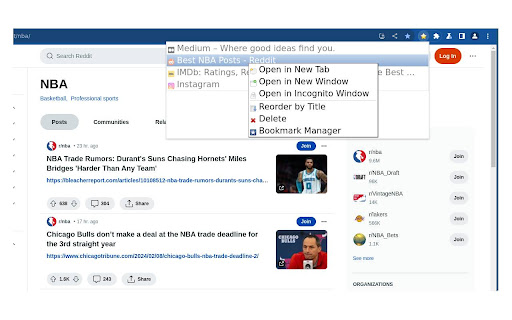
This extension provides access to a bookmarks menu.
How to use:
- Click with the left mouse button to open a bookmark in the current tab.
- Use the middle mouse button or the left mouse button while holding down the Ctrl key to open a bookmark in a new tab.
- To instantly switch to a newly opened tab with a bookmark, press the middle mouse button while holding down the Shift key.
- Press the left mouse button with the Shift key held down to launch a bookmark in a new window.
- Click the middle button on a folder to open all its bookmarks in separate tabs.
- Right-click to bring up the context menu.
In the settings panel, you can choose to conceal certain bookmarks or folders, which is particularly handy if you're syncing bookmarks across various computers.


Reviews
Loading reviews...
Permissions (5)
Permissions
bookmarksℹ Can read and modify your bookmarks faviconfontSettings storageℹ Can store data locally in your browser webNavigationℹ Can monitor navigation events
Details
| Version | 3.4 |
| Updated | Feb 29, 2024 |
| Size | 184KiB |
| First Seen | Mar 24, 2026 |
Popular in workflow

Adobe Acrobat: PDF edit, convert, sign tools
by Adobe Inc.
330M
★ 4.40
workflow
330M
★ 4.40
workflow

Chrome Remote Desktop
by Chrome Remote Desktop Release Managers
38M
★ 3.14
workflow
38M
★ 3.14
workflow

Microsoft Power Automate
by Microsoft Corporation
10M
★ 1.99
workflow
10M
★ 1.99
workflow

Screencastify - Screen Video Recorder
by castify-ext-dev
9M
★ 3.95
workflow
9M
★ 3.95
workflow

Mendeley Web Importer
by Mendeley
3M
★ 2.25
workflow
3M
★ 2.25
workflow
Popular Extensions
Adobe Acrobat: PDF edit, convert, sign tools
by Adobe Inc.
330M
★ 4.40
workflow
330M
★ 4.40
workflow
Chrome Remote Desktop
by Chrome Remote Desktop Release Managers
38M
★ 3.14
workflow
38M
★ 3.14
workflow

Cisco Webex Extension
by cisco.chromestore
24M
★ 2.34
social
24M
★ 2.34
social

Kami for Google Chrome™
by Kami
17M
★ 4.56
education
17M
★ 4.56
education

Read&Write for Google Chrome™
by Texthelp
17M
★ 3.44
accessibility
17M
★ 3.44
accessibility