
⚠️Not updated in over 2 years
Description
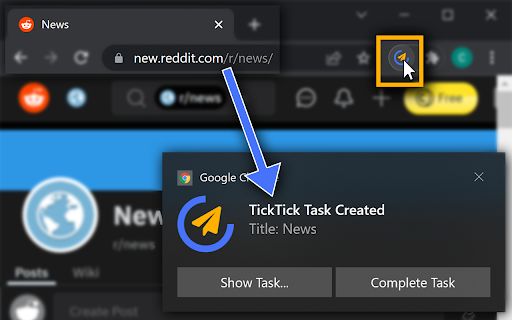
If you frequently create TickTick tasks linking to a website you visit - maybe to visit again later or to remember something - One-Click TickTick is for you! Login once and saving a link to the current page is just one click away.
⚡ Quick and Snappy
Task creation is immediate, no waiting for TickTick to load. Click the button and the page is saved!
⭐ Features and Available Options
- [NEW] Web clipper functionality! Saves contents of the website as formatted task description (can be disabled in extension options)
- Add tags to each created task
- Automatically add a due date
- Quickly open the created task via the notification to add more information
- Right-click anywhere on the page to create a task
- Include selected text in the created task or use it as a title
- Close the current tab at the same time (use it as a "read later" button)
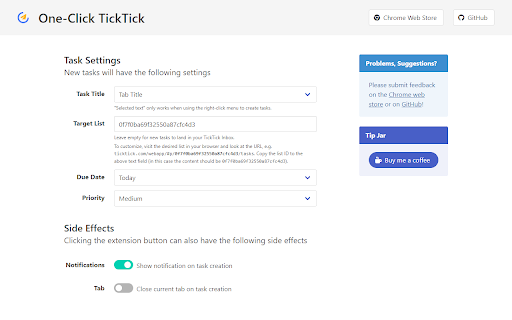
Tasks will directly land in your inbox. In the options page, you can configure additional properties the new tasks should have.
Functionality is limited by the official TickTick Open API. This is a community extensions not developed by TickTick.

Reviews (2 cached)
★☆☆☆☆2025-02-26
Andreas Persson
Looks promising, however selecting text and right-clicking "Send Selection to TickTick" only open the extension's settings page, with no apparent way of actually sending the text. It does not show up in Inbox or anywhere else in TT. Am I missing something? Also, presuming it works, would it be possible to create Notes as well? Maybe even set default Lists for Tasks and Notes separately? Thank you!
★☆☆☆☆2022-05-11
손형준
failed to login with apple id
Permissions (7)
Permissions
activeTabℹ Can access the current tab when you click the extension contextMenusℹ Can add items to the right-click menu identityℹ Can use your Google account identity notificationsℹ Can show desktop notifications scriptingℹ Can inject scripts into web pages sessionsℹ Can access recently closed tabs and windows storageℹ Can store data locally in your browser
Details
| Version | 1.4.2 |
| Updated | Mar 15, 2024 |
| Size | 685KiB |
| First Seen | Mar 26, 2026 |
More by csdev


Popular in workflow

Adobe Acrobat: PDF edit, convert, sign tools
by Adobe Inc.
330M
★ 4.40
workflow
330M
★ 4.40
workflow

Chrome Remote Desktop
by Chrome Remote Desktop Release Managers
38M
★ 3.14
workflow
38M
★ 3.14
workflow

Microsoft Power Automate
by Microsoft Corporation
10M
★ 1.99
workflow
10M
★ 1.99
workflow

Screencastify - Screen Video Recorder
by castify-ext-dev
9M
★ 3.95
workflow
9M
★ 3.95
workflow

LastPass: Free Password Manager
by LastPass
8M
★ 4.26
workflow
8M
★ 4.26
workflow
Popular Extensions
Adobe Acrobat: PDF edit, convert, sign tools
by Adobe Inc.
330M
★ 4.40
workflow
330M
★ 4.40
workflow
Chrome Remote Desktop
by Chrome Remote Desktop Release Managers
38M
★ 3.14
workflow
38M
★ 3.14
workflow

Cisco Webex Extension
by cisco.chromestore
24M
★ 2.34
social
24M
★ 2.34
social

Kami for Google Chrome™
by Kami
17M
★ 4.56
education
17M
★ 4.56
education

Read&Write for Google Chrome™
by Texthelp
17M
★ 3.44
accessibility
17M
★ 3.44
accessibility