
✅Recently updated
Description
How it works:
===========
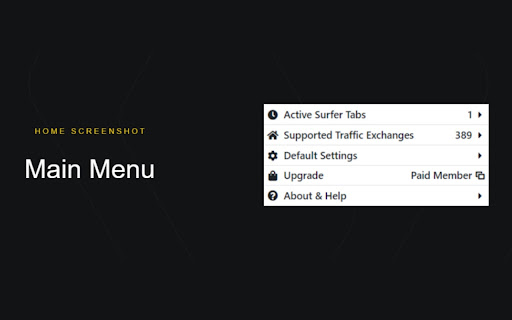
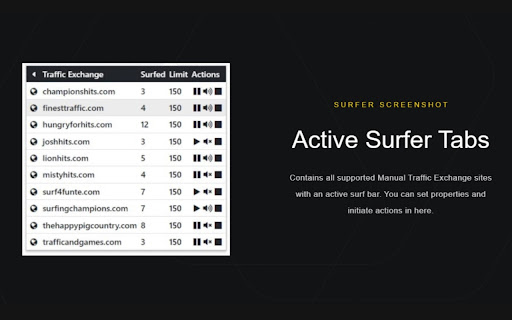
After you log in and start surfing one or more Manual Traffic Exchange sites, the program detects the tabs with an active surf bar. When you click on one of the images on the surf bar, the extension automatically switches to an active tab.
You can set surf limit and various actions for each tab separately.
As a 'Free User', you can surf in 7 traffic exchanges at the same time. As a 'Paid Member', you can surf in any number of traffic exchanges at the same time, limited only by the performance of your device.
This extension does not violate the terms of Manual Traffic Exchanges!
Currently, the best known manual traffic exchanges are supported, but new sites are added regularly.
Main features:
============
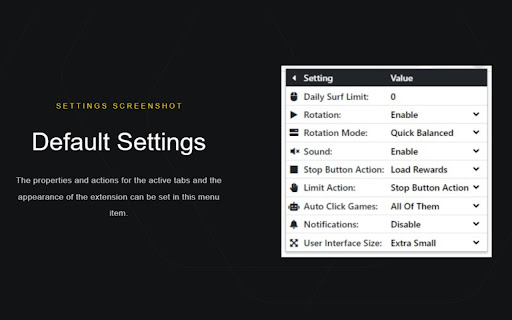
You can set the tab's surfing limit from 1 to 9999, at which point the 'Limit Action' will be executed. You can also set a value of 0, which means that there are no limits at all.
You can set whether the tab is need to be included in the rotation or not when the surfing starts.
You can mute or unmute tab's sound separately
You can select which function to run when you press the stop button. All functions run in the background, but the 'Go' functions switch to the stopped tab once they are completed. If the selected action not supported by the Traffic Exchange, the member's home will be loaded.
You can choose which function to run when the surfing limit reached. 'Pause Rotation' leaves the tab with the active surf bar open and untouched. It simply skips the tab from further rotation.
Subscription - No Refund Policy:
==========================
Once your subscription starts, you can't get a refund for any payments you've already made. You can cancel your subscription at any time before its auto-renewal date. You will still have access to the subscription until the end of the period you paid for.
Note:
=====
You can find the 'Terms And Conditions' and the 'Privacy Policy' in the 'About & Help' menu of the extension and on the extension's website.
Reviews
Loading reviews...
Permissions (4)
Permissions
notificationsℹ Can show desktop notifications scriptingℹ Can inject scripts into web pages storageℹ Can store data locally in your browser tabsℹ Can see your open tabs and their URLs
Details
| Version | 2.6.7 |
| Updated | Mar 8, 2026 |
| Size | 93.75KiB |
| First Seen | Mar 22, 2026 |
Popular in functionality

Go Back With Backspace
by gobackwithbackspace
300K
★ 3.16
functionality
300K
★ 3.16
functionality

Google Search Maps Button
by Publisher54321
200K
★ 4.81
functionality
200K
★ 4.81
functionality

Disable AI Overview | Turn Off AI Overview
by hideaioverviews
100K
★ 4.06
functionality
100K
★ 4.06
functionality

IPvFoo
by Paul Marks
100K
★ 4.82
functionality
100K
★ 4.82
functionality

GNTD: Glass New Tab Dashboard
by akram.ismayilov13
100K
★ 4.23
functionality
100K
★ 4.23
functionality
Popular Extensions

Adobe Acrobat: PDF edit, convert, sign tools
by Adobe Inc.
330M
★ 4.40
workflow
330M
★ 4.40
workflow

Chrome Remote Desktop
by Chrome Remote Desktop Release Managers
38M
★ 3.14
workflow
38M
★ 3.14
workflow

Cisco Webex Extension
by cisco.chromestore
24M
★ 2.34
social
24M
★ 2.34
social

Kami for Google Chrome™
by Kami
17M
★ 4.56
education
17M
★ 4.56
education

Read&Write for Google Chrome™
by Texthelp
17M
★ 3.44
accessibility
17M
★ 3.44
accessibility