
Google Search Maps Button
Description

Reviews (21 cached)
Seems that stopped working
not woking
dumb thing cowtows to fascists
There is a much better extension for this here.
Very annoying, the maps link goes where the image link is supposed to be. And I keep clicking maps when I want to click images. "Google Maps QuickClick - Search to Maps" is the better one
Extension is not working. Still do not have the map options on google search...
This extension breaks Images, when you open the page it blanks all the images for ~5 seconds before loading them
doesn't work on google.com or google.ro
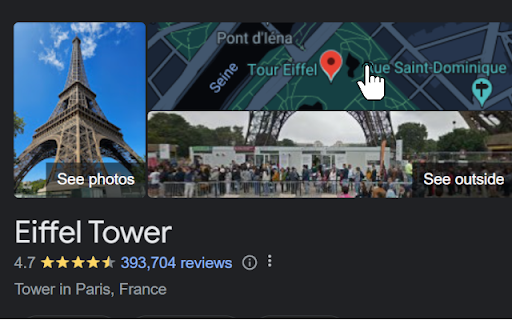
Unfortunately this extension doesn't fix anything. The map is not clickable in most use cases, and when it is, it opens maps with the wrong address.
Not working for me. Perhaps because I am in EU
Sweet. except for my security paranoia brain. See, Google is my password vault, my payment function and my daily driver. A script pretending to be me better be water tight, security wise... mind to open source it, ideally with a reproducible build? and also I looked at the permissions and I think they can be more restrictive for example, why would it need * background sync * protected content IDs * payment handlers??? dafuq? * third party sign-in ?? and many more features simply inherit "the default" instead of being blocked. YAGNI. please kindly declare what you don't need. the URL, can you make that google.XX/search/* instead of google.XX/*? be as restrictive as you can, please. I'll happily uprank from 2 to 5 once security is addressed, function is great.
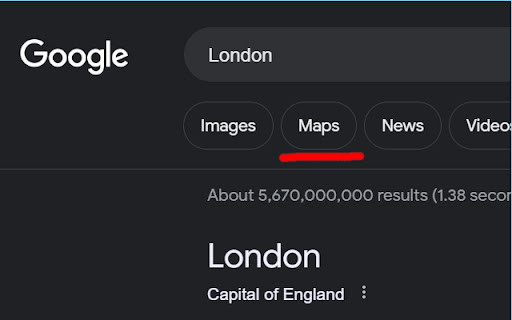
This doesn't work for me sadly. I installed the extension and restarted chrome, but no go. If I search for "London", the maps button doesn't appear, if I search "London maps", the button does appear. If I repeat the same with "Laurel canyon" and Laurel canyon" the button doesn't appear.
Previously I rated it 5/5, but since a couple a days ago it does not work for me. Tried reinstalling the extension, did not work.
I love the functionality when it works, my issue is that when i type in a stock, the "maps" button opens up right over the stock price , so i can see the chart but i cant see the price.
where is source code for this plugin?
For god's sake please put the "Maps" tab after "Images", I beg you! Or even make a setting option to choose where to place it in the google search
Could've been better, loads last and appears before "Images".
It would be great if we can change the position of the button. The button on second position, or where the images link is supposed to be is annoying.
Works, but has the same problem as other similar extensions: it opens maps with the same search but result might be different. Thus the preview on google search page will not always match the location in the maps
Also not working for me....The div element containg the map is: <div jsname="z4gC7c" class="V1GY4c sjBi9c uhHOwf ez24Df"><img alt="" id="dimg_1" src="/maps/vt/data=_-8FKgu038ZstIPOpbklwiNeCQ2Wgc_7sFu0HjTPHW5PWX8FVokDJeCtqAT5tINInfYriz-rGTQ6Ac_qE3WucNFT968oVDLVTF6Dezl8r5_QZKahXVjWJRsxzOeY5XcwOW3N7Xm2fLQVp-yEac8xgdnytO9A6MZAU7Ld9XYyEgz6QURu6M_Tp4p45hWuxgPhq4gPg72Cjtftu9SZA3q-uX0GkZ_Kq5juL9PS7Psly_4ApoveA0B6LD8P0zpcyDiq" data-csiid="13" data-atf="1"></div>
Love the app, but would you be able to make an extension that makes images - videos - maps always be in that order?
Permissions (1)
Permissions
Details
| Version | 1.2.4 |
| Updated | Dec 22, 2025 |
| Size | 8.97KiB |
| First Seen | Mar 21, 2026 |
Popular in functionality


Popular Extensions




